Category: Uncategorized

  • Tammie Lister: Why Gentle Leadership Builds Better Products

    We’ve all seen it. A product launches, a feature ships, a choice gets made. And within hours, the not-so-hot, more grumpy takes arrive. Threads dissecting every misstep. Social media posts stating how they’d have done x or y better. Statements across the web cataloguing failures. Commentary that positions the critic as the one who would have done it better. This happens even more on Open Source projects, we’ve all seen it across WordPress.

    This is an increasingly prevalent issue in product circles. Yet, we seldom highlight the human impact of this culture and the more effective alternatives that can truly foster better products and stronger teams. Even more so in open source. It’s also worth noting that those who can drive change, those called and looked to as product leaders, are often the ones who contribute most to the problem. By inspiring others and adopting more positive practices, we can foster a more collaborative and thriving environment for everyone involved.

    The Changing Position of the Role of Product

    My experience in product is a journey many of us share as we grew alongside the practice. We often had to fight for our place at the table, sometimes moving gently and other times more forcefully to ensure our voices were heard.

    Times have changed, and now the product is at the centre of much of our work. It no longer needs to prove its worth or challenge existing components; instead, it should avoid adopting harmful practices seen in longer traditions, such as design, which have led to dangerous and destructive patterns of critique. It’s possible to disagree without resorting to tearing others down or stripping away their contributions. In fact, taking a more constructive approach is a sign of greater skill, as many of us have come to learn.

    Throughout my career, I have learned a great deal through trial and error, thanks to the incredible mentors who guided me and the space they provided for me to understand. Their compassion and calmness shaped my understanding of leadership; it’s not just about being in the spotlight, which was a breath of fresh air for someone like me who thrives behind the scenes.

    The Psychology of What We’re Really Doing

    When we share our thoughts on products and the teams behind them, we’re doing more than just providing feedback; we’re meant to encourage accountability and nurture growth. The impact of our words can ripple far beyond the initial conversation, creating a meaningful dialogue.

    Studies in self-determination theory reveal that environments filled with criticism, rather than constructive support, can lead to loss of motivation. This is especially true over time. In open-source and collaborative spaces, the consequences are even more significant. Unhelpful criticism can generate conflicts and discourage participation, particularly for those from underrepresented backgrounds. Our language truly matters, and it becomes even more powerful when coming from influential voices.

    “Leadership is about making others better as a result of your presence and making sure that impact lasts in your absence.”

    Sheryl Sandberg

    The evidence suggests that public criticism, especially when not accompanied by constructive input, doesn’t enhance products. Instead, it risks stifling the very voices we should be championing to drive improvement and innovation. Let’s strive to uplift one another and create positive pathways for making. I know I want to create in a space like that, and I’m reasonably sure those who often critique the loudest do.

    What Leadership Actually Looks Like

    This isn’t about being soft or avoiding critical conversations, far from it. But if harsh criticism is all you’re known for, people eventually stop listening. By taking this approach, you are showing an understanding that great products emerge from empowered teams, not demoralised ones.

    “To me, leadership is about encouraging people. It’s about stimulating them. It’s about enabling them to achieve what they can achieve — and to do that with a purpose.”

    Christine Lagarde

    The difference between critique and leadership is simple. Leaders focus on building capability, not broadcasting judgment. They build up whilst also setting on a path for that building. It’s certainly a harder thing to do, but in the long term, far more rewarding for both the leader and those involved. Being the critic, even if you have been elevated to a lead, eventually casts you as the villain of the piece, and that’s not good for anyone’s heart. Most leads got there through being incredible makers in the first place; somewhere along the way, they shifted from making to criticising, from building to broadcasting judgment.

    The Alternative: Being Part of the Solution

    “I raise my own voice—not so that I can shout, but so that those without a voice can be heard.”

    Malala Yousafzai

    If you see a product or team struggling, you have choices beyond posting about it.

    • Mentor someone on the team. Reach out privately. Offer your experience. It is often more impactful to say it privately. Share what you’ve learned from similar challenges.
    • Contribute directly. If it’s open source, submit a thoughtful pull request. If it’s not, offer specific, actionable feedback through proper channels. Build the bridge instead of pointing out it’s incomplete.
    • Support publicly, guide privately. Public spaces should be for celebrating attempts, acknowledging effort, and showing solidarity. Save detailed feedback for contexts where it can actually be heard and acted upon.
    • Balance your critiques with equal praise. When was the last time you praised a feature? Do that as much as you also critique and balance.
    • Build knowledge, not status. Research shows that when team members feel their psychological needs met, such as autonomy, competence, and relatedness, they’re far more likely to develop intrinsic motivation and engage meaningfully with their work. Your role as a leader isn’t to prove you could have done better. It’s to help others actually do better. 

    The Myth of “Necessary Toughness”

    There’s a belief in some communities that toxicity is “a naturally occurring if not necessary facet of culture.” This is demonstrably false. Toxic behaviour causes contributors to leave projects and creates barriers to participation, particularly for newcomers and those from underrepresented communities. It causes burnout not just in those receiving but also in those giving. It eats at you.

    Gentle leadership isn’t weak leadership. It’s strategic leadership. It’s essential to understand that the long-term health of products and communities depends on creating environments where people want to contribute their best work, not environments where they’re afraid to take risks and fail.

    Evaluating Your Leadership

    “You can evaluate the quality of your authority by looking deeply to see if compassion is the foundation of your leadership.”

    Zen Buddhist monk Thích Nhất Hạnh 

    This isn’t just an abstract philosophy. You can apply a practical lens for examining how we show up as leaders. The next time you’re tempted to post about what’s wrong with someone else’s or your own product, ask yourself:

    • Will this help the team, the product improve, or position me as knowledgeable?
    • Who does this harm and who does this serve?
    • Could I offer this insight in a way that builds rather than breaks?
    • Am I solving a problem or performing expertise?

    The products that endure, the teams that innovate, they don’t come from cultures of constant public criticism. They come from environments where people feel safe to experiment, supported when they stumble, and mentored toward excellence.

    Your influence as a product leader isn’t measured by how effectively you can identify flaws; it’s also about how effectively you can address them. It’s measured by how many people do better work because you were there.

    Building Better, Together

    Every product you see represents countless hours of human effort, difficult trade-offs, and people doing their best with the information and resources available to them. Before you critique, consider how you might contribute. Before pointing out failures, consider how you can prevent them in the future by teaching, mentoring, and supporting.

    “At the end of the day, at the end of the week, at the end of my life, I want to say I contributed more than I criticised.”

    Brené Brown

    The industry doesn’t need more critics. It needs more builders. It requires leaders who understand that gentle doesn’t mean permissive, and that the strongest teams are built on foundations of trust, growth, and mutual support.

    If I can leave one thought at the end of this, it would be to consider: “What impact will your leadership have?” Great products are built by great teams. Great teams are built by leaders who lift others. Choose to be that leader.

  • Matt: Greenwashing

    Tonight there was a lovely event at TinkerTendo by Raman Frey and Karin Johnson of Good People Dinners, this one honoring David Gelles’ new book, Dirtbag Billionaire: How Yvon Chouinard Built Patagonia, Made a Fortune, and Gave It All Away. I’m a huge fan of Yvon Chouinard and really enjoyed his book Let My People Go Surfing which I read back in 2018. It was the first time hosting such a large 60-person dinner in the TinkerTendo warehouse, and thanks to this Copper battery-operated induction stovetop and an amazing local chef, Hanif Sadr, the food turned out amazing.

    I’ve only started the new book, but I’m interested to see what’s happened in the 20 years between Yvon’s book and David’s, especially the story of how Yvon gave away all his equity and control in the company to ensure a focus on his lifelong goal of environmentalism and conservation. Patagonia is one of the better corporate entities fighting for good, but it reminded me of how companies can put on a jacket of doing good while actually being evil underneath.

    Like I talked about the economic concept of Externalties a few weeks ago, I think it’s imperative that the WordPress community understands the history of Greenwashing, which the United Nations defines as follows:

    1. Claiming that the company will achieve future environment milestones while not putting sufficient plans in place to do so.
    2. Being intentionally vague about operations or using vague claims that cannot be specifically proven (like saying they are “environmentally friendly” or “green”).
    3. Saying that a product does not contain harmful materials or use harmful practices that they would not use anyway.
    4. Highlighting one thing the company does well regarding the environment while not doing anything else.
    5. Promoting products that meet regulatory minimums as if peer products do not.

    In WordPress and open source our environmental crisis comes from companies that frack the open source software and brands, which shows up as lack of investment in the code which falls fallow espescially in the security sense, or by attaching themselves to a brand or trademark and tricking people into thinking they’re associated with the Good Open thing, when they’re really a parasitic cancer on it.

    This is happening right now in WordPress, so when you see a company hire a good person or sponsor an event that seems on its own a good thing, and probably represents hundreds of thousands of dollars of investment, weigh that against the tens of millions they’re spending with their other hand to destroy the source of everything they’ve benefited from, and if they were to win, endanger every open source project. It’s an open source form of greenwashing, perhaps call it openwashing.

  • Gutenberg Times: Blocks galore, test template management, Woo product collections, and more—Weekend Edition 343

    Gutenberg Times: Blocks galore, test template management, Woo product collections, and more—Weekend Edition 343

    Howdy,

    And just like that, the last quarter of 2025 has begun. It’s been an interesting year again, and now we are on the home stretch, heading into a Holiday season. It’s become my favorite time of the year when Autumn make nature paint trees and bushes in so many colors. After a life near evergreen Everglades of Florida, the middle European changing colors of the fall seems magical.

    Soon it’s time to plan for 2026. Speaking of which, in case you missed it, WordCamp Asia Call for Speakers has been out for a couple of week, and the deadline is quite early: October 31, 2025. If you were thinking about going to WordCamp Asia, what would be a talk you would be interested in seeing in April of 2026?

    Anyway, the present is pretty amazing right now, too. So without further ado, the news.

    Yours, 💕
    Birgit

    PS: This weekend, on October 3rd, Germany celebrates the 35th anniversary of the Reunion after the Iron Curtain was lifted.

    Developing Gutenberg and WordPress

    .Jonathan Bossenger, WordPress 6.9 release co-lead for testing, is asking for your help to test changes to the template management. The new feature is a great enhancement to the way templates are handled in the Site Editor. More eyes are needed to make sure it’s the best it can be in the short amount of time until the first Beta version is released. The instructions are detailed, and Bossenger added a video to show how the various sections of this test should work.

    Need a plugin .zip from Gutenberg’s master branch?
    Gutenberg Times provides daily build for testing and review.

    Now also available via WordPress Playground. There is no need for a test site locally or on a server. Have you been using it? Email me with your experience

    The security and maintenance release, WordPress 6.8.3 is now available. John Blackbourn led the release and shares the details in his release post. Update as soon as you can, as it plugs a few security holes.


    Carlos Bravo issues the release candidate for Gutenberg 21.8 and it’s available for testing. The final release is scheduled for October 8.

    🎙 The latest episode is Gutenberg Changelog 121—Gutenberg 21.6 and 21.7,  Block Theme Development, and Block Themes with Anne Katzeff of AskDesign.

    Gutenberg Changelog 121 with special guest Anne Katzeff and host Birgit Pauli-Haack

    If you are listening via Spotify, please leave a comment. If you listen via other podcast apps, please leave a review. It’ll help with the distribution.

    Plugins, Themes, and Tools for #nocode site builders and owners

    In the WordPress VIP blog post and video, Pew Research Center Builds Interactive Content at Scale, the Seth Rubenstein and his team share how they rebuilt their website using WordPress VIP to tackle challenges in a world where people seldom visit original sources. Their old method took weeks of custom coding for interactive content, which delayed publishing. By adopting a block-first strategy in 2022, they cut production time from weeks to minutes, enabling editors and designers to create quizzes and maps on their own. This shift allowed developers to focus on innovation while increasing publishing frequency and lowering costs with evergreen interactive content that engages audiences directly.


    In his video Level up your Product Collections, Brian Coords demonstrates the new features in WooCommerce 10.2. He covered carousel layouts, taxonomy filters (Category/Brand/Tag), and an improved Cross-Sells collection for displaying products.


    Joanne Courtright of Groundworx released a new Testimonials plugin in the WordPress repository. Get the skinny from her blog post: Introducing Groundworx Testimonial: Modern Testimonials for WordPress Block Themes. “Most testimonial plugins are still stuck in the classic era. This one is designed for developers and site builders who want testimonials that “just work” with Gutenberg, she wrote. It aims to be Gutenberg-native, theme.json aware, and accessibility-first. It includes a dedicated Testimonial post type + flexible blocks.


    Justin Tadlock released the first version of an Authors List Block for multi-author sites. “This is especially useful if you’re coming over from using a classic WordPress theme and need a block that’s similar to the old wp_list_authors() template tag,” he wrote. The plugin comes with a full array of block design tools. It also sports options to display number of posts, various order filters, and feed links.

    Mike McAlister released his Ollie Menu Designer for free in the WordPress repository. It is a powerful way to build mobile and dropdown menus in the WordPress block editor—no coding required. For more details, watch his announcement video on YouTube.

    Blocks Galore with Telex

    In his post, If Automattic’s Telex Builds This, You Might Not Need That Page Builder, Jamie Marsland explores how Automattic’s Telex AI tool could transform WordPress by enabling users to extend existing core blocks rather than just creating new ones. Currently, Telex generates custom blocks like video effects and timelines, but extending core blocks like paragraphs, tables, or buttons requires complex developer skills. If Telex could extend core blocks and offer a public directory for sharing these extensions, it could replace traditional page builders by unlocking the full potential of WordPress’s native blocks without adding technical debt or duplication.


    Tammie Lister started her personal Blocktober, posting a block a day on the newly created site. Every day at noon, she uses Automattic’s Telex and builds a new block. Spanning the arc of history back to the 1980s, Lister started with an ASCII Tetris block. Here goes my Thursday morning….

    In his latest blog post, Marko Ivanovic made a set of blocks for designers with the help of Automattic’s Telex. Earlier he also created animated icon blocks. Ivanovic is a designer working for Automattic, and since 2022. His post on how he rediscovered WordPress and why any designer should embrace WordPress is worth a read, too. And I love those sticky notes.

    Theme Development for Full Site Editing and Blocks

    In preparation for the WordPress 6.9 release on December 2, Justin Tadlock published a new tutorial on the WordPress Developer Blog: You on how to implement Border radius size presets in WordPress 6.9. “You define an array of sizes that users can apply to blocks that support border radius. You can also reuse them within your own theme stylesheets and theme.json file.”, he wrote.

    border radius presets coming to WordPress 6.9

    At WordCamp Gdynia I shared how to use WordPress Playground and GitHub for No-Code Version Control of Site Editor Changes The recording of my talk is now on WordPress TV. You will learn how theme developers can leverage WordPress Playground alongside the Create Block Theme plugin to create a seamless, browser-based development environment that integrates directly with GitHub for version control—all without writing a single line of code. The slides are available on Google Drive.

    “Keeping up with Gutenberg – Index 2025”
    A chronological list of the WordPress Make Blog posts from various teams involved in Gutenberg development: Design, Theme Review Team, Core Editor, Core JS, Core CSS, Test, and Meta team from Jan. 2024 on. Updated by yours truly. The previous years are also available: 2020 | 2021 | 2022 | 2023 | 2024

    Building Blocks and Tools for the Block editor.

    Long-time block developer Kevin Batdorf at Extendify just updated his Block Starter plugin repo—an “opinionated starter template for crafting WordPress block plugins,” as he calls it. It uses Tailwind v4 with output for the editor and frontend, TypeScript and Biome.js for code quality and type safety, and runs Playwright tests on PR using the Playground CLI. It also includes a Plugin Check on commits to main and before a release.


    Questions? Suggestions? Ideas?
    Don’t hesitate to send them via email or
    send me a message on WordPress Slack or Twitter @bph.


    For questions to be answered on the Gutenberg Changelog,
    send them to changelog@gutenbergtimes.com


    Featured Image: “Building blocks” by jgbarah is licensed under CC BY-SA 2.0 and found on WordPress.org/openverse.


    Don’t want to miss the next Weekend Edition?

    We hate spam, too, and won’t give your email address to anyone
    except Mailchimp to send out our Weekend Edition

    Thanks for subscribing.

  • Matt: Linkrot

    One of the things I hate most on the internet, and part of the reason I started WordPress, was to fight linkrot. Ever since 1998, when Tim Berners-Lee wrote “Cool URIs Don’t Change,” I’ve been obsessed with content management and ensuring that links don’t break. (BTW, TBL, a pioneer of creating the World Wide Web, has a great new profile out in the New Yorker.)

    I learned today from the Newspack newsletter that the Houston Press is now on WordPress. Newspack is a distribution or bundle of WordPress designed for journalism, and it is led by Kinsey Wilson, who began his career as a night-shift journalist covering cops for a newspaper in Chicago, went on to have top editorial and business positions at The New York Times, NPR, and USA TODAY, and ran WordPress.com for a few years, which gives him a very unique position to help craft WordPress for journalists and publishers.

    The Houston Press is an alt-weekly that wrote the very first profile of me in the world, which I blogged about here. There’s a funny quote in there:

    He recently considered taking a job with a San Francisco search-engine start-up, but ended up turning them down. “They have a ton of money…But it would be 50- or 60- or 70-hour weeks, a lot of work, and I wouldn’t have time” to do WordPress.

    That “search-engine start-up” was Google! How the internet might have turned out differently if I had taken that job, as my Mom wanted me to (because they offered free food). I still think Google is one of the most interesting companies in the world, one of the few places I’d consider working if I weren’t running Automattic.

    Back to linkrot, the original link to the profile in that article was http://www.houstonpress.com/issues/2004-10-28/feature2.html, which this morning didn’t work, but thanks to the Houston Press being on Newspack/WordPress I was able to ping Kinsey and his colleague Jason Lee was able to fix it so it redirects to the new canonical URL for that content in minutes. A little corner of the internet tidied up! I love the Wayback Machine, but not needing it is even better.

  • How I Use OpenAI to Autogenerate WooCommerce Product Descriptions

    How I Use OpenAI to Autogenerate WooCommerce Product Descriptions

    The other day, I met my friend for coffee, and we were talking about her WooCommerce business. She told me that sometimes, she hits a wall and ends up reusing the same adjectives for her product descriptions—sleek, nice, stylish—across multiple products.

    The worst part? She often doesn’t notice until much later, when her store pages already sound repetitive.

    As an AI enthusiast, I immediately suggested using AI to automate the process.  But my friend was hesitant because she thought connecting AI to her WooCommerce store would be too complicated. 

    That’s when I told her to leave it to me. Within one day, I had her WooCommerce store connected to OpenAI. 

    Now, all her product descriptions are unique, fresh, and written automatically.✨

    If you’ve ever felt stuck writing the same product descriptions over and over, don’t worry. In this guide, I’ll show you my AI tricks to generate WooCommerce descriptions automatically.

    AI Tricks to Auto-Generate WooCommerce Descriptions

    ⚡ Quick Answer: Best AI Tools to Auto-Generate WooCommerce Product Descriptions

    In a hurry? Here’s a quick overview of the best tools to create product descriptions with AI:

    • Uncanny Automator – Ideal for larger stores that need full automation. Connects with OpenAI to automatically generate product descriptions whenever you add new products.
    • StoreAgent – Perfect for beginners or smaller shops. Generates an AI-powered description for each individual product.

    I’ll walk you through both methods so you can pick the one that fits your store.

    Why Auto-Generate WooCommerce Product Descriptions With AI?

    Auto-generating your WooCommerce product descriptions can help you save time, improve consistency, boost SEO, and make scaling your online store much easier.

    Here’s how it helps:

    • Save hours on manual writing: Quickly create product descriptions without staring at a blank screen.
    • Keep descriptions consistent: Every product sounds polished and professional.
    • Boost SEO: Automatically include relevant keywords to rank higher in search results.
    • Reduce repetitive content: Avoid using the same words and phrases across your entire store.
    • Scale easily: Generate descriptions efficiently, whether you have a few products or hundreds.

    When I set this up for my friend, she saw the difference right away—her WooCommerce store looked sharper, her descriptions were consistent, and she saved hours every week.

    Uncanny Automator vs StoreAgent: Which One Should You Pick?

    I’m going to cover two methods in this tutorial. Here’s a quick side-by-side comparison to help you decide:

    Uncanny Automator StoreAgent
    Best For Larger stores that need full automation Beginners or smaller shops looking for a simple solution
    Setup Moderate – requires connecting an OpenAI API key Easy – guided setup, account creation, and plugin connection
    Workflow Fully automated recipes run in the background whenever you add products Product Description AI lets you generate descriptions for each product individually
    Flexibility Highly customizable – tweak triggers, actions, prompts, and more Limited options but very simple to use
    Cost Free version available; Pro upgrade recommended for frequent use Free version works for most small stores

    Both tools have their strengths, so I suggest choosing the one that matches your store size and workflow. It can also depend on how much control you want over your product descriptions.

    What You’ll Need to Get Started

    Before I jump into the tutorials, let’s make sure you have everything ready. Since each method works a little differently, I’ve broken down the requirements for each.

    Method 1: Uncanny Automator (Best for Large Stores)

    Requirement Why You Need It
    WooCommerce store The base platform where your products live. 🛒
    Premium OpenAI account & API key It lets the AI generate product descriptions automatically. 🤖
    Uncanny Automator plugin (Free or Pro) The free version connects WooCommerce and OpenAI. Pro unlocks more credits and advanced features. ⚡

    👉 If you haven’t set up your WooCommerce store yet, don’t worry – I’ve got you covered. Follow our step-by-step WooCommerce setup guide to get your store ready.

    Method 2: StoreAgent (Beginner-Friendly Option for Small Shops)

    Requirement Why You Need It
    WooCommerce store Your store where AI descriptions will appear.
    StoreAgent plugin Comes with Product Description AI agent. It lets you generate AI-powered descriptions for each product ✨
    StoreAgent account To connect your store and access the AI tools.

    And if you’re not sure how to get an OpenAI API key or a StoreAgent account, don’t worry—I cover those steps in detail in each tutorial.

    You can now use the links below to jump straight to the method of your choice:

    Method 1: Automate AI Descriptions with Uncanny Automator (Best for Large Stores)

    If you’re running a WooCommerce store with dozens—or even hundreds—of products, then manually generating and updating descriptions isn’t realistic. That’s where Uncanny Automator is ideal.

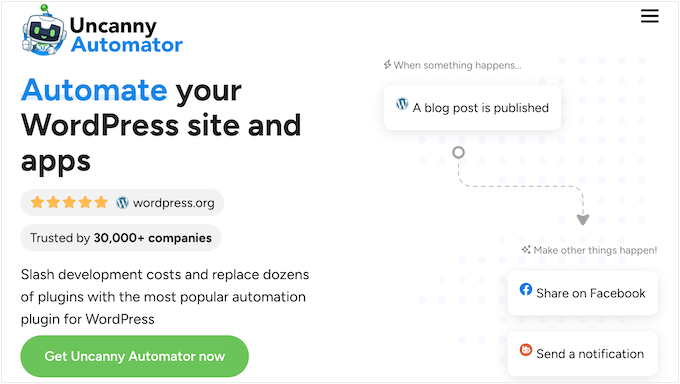
    It is the best WordPress automation plugin that connects your WooCommerce store with OpenAI so that product descriptions can be generated automatically. This can save you hours of repetitive work.

    The Uncanny Automator no-code automation plugin

    It is actually the solution my friend ended up choosing for her store, and I’ve thoroughly tested it too. Think of it like Zapier for WordPress—it connects your store to other apps and services so workflows run on autopilot.

    If you want to dive deeper into its features, then I recommend checking out our complete Uncanny Automator review.

    Step 1: Install and Activate Uncanny Automator

    The first thing you need to do is install and activate the free Uncanny Automator plugin. This acts as the base plugin, so even if you go with a premium plan, you’ll still need the free version installed.

    If you haven’t done this before, you can follow our beginner’s guide on how to install a WordPress plugin.

    📌Important Note: Uncanny Automator’s free plan lets you connect WooCommerce and OpenAI, but it comes with a small number of free app credits.

    Think of a credit as one pass to run an automation. Each time Uncanny Automator generates a product description for you, it uses one credit.

    Once your credits run out, the automation will pause until you upgrade or purchase more.

    That’s why I recommend a premium plan. It gives you more credits so that you can actually use the automation on a regular basis and unlock advanced features.

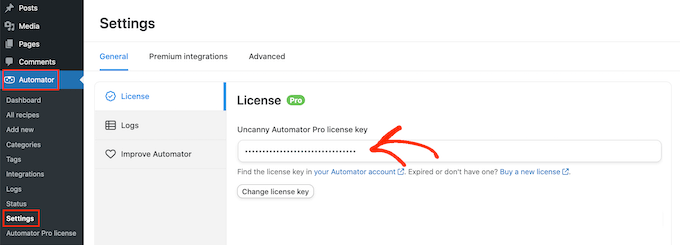
    Upon activation, head over to the Automator » Settings » General page in your WordPress dashboard to enter your license key.

    How to add a license to Uncanny Automator

    You can find this information in your Uncanny Automator account.

    Step 2: Connect OpenAI to WordPress

    Next, head over to the Automator » App Integrations page from the WordPress admin sidebar.

    Here, you’ll see a list of all the third-party apps that Uncanny Automator can connect with. Scroll through until you find ‘OpenAI’ and click on it.

    Go to App Integrations and select OpenAI in Uncanny Automator

    At this point, the plugin will ask you for a secret key (commonly known as an API key) to connect your OpenAI account with WordPress.

    This secret key is a unique code that works like a password for apps. Instead of logging into your OpenAI account every time, the key securely allows WordPress to communicate with OpenAI in the background.

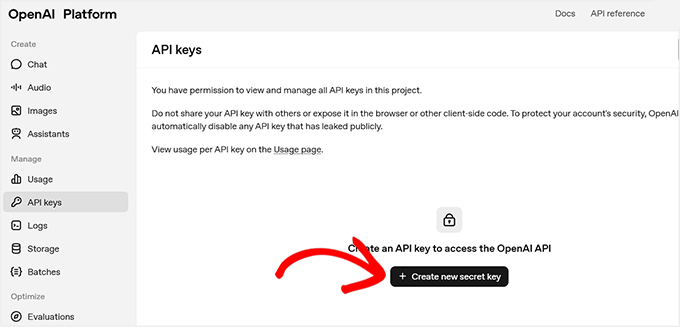
    To create one, log in to your OpenAI account and switch to the ‘API Keys’ tab from the left column.

    Then click the ‘+ Create new secret key’ button.

    Click the + Create new secret key on the OpenAI website

    💡 Important Note on OpenAI Costs

    To use the OpenAI API, you must have a paid account and add a payment method. API usage is pay-as-you-go, which is different from a monthly ChatGPT Plus subscription.

    You are charged only for the tokens you use.

    Tokens are small pieces of text—about 4 characters or one short word. Even though each token costs very little, generating many product descriptions can add up quickly.

    To avoid surprises, go to Settings » Limits in your OpenAI account and set a monthly spending limit.

    This gives you full control over your costs and ensures your automation stays within budget..

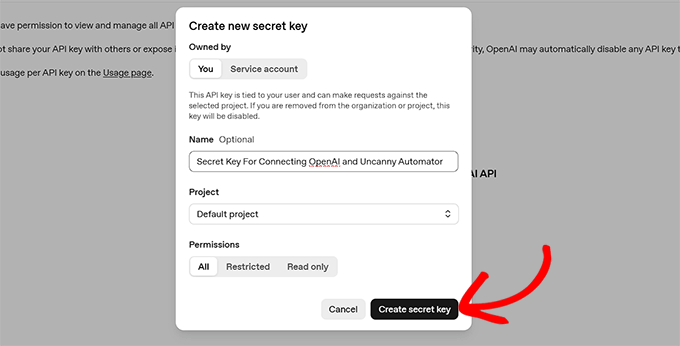
    This will open a prompt, where you need to add a name for the key.

    I recommend choosing a title that’s clear and memorable, like ‘Uncanny Automator connection.’ It makes it easier to find if you ever want to edit or delete it later.

    Then, go ahead and click the ‘Create secret key’ button.

    Add a name and create your secret key in OpenAI

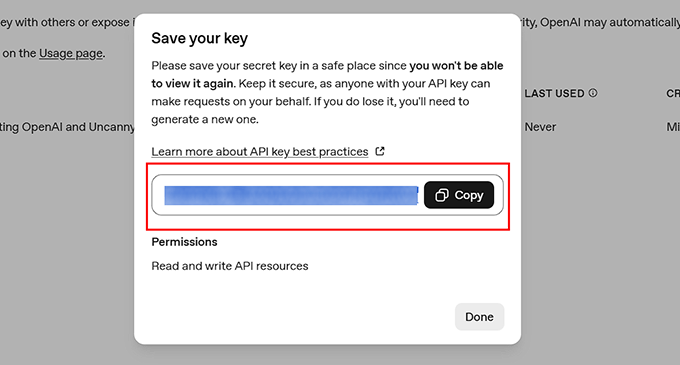
    OpenAI will now generate the key for you.

    From here, simply copy it into your clipboard.

    Copy your secret key from OpenAI website

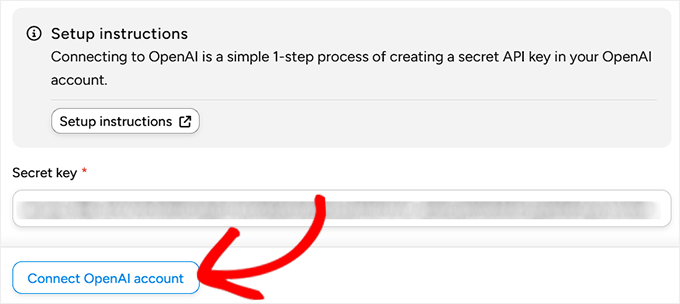
    Then go back to your WordPress dashboard and paste it into the ‘Secret key’ field in the Uncanny Automator settings.

    Finally, click the ‘Connect OpenAI account’ button.

    Click Connect OpenAI account button in Uncanny Automator

    If everything works correctly, you’ll see a success message confirming the connection.

    Step 3: Create a Recipe in Uncanny Automator

    Now that your accounts are connected, it’s time to create a recipe.

    In Uncanny Automator, a recipe is simply a rule that says, “when something happens, do this next.” That ‘something’ is called a trigger, and the ‘do this’ is called an action.

    In our case, the trigger will be adding a new WooCommerce product, and the action will be generating a product description with OpenAI.

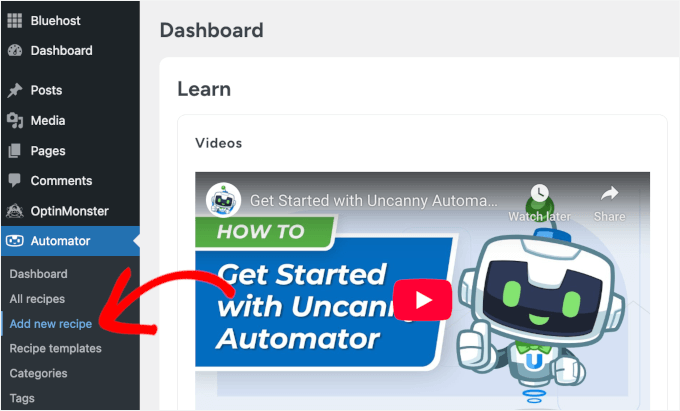
    To start, go to the Automator » Add new recipe page from your WordPress dashboard.

    Add new recipe in Automator

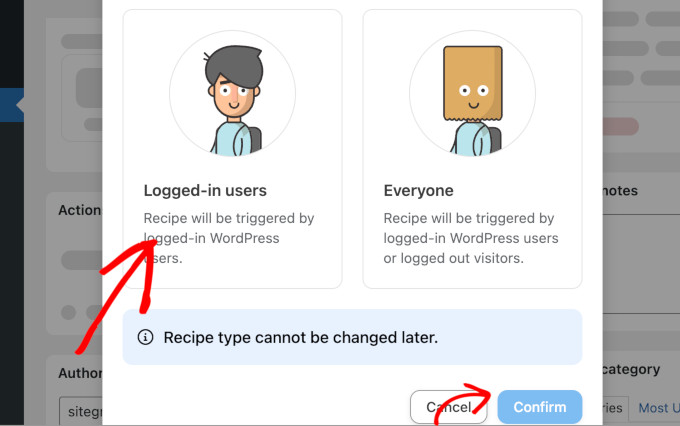
    This will open the recipe editor, where the first choice you’ll see is the recipe type: Logged-in users or Everyone.

    I recommend choosing Logged-in users. This means only you or your team members (who are logged into WordPress) can trigger the recipe.

    Choose recipe type in Uncanny Automator

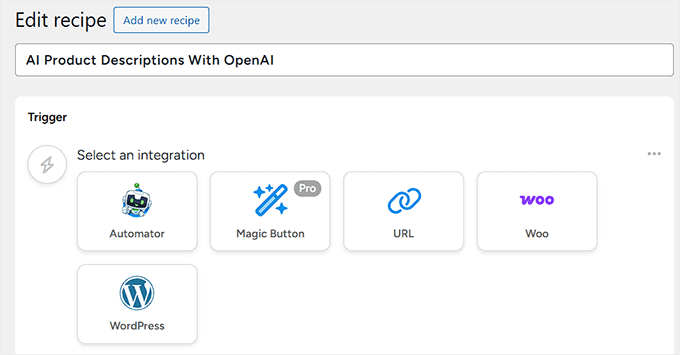
    Next, add a clear name for your recipe so you can easily recognize it later if you want to edit or delete it. Something like ‘AI product descriptions’ works well.

    Step 4: Set Trigger for Automatic WooCommerce Product Descriptions

    Once your recipe is named, it’s time to set the trigger. To do this, select ‘WordPress’ from the Trigger panel.

    Now, you might be wondering why I am choosing WordPress instead of WooCommerce.

    That’s because WooCommerce products are actually stored as WordPress “posts” in the backend, so Automator uses WordPress triggers here.

    Add recipe title and choose WordPress for trigger integration

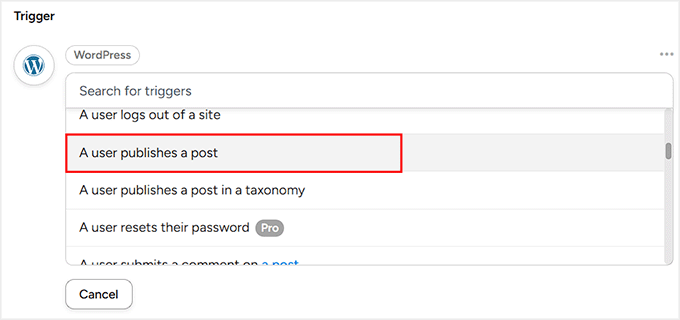
    When you select WordPress, you’ll see a list of possible triggers.

    From here, choose ‘A user publishes a post.’

    Choose a User publishes a post as the trigger type in Uncanny Automator

    Then, from the dropdown menu that appears, select ‘Product’ as the post type.

    This tells Automator that the trigger should fire whenever a logged-in user publishes a new WooCommerce product.

    After this, simply click the ‘Save’ button to confirm your trigger.

    Choose product as the post type for the trigger in Uncanny Automator
    Step 5: Set the Action with OpenAI to Auto-Generate Product Descriptions

    Now it’s time to decide what happens after the trigger. For this, scroll down to the ‘Actions’ panel and click the ‘Add action’ button.

    This will open a list of integrations, where you can select OpenAI.

    Select OpenAI as the action integration in Uncanny Automator

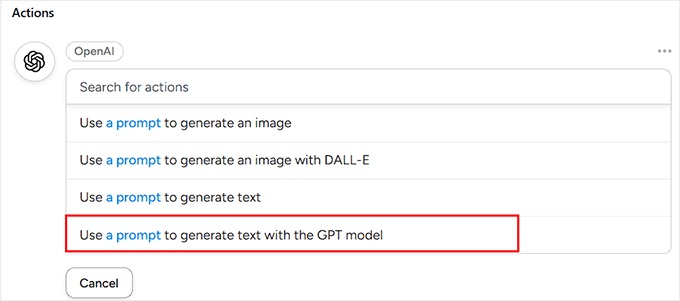
    You’ll now see a list of actions available with this tool. From here, choose ‘Use a prompt to generate text with the GPT model.’

    This option allows you to write your own AI prompt for how OpenAI should generate the product description.

    Choose 'Use a prompt to generate text with the GPT model' as the action type

    Automator will now show you a form where you can configure some settings.

    This part might look a little technical at first, but don’t worry—I’ll break it down step by step.

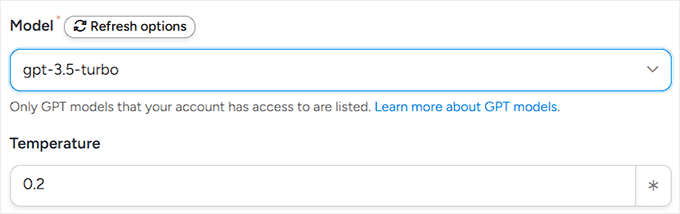
    The first option you’ll see is the ‘Model’. This is just the version of GPT (the AI engine) that Automator will use. I recommend leaving it on the default setting, because that’s always the latest and most reliable model.

    Choose GPT model in Uncanny Automator

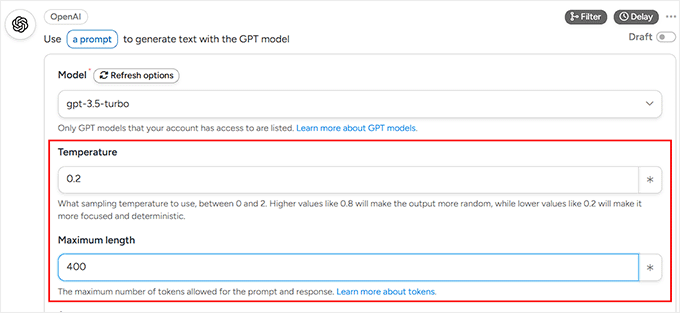
    Next is the ‘Temperature’ field. Think of this as a “creativity dial.”

    A higher number (like 0.8) makes the AI more playful and creative with its wording, while a lower number (like 0.2) makes it stick to safe, predictable phrases.

    For product descriptions, I recommend setting the temperature in the middle (between 0.2 and 0.5). This keeps text fresh, engaging, and professional.

    After that, you’ll need to choose the ‘Maximum Length.’ This tells the AI how long the product description should be, measured in tokens.

    As I covered earlier, your OpenAI API costs are based on how many tokens you use. Most WooCommerce product descriptions work best at around 250–300 characters.

    To make sure the AI doesn’t cut off mid-sentence, I recommend setting your maximum length to 400 tokens. This gives the AI enough space to write naturally.

    Configure temperature and maximum length in Uncanny Automator

    Note: Token counts can be slightly different in other languages, so it’s worth checking OpenAI’s documentation if you have a multilingual store.

    Step 6: Write the System Message and Prompt

    Now that the technical settings are out of the way, it’s time for the fun part—telling the AI how to actually write your product descriptions. You’ll do this using the System Message and the Prompt.

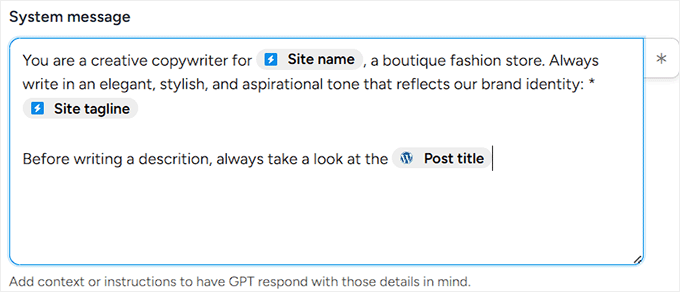
    The ‘System Message’ is like giving the AI a job description. It sets the rules for how the AI should act when it’s writing.

    For example:

    You are a copywriter for [Site name], a store that sells eco-friendly lifestyle products. Always write in a friendly, approachable tone that matches our brand.
    

    This way, the AI knows to stay on-brand every single time.

    To make this easier, Automator lets you insert dynamic placeholders (or tags) like ‘Site name’ and ‘Site tagline.’

    These are different from the OpenAI tokens I mentioned earlier; think of them as shortcuts that automatically pull information from your website.

    To add one, just click the little asterisk icon next to the field.

    Add a system message in Uncanny Automator

    Next, you’ll write your prompt. This is your direct instruction for the AI about what to generate.

    For example:

    Write a short, engaging product description for {{Post title}}. Use details like {{Post excerpt}} and {{Post content (raw)}} to highlight the product’s main features. Keep the tone persuasive but friendly.
    

    Here, the post tokens (like Post title and Post excerpt) will automatically grab the right details from each product you add to WooCommerce.

    That means every new item gets its own unique description without you having to write a word.

    For instance:

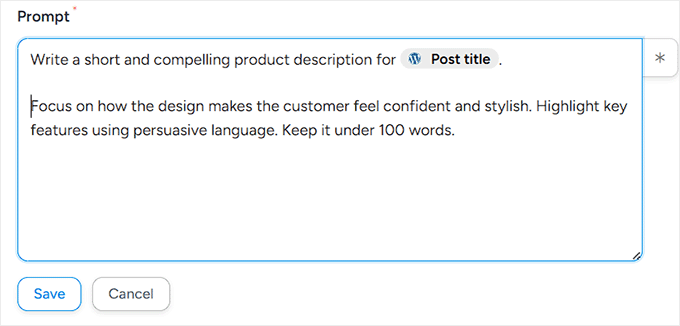
    Write a short and compelling product description for {{Post title}}. Focus on how the design makes the customer feel confident and stylish. Highlight key features using persuasive language. Keep it under 100 words.
    

    Once you’ve written your System Message and Prompt, just hit the ‘Save’ button.

    Automator will now remember these instructions for every new product you publish.

    Add a prompt for OpenAI to follow

    Step 7: Automatically Update Products with AI-Generated Descriptions

    So far, your trigger and first action tell GPT to generate a product description. The next step is to automatically update the WooCommerce product with that description.

    This step is essential because, without it, the AI-generated content would exist in the background but never appear on your product pages.

    Connecting the OpenAI response directly to the product ensures every new product gets a polished, on-brand description immediately.

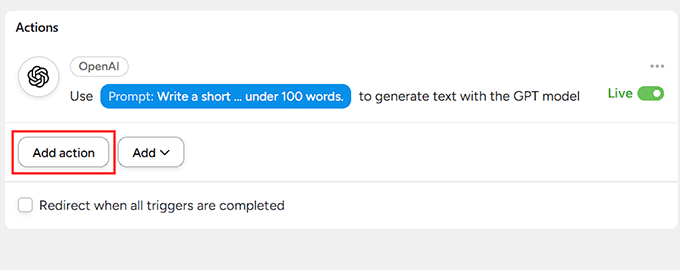
    To do this, go to the Actions panel in your recipe and click the ‘Add action’ button again.

    Click Add action button in Uncanny Automator

    Then, from the dropdown list, select ‘WordPress’ as your action integration.

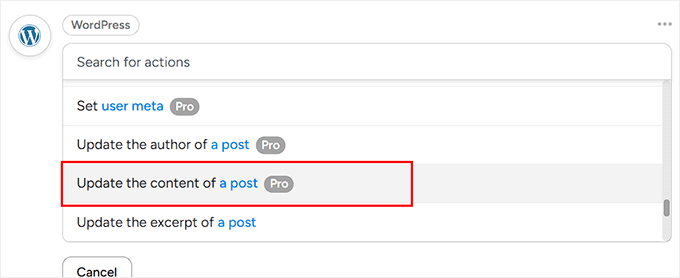
    This will display a list of available actions you can perform with WordPress. From here, choose ‘Update the content of a post.’

    Choose to update the content of a post as WordPress action

    Automator will now prompt you to select a post type and a specific post.

    Go ahead and choose ‘Product’ as the post type from the dropdown menu. Then, under ‘Post’, select ‘Use a token / custom value.’

    Next, you need to click the asterisk and add the ‘Post ID’ token in the field under it.

    This tells Automator to target the exact product that triggered the recipe, ensuring the AI-generated description is added to the correct item.

    Configure post and post type in Uncanny Automator

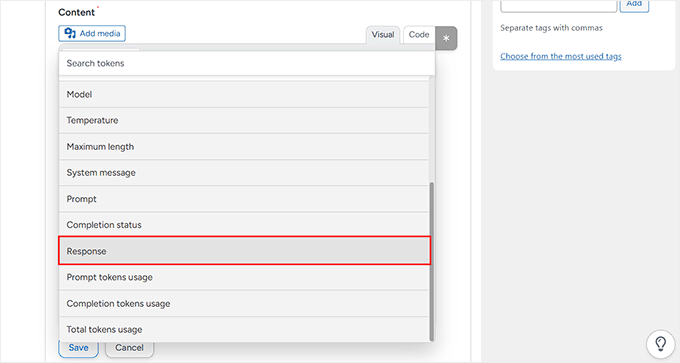
    Next, scroll down to the ‘Content’ field and add the ‘Response’ token from your OpenAI action. To do this, click the asterisk icon in the top-right corner of the field and add the token.

    This makes sure that each product’s content is automatically replaced with the AI-generated description.

    Add response in the content field in Uncanny Automator

    Once everything is configured, click the ‘Save’ button.

    From now on, every time a new product is published, GPT will generate a description, and Automator will add it directly into the product.

    Step 8: Test Your AI-Generated WooCommerce Product Description

    At this point, your recipe is ready to go—you just need to flip the switch. On the right-hand side of the editor, change the status from ‘Draft’ to ‘Live.’

    Your automation is now active.

    Make your Uncanny Automator and OpenAI recipe live

    However, before you start relying on it, it’s a good idea to test things out.

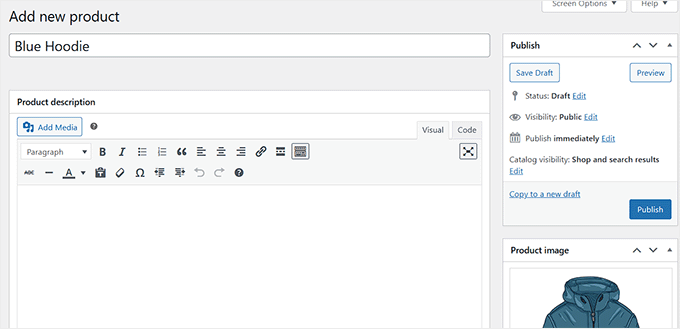
    To do this, head over to your WordPress dashboard and add a new product. Give it a title, price, image, and whatever other details you normally include, and hit the ‘Publish’ button.

    Publish a product without description for testing

    Now visit the product page on your site.

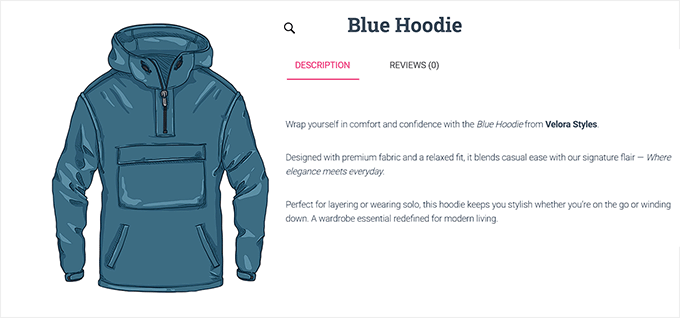
    If all is working well, then Uncanny Automator contacts OpenAI and generates a fresh product description automatically.

    Preview of AI product description generated with OpenAI and Uncanny Automator

    Method 2: Generate AI Product Descriptions With StoreAgent (Beginner-Friendly Option for Small Shops)

    If you’re starting with WooCommerce and want something simple, then StoreAgent is a great option. It’s an all-in-one AI suite made for WooCommerce.

    StoreAgent comes with a ‘Product Description Assistant’ that can generate descriptions with one click.

    Just keep in mind that it won’t automatically create descriptions in the background, so you’ll need to open each product and click a button.

    StoreAgent website

    For smaller online shops, this can actually be a good thing because it gives you more control and ensures you approve every piece of content before it goes live. However, Uncanny Automator is a better fit for larger stores.

    Step 1: Install and Connect StoreAgent

    First, you’ll need to install and activate the StoreAgent plugin on your WordPress site. If you haven’t done this before, you can check out our tutorial on how to install a WordPress plugin.

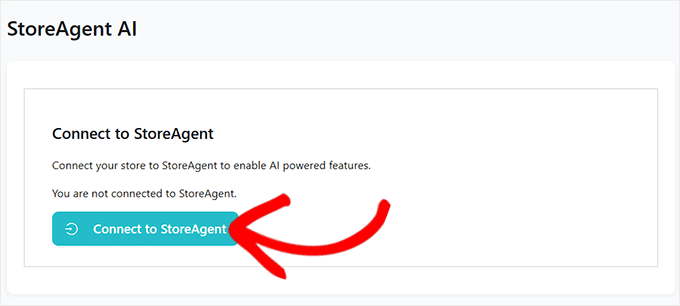
    As soon as you activate the plugin, a new screen will appear asking you to connect your website with a StoreAgent account. Simply click the ‘Connect to StoreAgent’ button.

    Click Connect to StoreAgent button

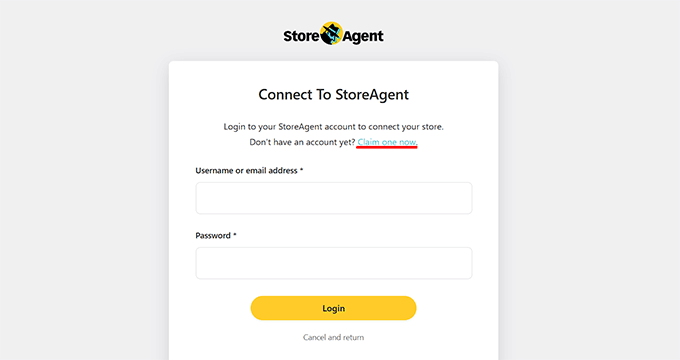
    This will take you to the StoreAgent website, where you’ll have to enter your username and password.

    If you don’t have an account, don’t worry—you can create one by clicking on the ‘Claim one now’ link.

    Log in to your StoreAgent account

    This will direct you to the signup page, where you simply need to enter your email address, name, and a password.

    Once you’ve filled it in, click the ‘Create Account’ button.

    Create a StoreAgent account

    Next, StoreAgent will ask for your website’s URL.

    You need to copy and paste your site address (URL) into the required field and click the ‘Install Plugin’ button.

    Enter website URL to connect StoreAgent with your website

    You’ll then be redirected back to your WordPress dashboard. Since the plugin is already installed, the setup will complete automatically.

    Step 2: Activate Product Description Assistant in StoreAgent.ai

    Now, head over to the StoreAgent » Settings » AI Content Tools page from your WordPress dashboard.

    Here you’ll see all the different AI agents that StoreAgent offers.

    Simply find the one called ‘Product Description AI’ and switch it from ‘Inactive’ to ‘Active.’

    Activate Product Description AI agent in StoreAgent
    Step 3: Open WooCommerce Product to Generate AI Description

    Next, go to Products » All Products in your WordPress dashboard. Pick any product you want to update by clicking the ‘Edit’ link under it.

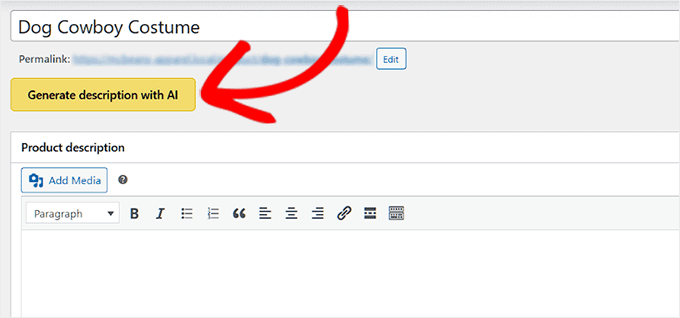
    Once the product editor opens, you’ll see a new button that says ‘Generate description with AI.’

    Click the Generate description with AI button

    You’ll be using this button to let StoreAgent create a product description for you.

    Step 4: Customize Your AI Product Description Settings

    When you click the ‘Generate description with AI’ button, a form will pop up asking you to set a few preferences before the AI starts writing.

    These options help StoreAgent understand your product better and make the description sound just the way you want.

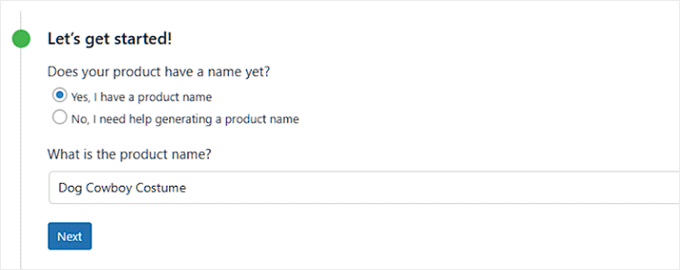
    The first thing you’ll see is the option to generate a product title. If your product doesn’t already have one, then StoreAgent can create a title for you.

    It’s not always perfect, but it can save time if you’re stuck or want some inspiration.

    Add product name in the StoreAgent AI product description form

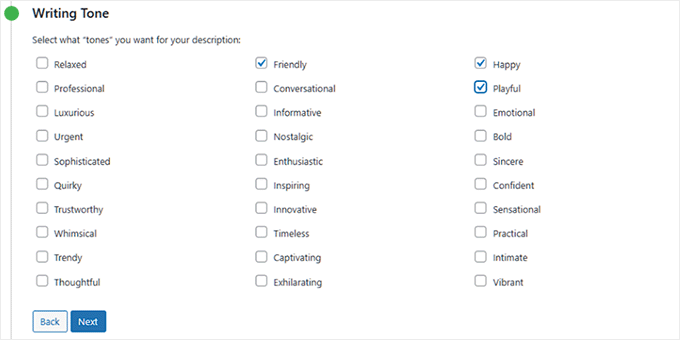
    Next is the Writing Tone. This is where you decide how you want your description to sound.

    For example, you could make it professional if you’re selling business products, or friendly and inspiring if you’re selling homemade items.

    You can even select more than one tone to blend styles and get a result that feels natural to your brand.

    Choose writing tone for product descriptions in StoreAgent

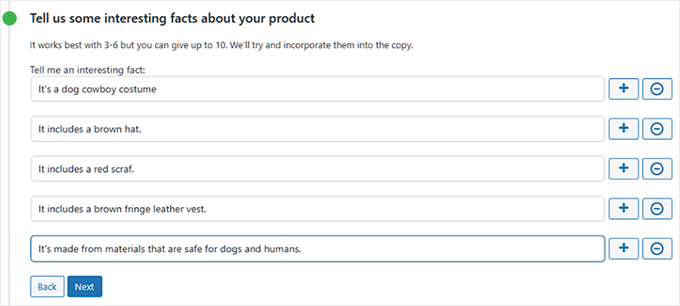
    After that, you can also add interesting facts or key details about your product.

    This is optional, but I recommend filling it in because it gives the AI more to work with. You can add things like the material, special features, or benefits.

    The more details you share, the more accurate and engaging your description will be.

    Add interesting facts about your product in StoreAgent

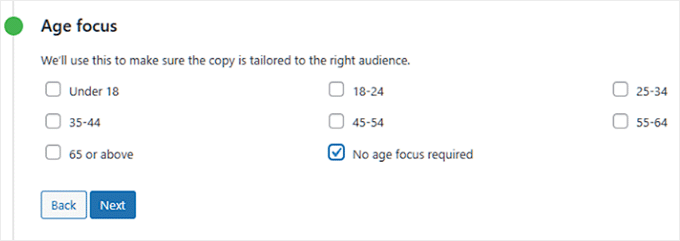
    If your product is meant for a specific age group, such as kids or seniors, you can set that in the ‘Age Focus’ section.

    If not, you can simply select ‘No age focus required.’

    This tells the AI whether to tailor the language toward a particular audience or keep it general.

    Choose age group for your product in StoreAgent

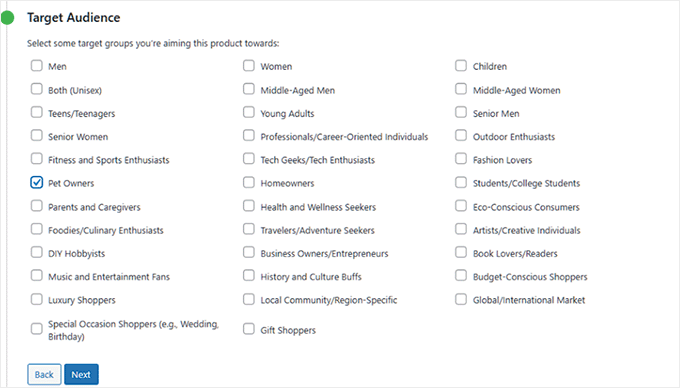
    Then, there’s the option to define your target audience. Every product has one. For example, if you’re selling a dog costume, your audience would be pet owners.

    Picking the right audience helps the AI write in a way that speaks directly to the people most likely to buy your product.

    Select a target audience for your product in StoreAgent

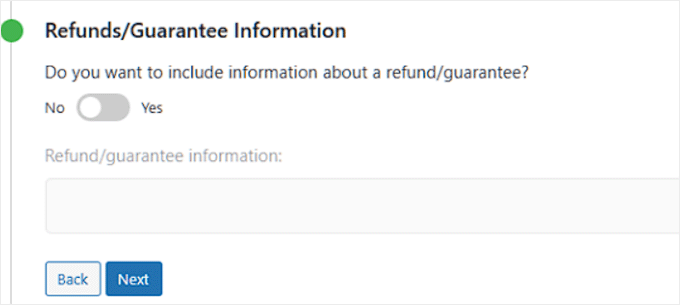
    You’ll also see a section where you can mention refunds or guarantees.

    If you want to highlight a money-back guarantee or a return policy, you can toggle this option and add the details. It’s a small touch, but it can make your description more persuasive.

    Add product refunds information in StoreAgent

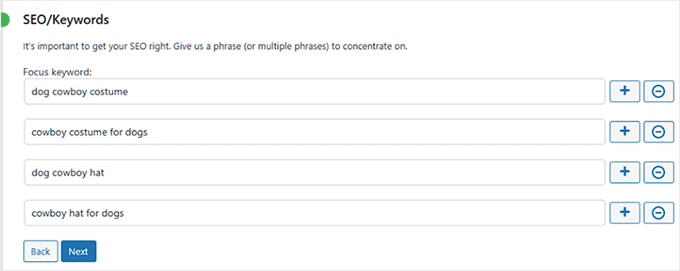
    There’s also a field to add keywords. This is useful for WordPress SEO because it can help your product page appear in search results.

    Just type in the terms people are likely to search for, and StoreAgent will naturally include them in the description.

    Add specific keywords for your products in StoreAgent

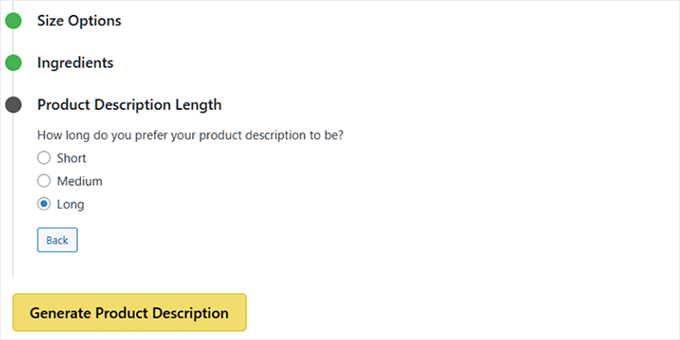
    Finally, you’ll be asked to choose the description length. You can go for short, medium, or long.

    A short description works well for simple products, while a longer one is better if your product needs more explanation.

    It’s totally up to you, and you can always test different lengths to see which works best for your customers.

    Choose product description length in StoreAgent
    Step 5: Publish and Review AI-Generated Product Descriptions

    Once you’ve set everything up, click the ‘Generate Product Description’ button. This tells the AI to create the description for you.

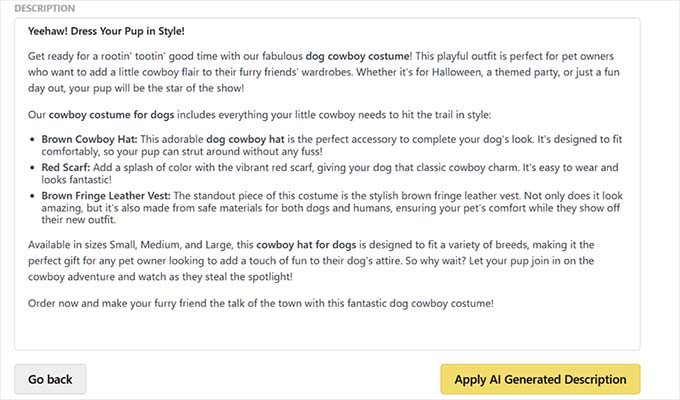
    StoreAgent will instantly generate the text and show it in a popup. From here, you can review what was written.

    Preview of AI description generated with StoreAgent

    If you don’t like the result, just click ‘go back’ to adjust your options and try again. If you’re happy, simply click the ‘Apply AI Generated Description’ to add it to your product.

    Finally, click the ‘Update’ or ‘Publish’ button to save your changes and make your product live.

    After that, repeat the process with each product to create its AI descriptions.

    💡Pro Tips for Better AI-Generated Product Descriptions

    Even with powerful AI tools like Uncanny Automator or StoreAgent, getting great product descriptions isn’t just about clicking a button.

    That’s why I suggest following these tips. They will make sure your AI-generated text is accurate, persuasive, and fully aligned with your brand.

    1. Write clear and detailed prompts

    Always include key details like features, materials, benefits, and relevant keywords for products in your prompt. The more details you include, the more accurate and persuasive the AI’s output will be.

    Think of it like giving the AI a cheat sheet to follow. For example, my friend used this prompt for her fashion boutique:

    Write a short and compelling product description for {{Post title}}. Highlight how the design makes the customer feel confident and stylish. Include the material and any standout features. Keep the tone friendly and engaging.
    

    This gave her AI-generated descriptions that were professional, persuasive, and aligned with her brand.

    You can also give the AI ‘negative instructions’ to make the output better. For instance, if you find the AI often uses generic words, you could add this to your prompt:

    Do not use common marketing words like "amazing," "revolutionary," or "game-changer".
    

    For more tips, check our guide on the best AI prompts for bloggers, marketers, and social media.

    2. Keep your brand voice consistent

    When using AI, you need to give it clear guidance on your store’s tone—whether that’s professional, playful, or inspirational. You can share examples of your existing product descriptions or brand guidelines so the AI doesn’t switch styles randomly.

    For example, the same t-shirt could be described in very different ways depending on your brand voice:

    • Professional: “Made from 100% organic cotton, this t-shirt offers a comfortable fit and long-lasting quality.”
    • Playful: “Your new go-to tee for Netflix marathons, coffee runs, and everything in between.”
    • Inspirational: “Wear it as a reminder that simple choices—like a soft, eco-friendly t-shirt—can make a big impact.”

    Consistency in tone builds trust with customers and makes your products feel cohesive across your store.

    3. Treat AI as your first draft assistant

    AI is incredibly powerful, but it’s not perfect. Always think of it as a tool that gets you 90% of the way there.

    Your human touch adds the final 10% that ensures accuracy, corrects any awkward phrasing, and adds a unique brand personality. Always read through the generated descriptions before publishing.

    4. Use bulk generation wisely

    For stores with many products, generating descriptions in bulk with Uncanny Automator saves time.

    However, always spot-check a few items to ensure quality and make adjustments where needed.

    Common Issues and Troubleshooting AI Product Descriptions

    Even with AI, things don’t always go perfectly on the first try. That is why I want to share solutions to some common problems you might run into.

    Why isn’t my API connecting?

    Double-check that your OpenAI API key is copied correctly and pasted into the right field. Make sure there are no extra spaces or missing characters.

    Why are the generated product descriptions too generic?

    Your prompts may be too vague. You can include product details, benefits, and brand context to make the AI output more specific and engaging.

    How do I manage costs when using OpenAI?

    Set usage limits or monitor your API usage in the OpenAI dashboard. This helps prevent unexpected charges while keeping your automation running smoothly.

    Why doesn’t StoreAgent generate a description automatically for each product?

    Unlike Uncanny Automator, StoreAgent requires you to click the “Generate Description” button for each product. This gives more control but isn’t fully automatic.

    Why is the AI sometimes missing product details?

    The AI can only work with the information you provide. Make sure your product title, excerpt, and any facts or features are complete before generating a description.

    Frequently Asked Questions About AI Product Descriptions

    Here are some questions that our readers frequently ask before setting up automatic AI product descriptions on their WooCommerce store.

    How much does OpenAI cost for generating WooCommerce product descriptions?

    OpenAI charges based on usage, measured in “tokens,” which are small chunks of text. The cost depends on the length and number of product descriptions you generate. You can monitor and manage your usage in the OpenAI dashboard to control costs.

    Do AI-generated WooCommerce product descriptions affect SEO?

    Not if they’re well-written. AI-generated content can rank well if it’s unique, relevant, and optimized for keywords. However, you should always review and tweak the descriptions to maintain accuracy and add your brand voice.

    Can I autogenerate AI descriptions for 1,000+ products?

    Yes. Tools like Uncanny Automator allow for fully automated workflows, making it easy to generate AI descriptions at scale.

    For StoreAgent, you’ll need to generate descriptions product by product, which works best for smaller catalogs.

    What if the product descriptions are inaccurate?

    Always check AI-generated content before publishing. You may need to edit it to correct errors and improve clarity for accuracy and persuasiveness.

    I hope this article helped you learn how to easily auto-generate AI product descriptions in WooCommerce. You may also like to see our guide on how to automatically generate image alt text in WordPress with AI or our guide on how to use AI for marketing.

    If you liked this article, then please subscribe to our YouTube Channel for WordPress video tutorials. You can also find us on Twitter and Facebook.

    The post How I Use OpenAI to Autogenerate WooCommerce Product Descriptions first appeared on WPBeginner.

  • Matt: Blocktober

    It’s so exciting to see what the creative minds like Nick Hamze or Tammie Lister are doing with Automattic’s AI vibe coding tool, Telex. Tammie is doing a Blocktober, a block every day this month of October, you should follow along.

  • Matt: Fight For Open

    Sometimes the battle for open source and freedom can take on very prosaic and practical terms, but the wins can benefit everybody. To give an example: In Beeper we need more memory for showing notifications, because we support end-to-end encryption for networks like Signal, but Apple’s default was to only give 15 megabytes — barely enough to do anything. The previous CEO of Beeper, Eric Migicovsky, started a lobbying effort with the EU’s Digital Markets Act on behalf of the team to give third-party apps the same memory limits that Apple provides for their own apps, which is 50MB instead of 15MB. (And up to 250MB on their higher end devices.)

    Today we’ve gotten a notification that as part of iOS 26 update Apple has shipped to 2.3B devices around the world, our memory limits issue has been addressed globally, for every application developer, and some interoperability requests we had for SMS/RCS have been addressed for EU users. Kudos and huge thank you to Apple for giving us all new capabilities to build amazing experiences for users on par with what they seek to deliver themselves. If you want to geek out on this, check out the technical deep dive that Beeper just posted.

    BTW, if you haven’t heard of it yet, Beeper is an Automattic product which aims to democratize messaging, just like WordPress democratized publishing for the world, by allowing you to get all your messages from friends across 11 different networks, like WhatsApp, Instagram, Telegram, Twitter/X, Signal, Discord, in one single inbox. The new version we launched in July does this in a completely secure way that’s local to your device, so the same encryption, privacy, and security each network provides is maintained.

  • #187 – June Liu and David Denedo on Making the Web Accessible: The Mission Behind WP Accessibility Day

    Transcript

    [00:00:19] Nathan Wrigley: Welcome to the Jukebox Podcast from WP Tavern. My name is Nathan Wrigley.

    Jukebox is a podcast which is dedicated to all things WordPress, the people, the events, the plugins, the blocks, the themes, and in this case, making the web accessible, and the mission behind WP Accessibility Day.

    If you’d like to subscribe to the podcast, you can do that by searching for WP Tavern in your podcast player of choice, or by going to wptavern.com/feed/podcast, and you can copy that URL into most podcast players.

    If you have a topic that you’d like us to feature on the podcast, I’m keen to hear from you and hopefully get you, or your idea, featured on the show. Head to wptavern.com/contact/jukebox, and use the form there.

    So on the podcast today, we have June Liu and David Denedo.

    Both June and David are key members of the WP Accessibility Day organizing team, a global, volunteer driven, event focused on improving accessibility in the WordPress ecosystem.

    June serves as the marketing team co-lead, and works with sponsors, bringing her background in project management to keep the events efforts on track.

    David, a web designer and content creator based in London, contributes to the marketing and post-event teams, with his interest in web accessibility stemming from his personal experience as a visually impaired user.

    WP Accessibility Day has grown significantly in the past few years, uniting a large international group of volunteers, and organizers, to drive awareness and practical change in web accessibility.

    The event is powered by a host of teams, marketing, sponsors, tech and vendor, post-event, translation, speakers, and more, ensuring that everything from live captioning to sign language interpretation is in place.

    We begin by learning about June and David’s unique paths to accessibility advocacy. One through direct lived experience, and the other through supporting a loved one with cognitive challenges. Their stories highlight why accessibility can’t be an afterthought, and how events like WP Accessibility Day are raising awareness in this important area.

    We discuss what attendees can expect at this year’s event happening from the 15th of October, 2025. It’s free, fully virtual, and runs for 24 hours, making space for a diverse range of speakers and topics.

    Whether you’re interested in the moral, legal or technical cases for accessibility, there’s something for you here, including sessions on accessible design, risk management for agencies, legal compliance, and demonstrations of assistive technologies.

    June and David share how the event format, a combination of prerecorded talks and live chat, mixes polished content with real time engagement. Plus how translation and community involvement are key to its growing impact.

    If you want to learn more about how you can make your WordPress sites, and the web in general, more inclusive, or if you’re motivated by global collaboration or personal stories, this episode is for you.

    If you’re interested in finding out more, you can find all of the links in the show notes by heading to wptavern.com/podcast, where you’ll find all the other episodes as well.

    And so without further delay, I bring you June Liu and David Denedo.

    I am joined on the podcast by two fabulous guests. I’ve got June Liu and David Denedo. Hello both. How are you both doing?

    [00:03:58] June Jiu: Hi there.

    [00:03:59] David Denedo: Hello. I’m doing all right.

    [00:04:00] Nathan Wrigley: Well, it’s very nice to have you both with us. The intention of today’s podcast is to draw attention to something which well, I’m sure many of you will know about. If you don’t know about it, I certainly hope that by the end of this, not only do you know about it, but you are highly engaged, and hopefully going to attend and all of those kind of things, maybe even contribute some of your time, you never know.

    It’s called WP Accessibility Day, and we’re going to get into that in a moment. Before we do that, I just want to get the little bio, the introduction from both of you, one at a time, just telling us who you are, what your interest is in WordPress and accessibility, I guess.

    So we’ll keep it nice and short and sweet. So I’ll go to June first. Just let us know who you are, June.

    [00:04:39] June Jiu: Thank you, Nathan. I’m June, I serve on the organising team for WP Accessibility Day as the marketing team co-lead, and I also work on the sponsors team.

    My background is mostly project management, so my forte right now is helping the team coordinate tasks, and keeping the initiatives on track. Yeah, I coordinate between the sponsors and the marketing team to get the sponsor page prepared. So that’s basically my work with WPAD.

    [00:05:08] Nathan Wrigley: Thank you so much. That’s great. And David, let’s go to you next. Same question really.

    [00:05:11] David Denedo: Hi, I’m David. I’m visually impaired, so that’s why I love accessibility. I work in London as a web designer and a content creator, and I’m part of the WP Accessibility Day organising team, as part of the post-event people. But I’m also in the marketing team, just jumping around, and at least trying to put as much as I can into web accessibility.

    Yeah, I got into web accessibility mainly because of some talks I had two years ago from the WP Accessibility Day, and that just encouraged me. And then here we are two years later.

    [00:05:53] Nathan Wrigley: Thank you so much. So, WP Accessibility Day, one thing that just jumped out at me straight away from what you were both talking about there, you both talked about, I’m on the, and then you mentioned a team. That implies that there’s quite a lot of you in the background.

    So just to give credit where credit’s due, I think it’s always important to make sure that we credit not just the two of you, because there’s probably a lot of people behind this as well. I don’t want to go down the route of missing anybody out. So I wonder if it’s possible for us to just mention the kind of teams and things like that. And if there are any people in particular that you’ve been working with that you do wish to name, caveat emptor, dear listener, I apologise on behalf of everybody on this panel. If we miss anybody’s name out, sorry about that. But let’s go for the, how many teams there are and how big an enterprise is this these days?

    [00:06:39] June Jiu: I don’t think I’ve ever counted how many teams there are, but I’ll list some of them. And David, add yours if I miss any, please.

    There is a volunteer team that’s, right now, pivotal. That’s their work right now in preparing the event. The event is on October 15th, so we’re just about a month away. So the volunteer team is very active right now in onboarding the volunteers.

    Then we have the tech and vendors. And those are also very active. They work closely with the volunteer team to prepare the day of. So they’re the ones that prepare the Zoom platform for us. So making sure that it all runs well.

    Then we have website, APAC, post event, translation, sponsors, marketing. What else? I feel like there’s a few others that I’m missing. But there is a huge team behind Amber, Bet and Joe, working and making sure that we can make the event as smooth as possible, and take some of the load off of them.

    [00:07:36] Nathan Wrigley: The Amber, the Bet and the Joe that you just mentioned, we have got Amber Hinds, Bet Hannon and Joe Dolson. So there’s three names. Do you have any recollection whether they were the people that kind of kickstarted the event, whenever that was? Because if that was the case, it sounds like it’s gone gangbusters since then with lots of people joining on, and you two being some examples.

    [00:07:56] June Jiu: We do have a pretty big team this year. And yes, you’re right, the history is that Joe Dolson did start WP Accessibility Day. I don’t recall all of the specifics, but I think the second year, Bet, I think it might’ve started with Bet and Joe, and then Amber also came on soon after that.

    But we’re in our fifth year. It’s very exciting. I joined last year as an organiser and it was a point in my time where I was returning to work. So finding WPAD was kind of a sweet spot for me to test out my skill sets again, get used to being out in the public, so I have a soft spot for them.

    [00:08:35] Nathan Wrigley: Thank you. Okay, so there’s a few that we’ve rattled off. David, I don’t know if you can fill in any gaps that might have been left there. If so, go now.

    [00:08:42] David Denedo: Yeah, I think those are the main ones that were involved. And I would say Amber Hinds, when she came on board, she brought in a lot of organisation because, you know, with Joe, Joe understands the technical bits of things, but he’s not really so organised. So when she came in, that’s why the team grew exponentially from 2022, I believe when she joined. And then the year after, things just kept spiraling. And then now we have a massive team with lots of volunteers, everybody’s happy to help.

    The other thing that is quite nice is that there was a nice spread of people who are volunteering. So it’s not just maybe from one region or one country. We are a very nice spread of people, so that’s really nice. So from different parts, from Asia, from Africa, from the Americas and all of that, they’re all wide base.

    [00:09:33] Nathan Wrigley: That’s amazing. Everybody from all over the place. That’s really lovely.

    David, in your introduction, in your bio, you described that you are kind of eating your own dog food a little bit here in that, I can’t remember the exact phrasing that you had around your eyes. How did you describe the condition that you have, if that’s the right word?

    [00:09:50] David Denedo: Okay, yeah. So I am visually impaired, so I have very high myopia and high astigmatism. I also struggle to see myself, so that’s one reason why I got really interested when I saw how people are able to make the web more accessible. Because I grew up in a background where we had to adapt to so many stressful things, like there wasn’t really much help for people with accessibility needs.

    So I didn’t really know there were ways to help people out. Until I came into the whole system and I realised that, oh wow, so you can actually do this to help somebody else. Because I was always struggling, most times I couldn’t see the screen. So I’m always like relying on other people to tell me what’s in front of me, what’s on the screen, and all of that.

    But then when you start to see that, oh yeah, we can use a screen reader, you can use screen magnifier, you can do this, you can do that, you can just improve a little bit on your website, or even on the reality, makes things more accessible. I was like, wow, I’ve been living under the rock basically.

    [00:10:53] Nathan Wrigley: Yeah, that’s absolutely fascinating. I’m just wondering, June, if you have a similar story to tell in that, is there anything that you would like to share in that regard?

    [00:11:01] June Jiu: I do. My mother had a stroke, and from that she had vascular dementia. And being her caregiver for that many years, and seeing the decline in her loss of independence, because she wasn’t able to navigate the medical system by herself anymore. It was kind of, I learned everything in hindsight. I wish I had the knowledge that I have today to have helped her like 8, 10 years ago. But that drew me in.

    I was telling you how I came back into the workforce, and one of the things that somebody said to me was, hey, there’s this free event. It’s online, you don’t have to leave your house, just try it out. And it was WPAD. And when I was listening to the talks, I was like, yeah, wait a second, you mean that websites can be laid out differently so that it would be easier for somebody to navigate it, even with a mental decline?

    And it’s those simple, to us, it initially could be simple, but in the back end it might not be so simple. But just having her read through an online PDF, you know, it was difficult for her to hit the right area, because the PDF lines were so tiny. And her eye, hand coordination was reduced, so she’s not able to hit those lines to fill in the PDF.

    So for me it was the acknowledgement of, oh my gosh, it doesn’t have to be this way going forward. So it’s me trying to learn as much as I can to direct my future clients into a direction that gives better accessibility to all, and not just their one demographic.

    [00:12:41] Nathan Wrigley: It’s so curious that you’ve both got two stories where the end of it, the target, if you like, is the same, but how you’ve arrived at the things are entirely different.

    David, a very personal story about your own life. And June, well, another personal story, but viewed through the prism of somebody else. Almost like standing over somebody’s shoulder and being able to ascertain, well, this person’s not getting what they could out of the internet.

    And it strikes me that if you rewound the clock, I don’t know, let’s say 30 years ago before the internet was in any way, shape, or form common, but you could describe what would be available in 30 years time. And you could say, well, so many people, they’d have this little device in their hand, and there’d be these machines where there’d be screens on desktops and things like that.

    At that moment, you would be thinking to yourself, this is literally the perfect technology to help people who, let’s say for example, are struggling to see. Are unable to get out of the house. There may be an aspect of their body which doesn’t function in the way that your body or my body might function.

    You would describe that and you’d think, oh, this is like manna from heaven. This is the perfect thing. But it never turned out that way. The internet went in a way entirely leaving those people behind, I think, which was such a lost opportunity.

    So we’re kind of 25 years or whatever it is into the internet, and we’re now going back and filling in all of the gaps that probably, with the benefit of hindsight, should never have been left.

    I mean, I don’t know that there’s any question in there, but it’s curious that that one technology which could have made the lives of so many people so much more straightforward, really hasn’t serviced those people particularly well until events like this come along and educate the rest of us in how to do it.

    [00:14:23] June Jiu: I think, Nathan, you hit two big points. Everyone’s journey with accessibility is very personal, and unless you experienced it firsthand, or even secondhand in my case, you don’t really see that impact.

    And the second part is that the second nail that you hit is that a lot of times it becomes an afterthought. Accessibility becomes the afterthought. I think that with an event like WPAD, we want it to become the foundational, so we’re hoping to make that change.

    [00:14:53] Nathan Wrigley: For example, I’m imagining, again harking back to how the internet could have been, we’ve now got a technology where a small rectangle held in your hand, with a few clicks of a few buttons can enable you to more or less have anything delivered to your front door, in a very short space of time. Which is like, how incredible is that, that that is even possible?

    And so this is the perfect answer to people, let’s say for example, who struggle to get out of the front door, and navigate the shops and what have you.

    And yet we’re faced with a situation where that sublimely cool technology is impenetrable, and unavailable, to many people because it never got baked in as a requirement, and we can come to that later. David, I’m sorry, I think I interrupted.

    [00:15:36] David Denedo: Oh no. Yeah, what you said is quite right. There is an imbalance in the way things are getting better, but it’s getting better for a certain set of people, but leaving some other people behind. So that is the problem.

    With the web, it was improving at a very fast rate in terms of how to build the web, but somewhere along the line, people forgot that the whole essence of worldwide web, the man who created the W3C consortium, who basically created the web, the father of the web, his whole idea was that the web should be accessible to all. That was his vision, his goal from the very start.

    But as people are trying to push the boundaries, sometimes they forget, well, it is quite normal that sometimes unless you are experiencing a certain problem, you will not find a solution to it. So now that we are bringing the awareness to people, then they’re now finding out, okay, we forgot this certain set of people, let’s now incorporate them into our thinking, into our design, into everything.

    So that is one nice thing about having a conference like WPAD, to help spread awareness to people. Because if you’ve never experienced a certain problem, for example, you’ve never been blind or you’ve never had something with your mobility. You may not really appreciate the struggles of those people. But when they’re able to express it out and explain to you in these conferences, then you can now get that third party understanding, and at least you can incorporate accessibility into your own lifestyle.

    [00:17:21] Nathan Wrigley: Yeah, I have a question around that, because I am in the position where my eyes, despite the fact I wear glasses, once the glasses are on my nose, my eyes, functionally, I think you would describe them as normal, and I have good ish hearing, and my body functions. And so, David, you’ve basically just described me.

    It can be, it has been hard to imagine, what is the lived experience of people who are not in the same boat as I am?

    And I did wonder if a part of WPAD, I did wonder if a part of that was that educational piece? Whether it was explaining to people, web developers, people who may not be accustomed to what the conference is about, and what the summit will, you know, the educational pieces. I wondered if there was a piece where you explained, okay, this is the setup that somebody using a screen reader, this is what it feels like to them when they’re on the internet. This is what it would feel like, for example, I don’t know, if you are using a puff and sip system or something like that.

    So I don’t know if you are providing content like that, but I’d be curious to know whether you explain what the lived experience would be for people who may benefit as a result of the tech talks in the conference.

    [00:18:34] David Denedo: Yeah, so from what we have planned, there are a few of the conference talks that will reflect about accessibility. I think one of them is by Dennis, he’s going to show how a screen reader user will access a website. And then there are also talks about post-production of videos. So some people will incorporate the talks in, or at least talk about the experiences, but it may not be like a full on description.

    But yeah, I’ve seen a few of the talks that will be happening and they will be incorporating some of the disabilities that we know, like colorblindness, and then like audio and other things. So that will help people to get an awareness of what disabilities are out there, and how to incorporate that into building a more accessible system.

    [00:19:26] Nathan Wrigley: Okay, that’s really interesting. I suppose the old adage is, you know, a picture says the same as a thousand words or something like that. And being able to perceive what’s going on. I’ve always found that incredibly motivating, because immediately I can see how the internet is a more difficult place than a thousand words could describe and what have you.

    So, okay, so that’s interesting. And then moving on to the conference itself, I’m presuming that this is aimed squarely at people already using WordPress as their content management system, their website builder. But it is curious because, I don’t know exactly where you land on this, maybe what I’m about to say doesn’t fit at all, but I’m presuming the conference is designed to enable everybody to get some way along the road of producing an accessible website.

    But presumably also the audience is a little bit of, trying to do what I’ve just described, make the case, the moral case, the legal case for needing to do it as well. So it’s the tech side of how to do it, as well as the sort of the moral and the legal obligations that might sort of follow that in train.

    [00:20:32] June Jiu: Yeah, there is one session that I think you might find interesting along that line, is that it’s talking about accessibility as a risk management for agencies and for business owners. So I think that in particular, I have found it most interesting. With a background in project management, I’ve often had conversations where somebody will say to me, but why do I need to have it assessable? And then you’d have to take that pause and go, okay. But I think that to have the angle of risk management is certainly something that business owners will be able to relate to a little bit better.

    We also have another one that is talking about what features you should be on a lookout for so that you can kind of mitigate the legal portion of it. I’m not saying that you can avoid it completely, but at least you’re more aware of it.

    So there’s that one and, of course, our keynote speaker is Vitaly Friedman, from Smashing Magazine. He’s going to come at it from the UI, UX portion of it. So it’s not just all on the development, but it’s also on different aspects of website building and different viewpoints on business and ownership of a website.

    [00:21:48] Nathan Wrigley: Yeah, it’s kind of interesting because there are many threads there aren’t there. If you were just to take the technical side, you could probably do a conference that lasted many, many weeks about the technicalities of how to do it.

    But it’s curious that you’ve also leaned into the things like, well, the compulsion, the kind of maybe the advent of the ambulance chasing lawyer, dare I say it, who has realised, latched onto the fact that the European Accessibility Act over this side of the Atlantic is now a thing. There is no longer just a moral component to doing the accessibility work on your website. There is now increasingly a big legal hammer, which could be deployed.

    And so that alone, I presume will draw a certain audience who, you know, if the only thing that they want to hear about is how to mitigate that problem, well, maybe that’s not the ideal motivation for it, but nevertheless, it is a bit of a carrot and stick, and it will bring some people into the arena, which is good.

    [00:22:41] June Jiu: And here’s why I’d like to give a shout out to a team that I forgot, the speaker team. They’re the ones that put together the application, and they vetted through all the applications to see what would be more interesting for everybody.

    The rating system is, when they go through the rating system, they kind of make it anonymous of who the presenter would be. So it makes it, you are really looking at what the topic is being talked about, rather than who might be presenting. And that gives us an edge in finding topics that might not be as well known and from areas that are less featured.

    So we do have a couple of speakers that are coming from the continent of Africa, and those are always very interesting to hear. In the past, because of the location and the technical availability, there had been technical issues. But this year we’re having it so that the sessions are all prerecorded. So that will kind of help with the presentation of it, the clarity. But each of the speakers will be in the chat and they’ll be available to answer questions in the chat.

    So I think that’s an interesting fold into this year’s event, to have that feature in there so that the speaker is not just presenting, but they’re in the chat room answering questions. I think that adds another layer to the event.

    [00:24:04] Nathan Wrigley: Yeah, I think what’s really nice about that as well is that if everything’s prerecorded, the speaker will get the chance to create and then re-edit, and then adapt and modify. And what you end up with hopefully is the best version of that talk.

    With the best will in the world, some people are not as great as others at doing live things. You know, they go down rabbit holes, and they lose their train of thought or what have you. This completely gets rid of that problem. They can do it as many times as they like and give you the best version.

    But also that lovely aspect of, they suddenly become available to have a conversation in the chat, whereas before, they was presenting, you know, and presumably needed to go and have a bit of a lie down afterwards. Whereas in this situation, much more relaxed, you can ask them the questions.

    I really appreciate that format. I think that’s actually, that’s my preferred way of a summit, kind of like this, the Accessibility Day in this case, being put together. I think that’s very forward thinking. And I hope that you continue doing it that way because I think the presenters probably appreciate it. Your audience will appreciate it, because it will be polished, and also you get to chat with the person involved. Anything on that, David?

    [00:25:11] David Denedo: Yeah. Another thing we forgot to talk about is the translation team. So as the talks are being presented, there are also some nice volunteers who are translating it into other languages to have as much diversity as possible. Because some people, English is not their first language, so we have a team trying to convert to like French. We have the one for Spanish. There are also some other ones, even like Hebrew and so many other ones. So it’s a very nice feeling to have so many translations and everybody is doing their bit.

    That is one thing I love about WP Accessibility, the entire organising team is the fact that everybody’s skill level, it doesn’t matter your skill level, you can always put in something. So that is something great. Whether you are a web designer, you are just a business owner, you can sponsor the event. If you are good with multilingual, you can be part of the translation. You can apply to speak.

    The whole talks is not all technical, like you already mentioned. The talks are varied, so we talk about risk management, we talk about designers can give their own bits. People who are in business can give the business case for accessibility. So it’s all, it’s a lovely spread and I really love it.

    [00:26:30] Nathan Wrigley: There really is a lovely spread. I mean, firstly, one thing that I should have done right top of the show, which I didn’t, and I will mention it because I record a preamble before we actually start talking, one thing I will do is I’ll read into the record the URL. But I’ll do that now as well.

    So the URL is fabulous, by the way. It’s just ideal. If you are returning customer, if you like, it’s wpaccessibility.day. Just one more time, wpaccessibility, the regular spelling, no underscores, no hyphens or anything like that, dot day.

    And then as a subdomain you are going to put in the year. So in this case it’s going to be 2 0 2 5, 2025.wpaccessibility.day. And you’re going to find all the different bits and pieces over there.

    And one of the things that I noticed about the getting involved side of things is, yeah, there’s the whole sponsorship thing. So you can become a sponsor if you’d like to do that. But also you can volunteer, you can become a media partner. If you feel philanthropic and you just want to donate some of your money into the project, that is also an option. And then there’s a whole tab for the attendees as well. It’s under community. There’s an attendee section as well.

    So it sounds like it’s not just this little event which flicks on for a couple of days and then turns off again. I mean, certainly from your side, it sounds like there’s a whole fun community of things happening in the background.

    And really that’s the glue that binds a successful project together. If it was all very uninteresting and dry and a bit boring and you were all feeling under pressure, it wouldn’t have so many legs, it wouldn’t be able to run for this many years. But I’m guessing that you’ve had nice experiences, right, in the background?

    [00:28:04] June Jiu: Oh, yes. Yes. We have a lot of fun. But thank you for mentioning those links.

    [00:28:08] Nathan Wrigley: No, I think that’s wonderful. So again, go and check that out.

    The other thing to say though is, let’s talk about how it’s actually happening. Obviously you’ve described that it’s going to be prerecorded videos. How are you making that content available? What’s going to be the platform of choice, or how are you going to get it?

    Is there a way that you can, I don’t know, for example, download all of the bits and pieces so you can watch them in your own time? Is it an event which is spanning a single day, you know, a 24 hour time?

    [00:28:35] June Jiu: Yeah, we do say that it is 24 hours, but all the content and the videos, they’re going to be available for replay after we go through the post-event production. Either from each subdomain, as you mentioned, the 2025 will be available on the 2025.wpaccessibility.day.

    Last year’s event is available on the 2024.wpaccessibility.day. So you can rewatch them. It’s also available through YouTube. So if you need some background noise, I often do it. I just turn on that and let it roll.

    I have to say, it is a lot of information to absorb, but I do find it to be very resourceful. I know that one of David’s work this year is to put in chapters for these past event videos. So that has been very helpful to me when I find the relevant video from the past. And I said, I remember somebody saying something about that. Now with the chapters there, it’s much easier to navigate and find it. So good work, David. Thank you.

    [00:29:37] Nathan Wrigley: Yeah, indeed. Good work. But what’s this, in the show notes that were shared before we actually joined the call, it describes, it says here, and I don’t know which one of you wrote it, but it says, the event will be hosted through Zoom events. And Zoom is capitalised, so I presume it’s the platform Zoom that we’re all familiar with. I don’t know what a Zoom event is. Does that differ from a regular Zoom call? Is there some key difference?

    [00:29:59] June Jiu: Yes. It’s different from like a Zoom webinar or a Zoom call. It’s a platform that has a lobby. You’re registering on our site, but then on event day you’ll be able to go into the Zoom event.

    There’ll be a lobby and there’ll be a chat room, that’s where you can find all the information for the event. So, it’s not like a traditional webinar where there’s just one link in order to go and join it, to join that session, or that sector of sections. So now you can go in and when that hour pops up, that session would pop up.

    [00:30:32] Nathan Wrigley: Oh, I see. Right. So you go to this one central place, and everything’s kind of bound in this one, so as soon as you’re in, you’re in, basically, and you don’t have to keep clicking links in emails to find the latest session, which is going live.

    [00:30:44] June Jiu: Exactly.

    [00:30:45] Nathan Wrigley: Okay. That’s really nice. Dave, anything to add to that?

    [00:30:47] David Denedo: Yeah. And you also have access to like swag. Everything will be in the event, so you can get some of the sponsor swag, you can chat with the speakers, you can chat with other event members, all within the same platform. So not having to jump from one platform to another platform to chat and then come back. You can lose people that way, but now everything all packaged together.

    [00:31:12] June Jiu: I wanted to give a shout out to the platform itself. It allows us to do live captioning. A lot of times with webinars, it is just automated caption. We actually do have live captioners typing into Zoom. That is another layer to WP Accessibility Day that is not a feature in other events.

    [00:31:32] Nathan Wrigley: No kidding, yeah.

    [00:31:33] June Jiu: Yes. And the other big one, expense for us is the American Sign Language interpreters. So they will be also on hand on event day, and there’s a team of them that will be available to us, and they do the ASL.

    This year one of our speakers is from Australia and he will be bringing in Australian Sign Language, which is different from American Sign Language. So there’s another layer to the accessibility. We understand either British Sign Language or American Sign Language but, yeah, there’s Australian Sign Language too.

    [00:32:08] Nathan Wrigley: You drop this as if it’s really straightforward, but when my head starts spinning on the technicalities there, the idea of injecting real time, typed transcriptions, somehow overlaying that into the video, there’s a whole technical piece there.

    And then you’ve got a sign language person. That’s a whole nother layer as well. That all needs, presumably, I don’t know if that’s going to be done live or filmed. Maybe there’s an opportunity.

    [00:32:33] June Jiu: It’s live.

    [00:32:33] Nathan Wrigley: Yeah, okay. So all of that, there are lots and lots of moving parts here.

    [00:32:37] June Jiu: That’s why we have the technical and vendor team, and the volunteer team. They’re pivotal on event day to have those two teams in place.

    [00:32:47] Nathan Wrigley: Can I just ask, because I know there’ll be some people that are curious about the, how to describe it, the business status, let’s put it that way. And maybe this is not something that either of you can answer, I don’t know.

    What’s the structure of WP Accessibility Day? So, for example, if I was to donate, in the UK we call these things charities. I think in the US the correct term is non-profit. So if I was to donate, do I have some sort of assurance that the money isn’t going to end up in some, I don’t even want to say the words because I know that nobody’s ethics are this poorly thought through, but I’m going to say it anyway. Just want to make sure that the money doesn’t end in somebody’s back pocket.

    Where did the donations end up? How is the structure of this organisation ensuring that everything is out in the open and clear and easy to understand?

    [00:33:28] June Jiu: Well, this year WordPress Accessibility Day was recognised by IRS as the 501 C3 public charity. So based upon that, a hundred percent of our income that comes in goes right back into the event.

    Organisers and volunteers are not paid. Every one of us who are working on this is out of the goodness of our heart, and what time availability that we have.

    The one caveat I will say, some of our translators are paid because translation is an income based business. And this is a recent development. In the past we’ve had to ask them to please donate their time to do the translation. But now we have a little bit more security to be able to pay them.

    People who have the ability to speak multiple languages, look into the translation because if you aren’t able to participate as an organiser or a volunteer, donating your time to translate or being paid for be translators for us is a huge difference for us to bring all these sessions available to a greater audience.

    [00:34:36] Nathan Wrigley: I think everybody would understand that there’s, that is how that industry works, isn’t it? When you go to a WordCamp, for example, and you see the people doing the live captioning, or you see the people standing on the stage and they’re doing the sign language, I think it’s understood that that is what they do for a living.

    [00:34:51] June Jiu: And I would be remiss not to give credit to our sponsors too. We have many sponsors who are repeat sponsors year after year, and they support us with their sponsorship. We are very appreciative of that.

    This year we have some new ones and a lot of repeating ones from every range. Our higher level are of course now closed, but we still have the bronze level, which is at a $500, or a micro sponsor which is at $150. And the difference between that is the Bronze has a webpage, a dedicated webpage for their company, and the micro sponsor has a logo on our sponsor page.

    [00:35:28] Nathan Wrigley: So as of recording, and maybe that will keep going right up to the deadline, I don’t know, so if what you’ve heard has made you feel that you’d like to be involved on a sponsorship level, bronze is available, that one is $500, and there’s a micro one. And obviously you can go onto the 2025 Accessibility Day website and discover for yourself what’s available in there.

    So we found out what’s happening. We found out why it’s being done. We found out some of the people that are being involved. I suppose what we ought to do at this point is drive people toward the schedule.

    Well, you’ve announced it already, but let’s just make sure we’re doing it again. The date for this event is when?

    [00:36:03] David Denedo: So it’ll be happening on October 15th to the 16th, and it’ll be 24 hour long event. So it’s going to go right up for 24 hours. We have the speakers all in the schedule, so you can go ahead and check it out. The link will be in the shownotes.

    [00:36:19] Nathan Wrigley: It will. Yeah, that’s absolutely right. So the 15th of October, it’s a 24 hour event. So I don’t know if you start in the sort of Pacific neck of the woods, that seems to be the traditional way that things are done. So Australia, they’re the sort of first people to receive the content, and then it just goes around the globe. And maybe the people in, on the west coast of the US and Hawaii and what have you, they get the content more towards the end of the day. I assume that’s how it’s working.

    But if you go to the URL that we mentioned earlier and just add forward slash schedule to it, you will be able to see through opening remarks from Joe Dolson right at the beginning of the day, right through the keynotes and everything, to the closing remarks, or at least the last presentation, which is happening some 23 or so hours later.

    I think that’s all the questions that I had. Is there anything that you feel it would’ve been important to say that we didn’t say? If that’s the case, please feel free to use this platform now.

    [00:37:09] June Jiu: The event is free, but we do ask that you register, so that we do have a good count of how many people are coming. So please sign up at 2025.wpaccessibility.day and you’ll find the registration link there.

    [00:37:26] Nathan Wrigley: Is that a mere request or is that a requirement? In order to gain access, do you need to have, yeah, okay. So I’m getting a nod of the head there from June. So go and register in order to access the content as well. David, anything we missed?

    [00:37:38] David Denedo: Yeah, the only thing is that I’m excited for Vitaly Friedman, because he has a very wide following, so he will bring more people into our event, hopefully. And he is going to be talking about accessible designs, which is something quite powerful. Because in this day and age, people always associate accessibility with very boring designs. But he’s coming to show you that you can have very beautiful designs in 2025 and still be accessible. So that’s a very important topic.

    [00:38:09] Nathan Wrigley: Well, the WP Accessibility Day website is an example of that. It’s actually a really tasteful, beautiful design. I’m going to guess that it’s, you know, the accessibility credentials of it are fairly strong. Let’s just, make that assumption, but it’s beautifully designed.

    Yeah, we didn’t really touch on the names of the speakers or what have you. But yeah, I’ll just go through a few just as I scroll through, just to give you some ideas.

    So accessible design patterns is Vitaly. Being a colorblind designer, typography, readability, digital accessibility, building accessibility that works in the global south, hyper accessible web design for the blind, audio accessibility, accessibility lawsuits, gosh, we’re only like six or seven in, and we’ve run the full gamut already. So here we go. Why accessibility matters, video and media your post-production, guide making WordPress events accessible, gosh, that’s fascinating. Auditing WordPress plugin accessibility, demystifying screen readers, technical checklists. That means testing WordPress themes and plugins for accessibility. The future is automated, will it be accessible? Making Gutenberg blocks accessible. I’m going to stop there, but you get the idea. There’s absolutely loads of breadth and depth.

    It’s very much the case that if you were to show up, I would guarantee more or less that there’s going to be something which will pique your interest and keep you engaged. The schedule, like I said, is at forward slash schedule.

    Okay, if that’s the case, I will just say thank you so much for being one of many cogs in this very important wheel. Thank you for doing what is incredibly important work, making the web accessible to far more people. Thank you. That’s quite amazing.

    So June and David, thanks for joining us today. Really appreciate it.

    [00:39:46] June Jiu: Thanks for having us.

    [00:39:48] David Denedo: Thanks for having us.

    On the podcast today we have June Liu and David Denedo.

    Both June and David are key members of the WP Accessibility Day organising team, a global, volunteer-driven event focused on improving accessibility in the WordPress ecosystem. June serves as the marketing team co-lead and works with sponsors, bringing her background in project management to keep the event’s efforts on track. David, a web designer and content creator based in London, contributes to the marketing and post-event teams, with his interest in web accessibility stemming from his personal experience as a visually impaired user.

    WP Accessibility Day has grown significantly in the past few years, uniting a large, international group of volunteers and organisers to drive awareness and practical change in web accessibility. The event is powered by a host of teams, marketing, sponsors, tech and vendor, post-event, translation, speakers, and more, ensuring that everything from live captioning to sign language interpretation is in place.

    We begin by learning about June and David’s unique paths to accessibility advocacy, one through direct lived experience, and the other through supporting a loved one with cognitive challenges. Their stories highlight why accessibility can’t be an afterthought and how events like WP Accessibility Day are raising awareness in this important area.

    We discuss what attendees can expect at this year’s event, happening from October 15th, 2025. It’s free, fully virtual, and runs for 24 hours, making space for a diverse range of speakers and topics. Whether you’re interested in the moral, legal, or technical cases for accessibility, there’s something for you here, including sessions on accessible design, risk management for agencies, legal compliance, and demonstrations of assistive technologies.

    June and David share how the event format, a combination of pre-recorded talks and live chat, mixes polished content with real-time engagement, plus how translation and community involvement are key to its growing impact.

    If you want to learn more about how you can make your WordPress sites, and the web in general, more inclusive, or if you’re motivated by global collaboration and personal stories, this episode is for you.
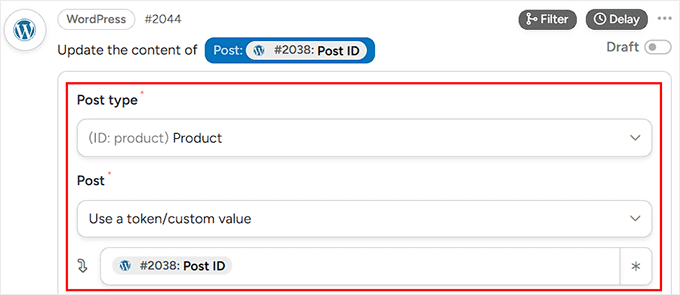
    Useful links

    WP Accessibility Website

    The WP Accessibility Day Team

    The WP Accessibility Day Schedule

    WP Accessibility Day YouTube Channel

  • WordPress.org blog: WordPress 6.8.3 Release

    WordPress 6.8.3 is now available!
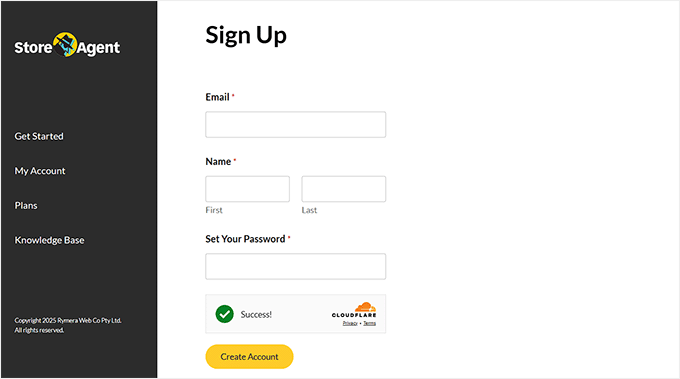
    This is a security release that features two fixes.
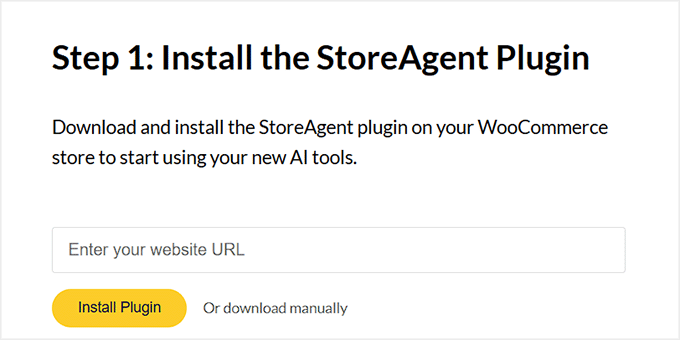
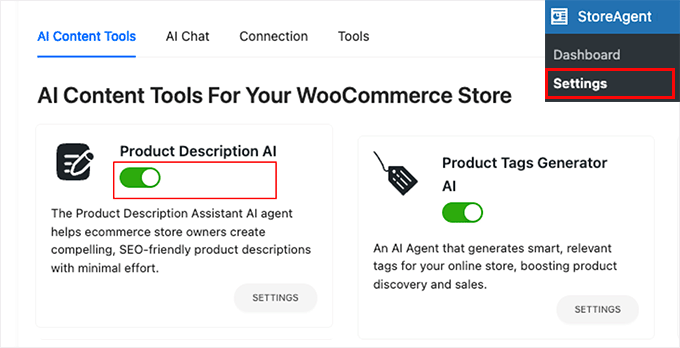
    Because this is a security release, it is recommended that you update your sites immediately.

    You can download WordPress 6.8.3 from WordPress.org, or visit your WordPress Dashboard, click “Updates”, and then click “Update Now”. If you have sites that support automatic background updates, the update process will begin automatically.

    The next major release will be version 6.9, which is planned for December 2nd, 2025.
    For more information on WordPress 6.8.3, please visit the version page on the HelpHub site.

    Security updates included in this release

    The security team would like to thank the following people for responsibly reporting vulnerabilities, and allowing them to be fixed in this release:

    • A data exposure issue where authenticated users could access some restricted content. Independently reported by Mike Nelson, Abu Hurayra, Timothy Jacobs, and Peter Wilson.
    • A cross-site scripting (XSS) vulnerability requiring an authenticated user role that affects the nav menus. Reported by Phill Savage.

    As a courtesy, these fixes have also been made available to all branches eligible to receive security fixes (currently through 4.7). As a reminder, only the most recent version of WordPress is actively supported.

    Thank you to these WordPress contributors

    This release was led by John Blackbourn.

    In addition to the security researchers and release squad members mentioned above, WordPress 6.8.3 would not have been possible without the contributions of the following people:

    Aaron Jorbin, Abu Hurayra, Adam Zieliński, Alex Concha, Andrei Draganescu, David Baumwald, Ehtisham Siddiqui, Ian Dunn, Jake Spurlock, Jb Audras, Joe Hoyle, John Blackbourn, Jon Surrell, Jonathan Desrosiers, Michael Nelson, Peter Wilson, Phill, Robert Anderson, Ryan McCue, Scott Reilly, Timothy Jacobs, vortfu, Weston Ruter

    How to contribute

    To get involved in WordPress core development, head over to Trac, pick a ticket, and join the conversation in the #core Slack channel. Need help? Check out the Core Contributor Handbook.

    Props to Ehtisham Siddiqui, John Blackbourn, Paul Kevan, Jonathan Desrosiers, Aaron Jorbin, Weston Ruter for reviewing.

  • Matt: What’s Your Time?

    I think some of the best writing about technology PR is this ten-year-old article by Aaron Zamost: What’s Your Hour in ‘Silicon Valley Time’? It describes the cycles that companies go through in public perception, and the beauty of revisiting it ten years later is that you can see which of the examples are still relevant, or the domains that 404. As someone who has been around this clock probably a dozen times now, I highly suggest this for anyone “going through it.” Some of the most powerful words in the English language: This too shall pass.

    See also: The Zen fable or old Chinese poem of the old man who loses his horse.