If you appreciate golf at all, the story of how Tiger Woods won the U.S. Open at Pebble Beach without knowing he was down to his last golf ball because of arcane rules is pretty interesting.
Category: Uncategorized
-
Gutenberg Times: Gutenberg Changelog #122 – Gutenberg 21.8 and WordPress 6.9
In episode 122 of the GT Changelog podcast, host Birgit Pauli-Haack is joined by Beth Soderbergh, CEO of bethink Studio, to discuss the latest updates in Gutenberg 21.8 and WordPress 6.9. The conversation kicks off with reminiscing about past WordCamp experiences and transitions into a deep dive on block themes, evolving design tools, and the challenges of adopting new workflows. Beth shares practical insights from her agency work, highlighting the benefits of section and block styles, synced patterns, and strategies for cleaning up legacy code as Gutenberg advances.
The episode covers new features like section styles, the highly anticipated accordion block, and improvements to template management, aimed at making theme and site building more flexible for users and developers. They also talk about experimental features such as PHP-only blocks, block bindings, and upcoming blocks like breadcrumbs and table of contents, which promise to streamline site navigation and content organization.
Birgit and Beth underscore the importance of continuous testing and learning, encouraging listeners—especially those hesitant to adopt block themes—to experiment, seek support, and embrace gradual change. The episode wraps with practical advice, recent security updates, and a look at promising innovations coming to the WordPress ecosystem.
- Editor: Sandy Reed
- Logo: Mark Uraine
- Production: Birgit Pauli-Haack
Show Notes
Special Guest: Beth Soderberg
- Bethink Studio
- WordPress.org Profile + Slack
- Talks by Beth Soderberg
Calls for Testing WordPress 6.9
Community Contributions
- Block Galore by designers and developers using Automattic’s Telex
- Moar Blocks
What’s Released
New Blocks still in the works
 Time to Read (m)
 - Accordion Block (m)
- Breadcrumbs Block (m)
- Terms Query block (m)
- Dialog Block
- Icon Block
- Stretchy Text
- Tabs Block
- Table of Contents block
= already merged into trunk, as experiments. Stay in Touch
- Did you like this episode? Please write us a review
- Ping us on X (formerly known as Twitter) or send DMs with questions. @gutenbergtimes and @bph.
- If you have questions or suggestions, or news you want us to include, send them to changelog@gutenbergtimes.com.
- Please write us a review on iTunes! (Click here to learn how)
Transcript
The transcript is in the works.
-
Matt: In Canada
I’ve been trying to find time in my calendar to attend more WordCamps as I love meeting WordPressers all over the world. The stars aligned, and I’ll be swinging by WordCamp Canada next week. They’ve put together an amazing program, including open web pioneer and inventor Dave Winer, so I’m looking forward to checking out the sessions. I wish I could go to every WordCamp, like I used to! I’ve been recording videos and messages for those I can’t physically attend. Ottawa is also great as the only other commercial board I’m on is Field Effect.
-
Matt: Twitter Hacked
Sorry everybody, my @photomatt on Twitter has been hacked, I’m trying to regain account access, but it is not currently in my control. Update: Thank you to the fine teams at X/Twitter and Nikita Bier, my account has been recovered. Just for future reference, I will never promote cryptocurrencies or similar investments. If you see anything from me or WordPress claiming that, be highly skeptical. Invest in open source, public stocks, and great companies like Automattic.

-

Gutenberg Times: Mega Menus in core, WordPress 6.9 calls for testing, going from Elementor to Site Editor — Weekend Edition 344
Howdy,
After meeting so many people at WordCamp Gdynia, on the plane and then on the train, I caught a nasty cold and struggled all week. I call this stage mushbrain, and everything becomes much harder, especially reading comprehension suffers. I am over it now, though. It also wasn’t the first time that I sounded horsey on a podcast episode.
It’s the time of year now here in Munich when the days get shorter and the weather is cold, drissly and overcast. A time when snow would brighten the sights, with its whiteness covering partly the darkgray, dark brown background.
Enjoy again this weekend edition and stay healthy.
Yours,

BirgitDeveloping Gutenberg and WordPress
Gutenberg 21.8 is now available and release lead Carlos Bravo hightlighed in his release post What’s new in Gutenberg 21.8? (8 October)
- Block Visibility Control Support and UI
- Block Comments Improvements
- Accordion and Time To Read Blocks
This week Gutenberg Changelog 122 recording, Beth Soderberg, lead developer at Bethink.studio and I chatted about the release and other WordPress topics around Block themes and on going change. The episode arrive at your favorite podcast app over the weekend. You can conclude from this photo, that we definitely had fun and you would be right.

It was JuanMa Garrido‘s turn to write the monthly roundup post What’s new for developers? (October 2025) on the WordPress Developer Blog. The 21.6, 21.7, and 21.8 Gutenberg releases add features for developers. The Command Palette now works throughout the admin, the new Terms Query block makes taxonomy layouts easier, and Block Visibility controls allow for conditional display. Notes (that’s how we call Block Comments now) improve team collaboration, while content-only editing maintains design integrity during client handoffs.
Help testing new features for WordPress 6.9
Release test co-leads Krupa Nanda and Jonathan Bossenger, published several calls for testing in preparation in WordPress of the 6.9 release. Each of the post has a detailed description of the feature, and instructions on how to test is with specific scenarios. It’s much easier to follow along with any of the calls for testing, to also learn what’s new in the next release.
Help test changes to template management is probably the most elaborate call for testing, as template management received a completely new feature, and it needs to be working for many different use cases, and has consquences on existing sites.
Call for Testing: Ability to Hide Blocks for this feature it’s the bare minimum of a new feature, that will be in future releases see some refinement and extensiblity.
Call for Testing: Accordion Block lets you dive into a whole new block, many users asked for an several plugins are already available for. Now it will come to core.
Your time spent on testing the new features for WordPress 6.9, has a lot of impact, as the bugs found now, make the release the best it can be for millions of other users.
 The latest episode is Gutenberg Changelog 121—Gutenberg 21.6 and 21.7, Block Theme Development, and Block Themes with Anne Katzeff of AskDesign.
If you are listening via Spotify, please leave a comment. If you listen via other podcast apps, please leave a review. It’ll help with the distribution.
Plugins, Themes, and Tools for #nocode site builders and owners
Leslei Sim informed us that EventKoi Lite is now available from the WordPress Plugin Repository. I mentioned the premium version before, Event Koi is modern, WordPress events calendar. Create single or multi-day events and display month, week, or list views via blocks (or shortcodes).
Mike McAlister announced a new product: OlliePro Extensions on Bluesky. He mentions: Animations, advanced grid + column controls, keyboard shortcuts, and more. Watch the vidoe Introducing Ollie Pro Extensions – Supercharge Your WordPress Block Editor
All controls are seamlessly integrated with the Core editor sitebar sections. Mark Howells-Mead commented in the WordPress Slack #outreach channel: ” I’m very impressed with how he’s been able to integrate the little add-ons many of us are integrating to our own projects, but in such a seamless way by extending core controls.” McAlister shared an example Gist on GitHub.
David McCan took a deep dive into the world of Block plugins. In this blog post Performance of Third Party Blocks and Core Compared he tries to answer the questions many site builders and owners have: “Can you add the features Gutenberg is missing yet still be performant like core?”. McCan tested ten third-party Gutenberg block plugins with WordPress core, specifically focusing on performance.
Matt Medeiros, WPMinute, took the Mega Menu Designer, also made by Mike McAlister, out for the spin. He shared his thoughts in the Video How to Build Mega Menus with WordPress Blocks. He provides a detailed walkthrough calls it “Perfect for anyone looking to enhance their website’s navigation experience.” As reported earlier the plugin is available for free in the WordPress plugin repository.
Rae Morey, publisher or The Repository, reported Ollie’s Menu Designer Flagged for Core, With Automattic Developers Set to Help Shepherd It. Automattic’s Anne McCarthy says developers are preparing to review Ollie’s Menu Designer for inclusion in the Gutenberg plugin, marking the start of a collaborative push to bring the plugin’s features into WordPress. This follows WordPress co-founder Matt Mullenweg’s suggestion that the menu functionality should be part of core. Details and links in Moery’s article.
Theme Development for Full Site Editing and Blocks
This episode of Greyd Conversations show, Switching to FSE from a pagebuilder, covers the story of Buro Staal, a smal dutch agency, which switched from Elementor to Full site editing cold turkey. Greyd’s host Sandra Kurze and agency owner Rosanne van Staalduinen shared why and how her agency switched and the lessons learned along the way.
The biggest hurdles were limited functionality of navigation block, not able to create Mega Menus, and the need for controls for mobile sites and responsiveness. So they augmented their tech stack with Kadence Blocks and Ollie Pro theme.
Building Blocks and Tools for the Block editor
Ryan Welcher published another recipe from his Blockdevelopment Cook Book on YouTube. How To Make A Simple Fade In Effect Fast. “In this recipe, we’re adding a little flair by loading custom JavaScript and CSS for the Cover and Image blocks to create a smooth fade-in effect as they scroll into view. To keep things efficient, we’ll only enqueue these files when the blocks are actually on the page.”
What’s new in and around Playground
Nick Diego announces that WordPress Studio version 1.6.0 now supports Blueprints, which are lightweight JSON files that predefine site configurations for quick and consistent setup. Instead of starting with empty sites or using large snapshots, teams can create portable recipes specifying WordPress versions, plugins, and settings. Studio offers three featured blueprints for quick starts, development, and commerce, while users can also upload custom blueprints. The feature integrates into the standard site creation flow and helps streamline workflows for solo developers and teams alike.
Playground documentation now has Ask AI button, to get help finding and understanding feature sets and APIs.

Ajit Bohra of Lubus shared on X “The Visual BluePrint Builder for Playground is shaping up nicely. All the latest updates are in, and it’s feeling solid. Stable version coming soon, but you can already check it out and start building visually.” A blueprint builder with blocks, how nice. You can test it via this Playground link. The code is available on GitHub.
Jamie Marsland also tries to make it easier to create blueprints for Playground sites and open up the WordPress in a browser tool for a broader audience. Details in his post Introducing Pootle Playground — My Experimental WordPress Blueprint Builder.
Adam Zielinski created an online PHP code editor using Playground. It allows developers to test PHP snippets quickly in their browser. The tool supports WordPress functions, enables switching between PHP and WordPress versions, and allows sharing code configurations through links. Built with WordPress Playground, it runs entirely client-side with network access and popular PHP extensions included. He’s currently experimenting with adding CLI and file browser capabilities to support composer packages and frameworks like Laravel or Symfony.
Need a plugin .zip from Gutenberg’s master branch?
Gutenberg Times provides daily build for testing and review.Now also available via WordPress Playground. There is no need for a test site locally or on a server. Have you been using it? Email me with your experience
Questions? Suggestions? Ideas?
Don’t hesitate to send them via email or
send me a message on WordPress Slack or Twitter @bph.
For questions to be answered on the Gutenberg Changelog,
send them to changelog@gutenbergtimes.com
-
Matt: Jeremy Kranz and Sentinel
I’d like to introduce you to Jeremy Kranz. With his career as an investor at Intel Capital, then GIC, which is the sovereign wealth fund of Singapore rumored to manage over $700B, to now running his own fund Sentinel Global, he has had a front-row seat to investments in industry changing companies such as ByteDance (which became TikTok), Alibaba, Uber, DoorDash, Zoom, DJI (which changed the drone industry and argubly modern warfare), and many more I’m probably not even aware of.
When I first met Jeremy in 2014, I was amazed that a late-stage financial investor could understand Open Source so well, and he immediately grokked what Automattic was doing in a way that I think has little parallel in the world. (Today, it reminds me of Joseph Jacks at OSS Capital.) Deven Perekh of Insight Partners led Automattic’s 1.16B valuation Series C round, making us one of only forty “unicorns” (private companies valued over a billion dollars) at the time, and one of the reasons they beat out others as the lead of the round was that GIC/Jeremy was a LP of Insight so they could directly co-invest. GIC is so intensely private I couldn’t even mention them in the announcement at the time even though they were the catalyst for the round. Since then, Jeremy has become a close friend and advisor, and he even took me to my first Grateful Dead concert.
Eleven years later, this is his first podcast! Jeremy shares incredible alpha around China, AI and its adoption in the enterprise, how asset allocation is evolving, and at the end, a beautiful tie together of the Grateful Dead and Open Source.
-
Does SEO Still Work in 2025? (My Expert Insights)
Many website owners I talk to are feeling a bit nervous about SEO right now. With AI search results getting all the attention, it’s easy to wonder if all that hard work is still paying off.
You may be wondering if SEO is still worth it in 2025. It’s a valid question, especially when your time and marketing budget are at stake.
At WPBeginner, we’ve been navigating these exact changes firsthand across our own blog and partner sites. And I can tell you with confidence that SEO is far from dead; it has just evolved.
In this guide, I’ll share what’s working for us right now and provide the clear, actionable playbook you need. Let’s start with the quick answer you’re looking for.
To help you navigate this guide, here’s a quick look at all the topics we’ll cover:
- The Direct Answer: Yes, SEO Still Works in 2025 (But the Rules Have Changed)
- What’s Actually Changed About SEO
- My Real-World SEO Results: What’s Working Right Now
- The 2025 SEO Strategy That Actually Works
- SEO Tactics That Are Dead in 2025 (Stop Doing These)
- The Tools I Use to Stay Ahead of SEO Changes
- What Will SEO Look Like in the Next 2 Years?
- Your Next Steps: 30-60-90 Day SEO Action Plan
- Frequently Asked Questions About SEO in 2025
- Additional Resources for SEO and AI Optimization
The Direct Answer: Yes, SEO Still Works in 2025 (But the Rules Have Changed)
Let’s get this out of the way immediately: Yes, search engine optimization (SEO) is still one of the most effective ways to get traffic to your website in 2025. It is absolutely worth your time and investment.
However, the way we need to approach SEO has changed significantly.
The rise of AI in search means that the old tactics of simply matching keywords are no longer enough. Instead, the focus has shifted from just ranking to being the most helpful and authoritative answer for a user’s problem.
What’s Actually Changed About SEO
The core of SEO remains the same: create great content that people want to link to.
What’s different is how search engines like Google find, understand, and present that content to users.
1. The Rise of AI-Powered Search Results
You’ve likely seen “AI Overviews” (previously called Search Generative Experience or SGE) at the top of Google search results.
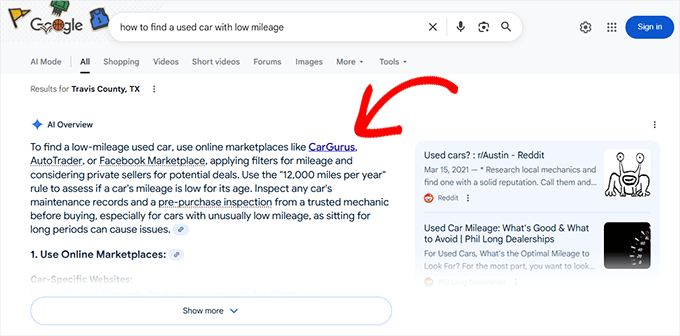
These are AI-generated summaries that try to answer a user’s question directly on the results page.
There are also new players in the business, mainly the generative AI chat platforms like ChatGPT, Gemini by Google, Claude, and many more.
All these tools answer user questions directly without sending the user to your website.
The new SEO strategy is to make your content appear in the AI answers, AI overviews, and zero-click search results.
2. User Intent Has Become Even More Important
AI is now much better at understanding the why behind every search query.
It doesn’t just match keywords. Instead, it tries to understand what the person really wants to achieve and what stage of their decision-making they’re in.
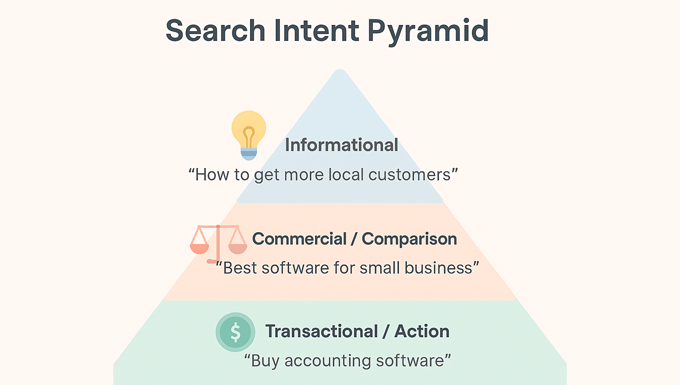
For example, if someone searches for “best contact form builder”, AI knows that they’re not just looking for a list of tools. They likely want to compare features, pricing, and ease of setup so that they can quickly choose the right one for their business.
Your content now needs to satisfy that intent deeply. A simple product list or surface-level advice isn’t enough. Instead, you need a detailed, helpful resource that answers the real question and guides users toward a confident decision.
Here are a few more examples of how intent works across different small business types:
- Local business owner: A search for “how to get more local customers” shows a need for practical marketing ideas like Google Business Profile tips, customer reviews, and local SEO checklists.
- Restaurant owner: Someone searching “how to design a restaurant menu” is likely looking for visual examples, layout inspiration, and pricing psychology, not just text-based advice.
- Online store owner: A search like “how to reduce abandoned carts” implies they want proven strategies, such as email reminders or free shipping offers, rather than a generic definition.
- Consultant or service provider: If a user searches “how to price consulting services,” they’re expecting detailed frameworks, pricing examples, and client communication tips, not vague suggestions.
When creating your content, ask yourself:
- What is the user trying to accomplish with this search?
- What details or examples would help them take the next step?
- What format best satisfies that intent — a comparison, tutorial, checklist, or visual guide?
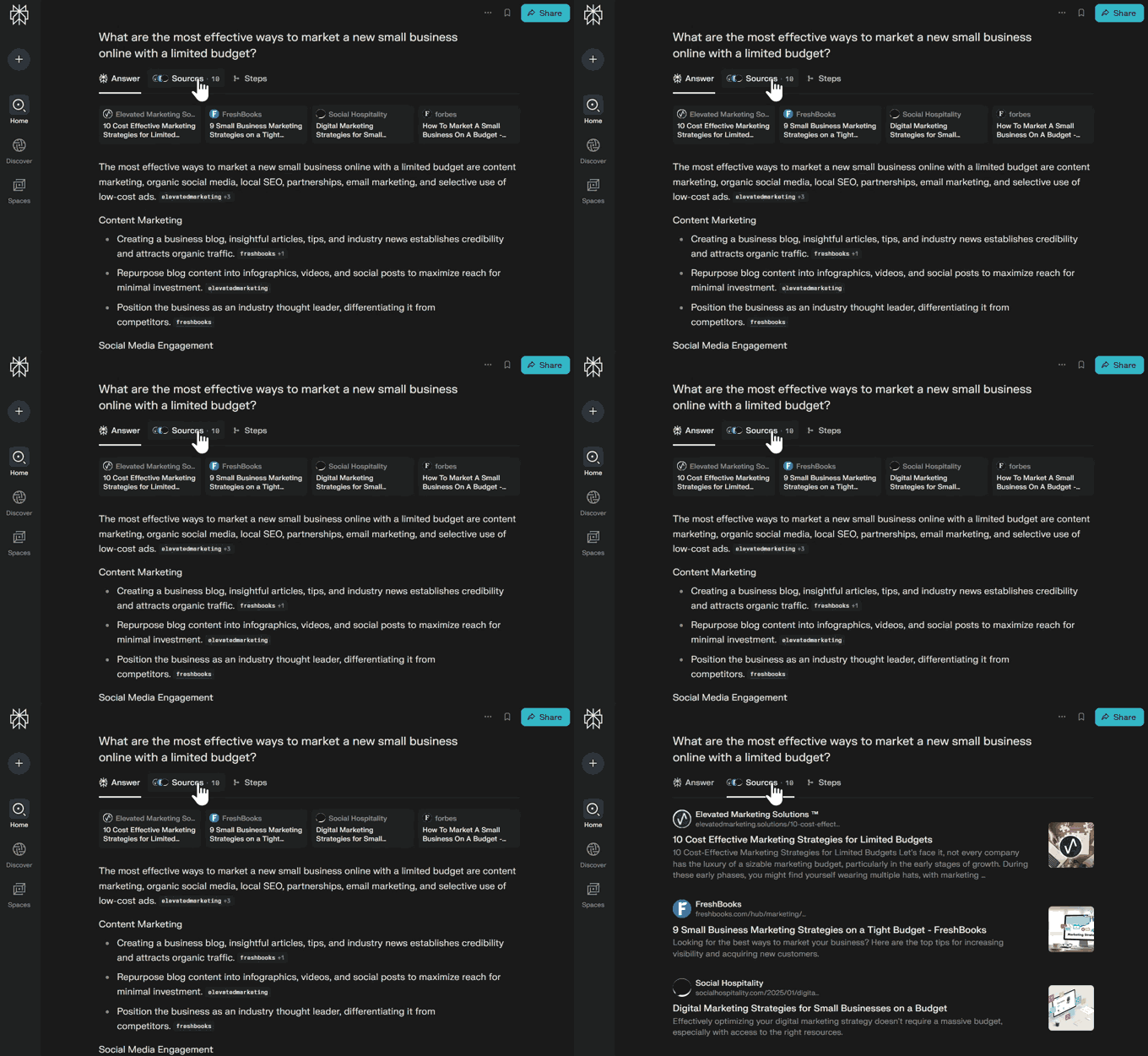
By matching your content to the user’s intent, whether it’s informational, commercial, or action-focused, you make it easier for both AI and users to view your page as the most complete and trustworthy answer.
3. The Technical Foundation Matters More Than Ever
For AI to easily read and understand your content, your site’s technical health is more important than ever. A well-optimized website helps search engines and AI tools interpret your pages correctly and present them to the right audience.
Key technical factors that impact your visibility include:
- WordPress hosting: A reliable hosting provider is essential for building a stable, fast, always available website. Poor hosting performance has a long-term impact on your site’s SEO, credibility, and user experience.
- Site speed: A slow website leads to higher bounce rates and a poor user experience. Use caching plugins, a quality host, and image compression to keep things fast.
- Mobile-friendliness: Most searches happen on mobile devices. Make sure your site layout, fonts, and buttons work perfectly on smaller screens.
- Structured data (schema markup): This helps AI and search engines understand the content of your page. Adding schema can make your content appear in rich results and AI overviews.
- Crawlability: Check that your site’s important pages are indexed and not blocked by robots.txt or noindex tags.
I understand that this might sound a little intimidating, especially for small businesses and DIY users who manage their own websites. But the good news is that you don’t need to be a developer to get this right.
There are simple tools that make technical SEO much easier to handle:
- All in One SEO for WordPress: Helps you add schema markup, generate an llms.txt file, and fix common SEO issues automatically. See our complete All in One SEO review to learn more.
- WP Rocket: Improves site speed with caching, minification, and lazy loading. See our full WP Rocket review for more details.
- Cloudflare: Keeps your website secure and protected from attacks. Even the free plan is enough for the most common threats faced by small business websites.
By maintaining a strong technical foundation, you give your content the best chance to be understood, indexed, and cited by AI tools.
For a step-by-step approach, see our Complete Guide to WordPress SEO.
My Real-World SEO Results: What’s Working Right Now
At WPBeginner, we don’t just write about SEO theory. We are in the trenches every day, testing and adapting our strategies for our own website and our partner companies.
Like most websites, we saw a decline in our search traffic recently. During this time, we have been adapting and testing new things to figure out what works and what doesn’t.
Case Study: How We Adapted Our Content Strategy
We saw the rise of AI in search and made a big shift in our content approach.
Here are some of the major changes we made to adapt to the changing landscape.
- Instead of just writing one-off articles, we focused on improving our “topic clusters“, which are groups of interlinked articles covering a subject from every angle.
- We also revisited our top 100 articles and updated them with FAQ sections, helpful videos, and structured data.
- We proactively applied our Generative Engine Optimization strategy to the articles. This is the strategy we use to optimize content for AI platforms.
Here are the results we have noticed:
- These efforts led to a significant increase in our content being featured in AI Overviews and traditional featured snippets.
- We have also seen a steady increase in traffic coming from ChatGPT and other AI platforms.
Now, let’s get into how we applied these changes so you can try them out.
The 2025 SEO Strategy That Actually Works
Now that I have shared the tools we use, let’s talk about how we use them in our day-to-day SEO strategy.
Here is the four-step process we use that you can follow for your own WordPress site.
Step 1: Audit Your Current SEO Foundation
You can’t fix what you don’t know is broken. Start with a simple audit of your site’s technical health.
- Site Speed: Use Google PageSpeed Insights to run a speed test and check your loading times. This is important because slow sites rank poorly.
- Mobile-Friendliness: Check your site on Google’s Mobile-Friendly Test tool. Most users are on mobile.
- Crawl Errors: Use Google Search Console to find any pages that Google is having trouble accessing.
Many SEO plugins, including All in One SEO, include a site audit checklist that makes this process much easier.
Step 2: Optimize for AI Search Features
To get your content featured in AI Overviews, you need to make it as easy as possible for AI to understand and trust your page.
That means writing in clear, natural language and structuring your content in a way that’s easy for both humans and AI to read.
Here’s how you can make your content AI-friendly:
- Use simple, direct language: Write short sentences and answer questions clearly so that AI tools can quote or summarize your content accurately.
- Organize with headings and lists: Break your content into clear sections using H2–H4 headings, bullet points, and step-by-step instructions.
- Add schema markup: Use structured data to label your content explicitly. For example:
- ✅ FAQ schema for question-and-answer sections
- ✅ HowTo schema for tutorials
- ✅ Recipe schema for food content
- Add an
llms.txtfile: AIOSEO makes it easy to create and manage yourllms.txtfile so that AI crawlers know how to access and cite your content properly.
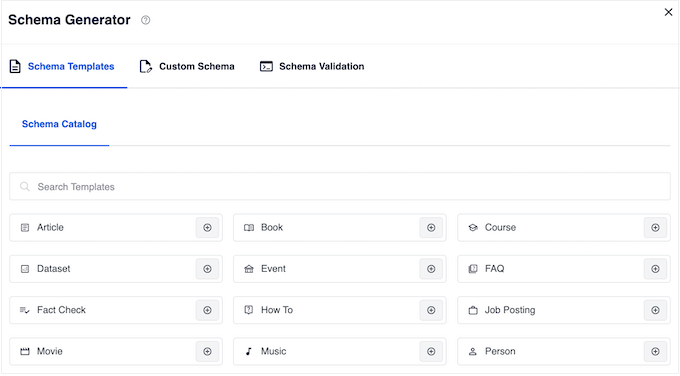
These small steps help AI models interpret your content accurately, increasing the chances of it appearing in AI-generated answers and summaries.
Step 3: Focus on Topical Authority (E-E-A-T) Over Keyword Density
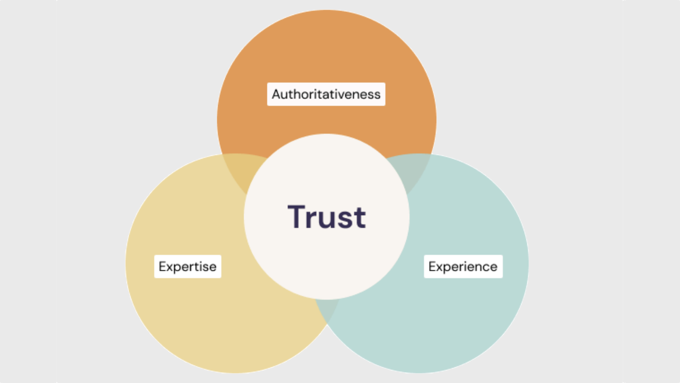
The days of stuffing a keyword into your page 10 times and ranking for that search term are long gone. Search engines now reward topical authority, which means being a comprehensive expert on a subject.
To do that, you need to apply the E-E-A-T principles to your content strategy:
- Show Real Experience: Add first-hand insights, case studies, and examples from your own use or testing.
- Highlight Expertise: Include detailed, accurate content written or reviewed by knowledgeable authors with visible bios.
- Build Authority: Earn backlinks from trusted sites, feature media mentions, and display trust signals like awards or testimonials.
- Boost Trust: Keep your site secure (HTTPS), update outdated content, and maintain clear About, Contact, and Privacy pages.
Step 4: Double Down on User Experience Signals
User experience, or UX, describes users’ feelings and opinions while using your WordPress website. It is a direct ranking factor used by search engines like Google.
A pleasant user experience means users find your website easy to use and helpful. By contrast, a poor user experience means users find your website difficult to use and can’t do what they want to do.
I have seen countless site owners testing their homepages or landing pages for user experience while completely ignoring their blog posts, contact page, product pages, and so on.
You need to double down on improving the user experience by locating and identifying those gaps and fixing them.
✅ Here are a few quick tips:
- Find Pages with the highest bounce rates: Locate pages with the highest bounce rates in Google Analytics by using MonsterInsights.
- Locate pages with mobile usability issues: Use Google Search Console’s “Mobile Usability” tab to find pages that are not optimized for mobile devices.
- Ask for user feedback: Use tools like UserFeedback to ask visitors what they are looking for or what’s missing from your content. This gives you direct insight into how you can make your site more helpful.
For more details, see our checklist on how to perform a comprehensive UX audit of your site like a pro.
SEO Tactics That Are Dead in 2025 (Stop Doing These)
Part of winning at SEO is knowing what not to do. Here are some outdated tactics that can now hurt your site more than help it.
Don’t Do This Anymore 🚫 Do This Instead ✅ Keyword Stuffing
Forcing keywords into your text unnaturally.Write for Humans
Cover your topic naturally and comprehensively.Buying Low-Quality Links
Purchasing links from spammy directories or link farms.Earn High-Quality Links
Create amazing content that people want to link to.Publishing Thin Content
Creating short, unhelpful articles just to target a keyword.Create In-Depth Guides
Aim to be the best, most detailed resource on the topic.Ignoring Mobile Users
Having a site that is difficult to use on a phone.Adopt a Mobile-First Design
Ensure your site works perfectly on all screen sizes.Exact-Match Anchor Text
Using the exact same keyword for every internal link.Use Varied Anchor Text
Link naturally with descriptive, relevant phrases.The Tools I Use to Stay Ahead of SEO Changes
Having the right tools can make all the difference. Here are the ones we use and recommend at WPBeginner to stay competitive.
Essential SEO Toolkit for WordPress in 2025
An SEO plugin is non-negotiable for any WordPress site. It handles the technical details so you can focus on creating great content.
For a detailed comparison, see our guide on the best WordPress SEO plugins compared.
Plugin Best For Key Feature All in One SEO for WordPress Comprehensive WordPress SEO Automatic, advanced schema markup for AI search. SEOBoost Content optimization AI-powered content optimization to grow organic traffic LowFruits.io Keyword research Finding low-competition keywords using real SERP data. These tools ensure that your site and your content are optimized for the latest SEO strategies, and you never run out of ideas to grow your organic traffic.
Free Tools Every Website Owner Needs
- Google Search Console: Essential for monitoring your site’s health, seeing which keywords you rank for, and submitting sitemaps. See our guide on connecting WordPress to Google Search Console.
- Google Analytics 4: Tracks your website traffic and user behavior. For details, see our tutorial on how to install Google Analytics in WordPress.
- Ahrefs Webmaster Tools: A powerful free tool that audits your site for technical issues and shows you your backlinks.
- Free Keyword Generator: Free keyword research tool that shows 300+ semantically related keywords.
- Blog Post Idea Generator: Generate 100+ content ideas on any given topic to write about.
Premium Tools Worth the Investment
- Semrush: The leading premium tool for keyword research, competitor analysis, and link building.
What Will SEO Look Like in the Next 2 Years?
Looking ahead, I predict that search will become even more of a dialogue. Instead of a single query, users will have conversations with AI to find what they need.
This means your content needs to be structured to answer multiple related questions within a single page. Authority, expertise, and building a trusted brand will become the most important ranking factors of all.
Here are my tips:
- Build topical depth: Cover your niche thoroughly with interconnected articles that establish your authority.
- Focus on conversational intent: Write in a way that anticipates follow-up questions and connects related answers naturally.
- LLM Ready Content: Write logically structured content that is easy to cite.
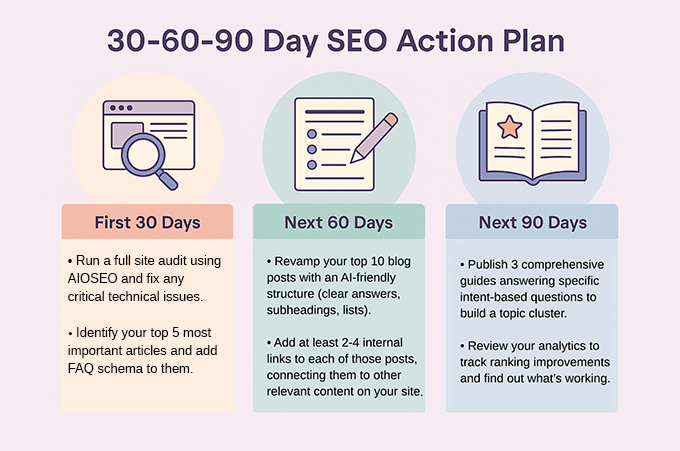
Your Next Steps: 30-60-90 Day SEO Action Plan
Ready to get started? Here is a simple plan you can follow to improve your SEO over the next three months.
First 30 Days:
- Run a full site audit using AIOSEO and fix any critical technical issues that it finds.
- Identify your 5 most important articles and add FAQ schema to them.
Next 60 Days:
- Revamp your top 10 blog posts with an AI-friendly structure (clear answers, subheadings, lists).
- Add at least 2-4 internal links to each of those posts, connecting them to other relevant content on your site.
Next 90 Days:
- Publish 3 new, comprehensive guides that answer specific, intent-based questions from your audience to build a topic cluster.
- Review your analytics to track ranking improvements and identify what’s working.
Here is a 30-60-90 day SEO action plan in a downloadable visual format:
For more ideas, check out our complete WordPress SEO checklist for beginners.
Frequently Asked Questions About SEO in 2025
The following are the answers to some of the most commonly asked questions about SEO in 2025.
Should I stop doing keyword research?
No, but you should evolve how you do it. Instead of focusing on single, exact-match keywords, focus on the topics and questions your audience is asking. Use keyword research to understand your users’ problems, then create content that solves them completely.
Is link building still important?
Yes, but the quality of links is more important than ever. A single, relevant backlink from a highly trusted website in your industry is worth more than hundreds of links from low-quality directories. Focus on creating link-worthy content and building genuine relationships.
Can I just use AI to write all my SEO content?
While AI can be a helpful assistant for outlines and ideas, relying on it to write entire articles is a risky strategy. Search engines are getting better at detecting purely AI-generated content that lacks real expertise or unique insights. Use AI as a tool, but ensure your content is edited and enriched with your own first-hand experience.
Does SEO still matter if most people use AI search?
Absolutely. AI search tools still rely on trusted web pages to find and cite answers. The stronger your site’s authority and structure, the more likely your content will be featured or cited in AI responses and overviews.
What should I focus on more — technical SEO or content?
You need both. Technical SEO ensures your site is crawlable, fast, and well-structured. Great content builds trust and authority. Think of technical SEO as the foundation, and content as the building — one doesn’t work without the other.
How do I measure SEO success in 2025?
Go beyond rankings. Track metrics like organic traffic growth, conversions, dwell time, and visibility in AI overviews. Tools like MonsterInsights can help you monitor the KPIs that truly reflect your SEO progress.
Additional Resources for SEO and AI Optimization
As you work on improving your site’s SEO in the AI search era, here are some helpful guides that may help you along the way:
- Is AI Content Bad for WordPress SEO? (Expert Insights & Tips)
- How AI is Reshaping SEO: 30+ Trends to Watch in 2025
- How to Write Content Using AI Content Generator in WordPress
- I Tested 7 Best AI Tools for Content Marketing: Here’s What I Found
If you liked this article, then please subscribe to our YouTube Channel for WordPress video tutorials. You can also find us on Twitter and Facebook.
The post Does SEO Still Work in 2025? (My Expert Insights) first appeared on WPBeginner.
-
Matt: Kathy Sierra
I was reminded today of the profound marketing influence of Kathy Sierra, who was a pretty prolific blogger and speaker back in the day. I would summarize her thesis as such: Your best marketing and communication should talk about how you make your users awesome, not how you’re awesome. If you’d like to check out some of her talks, she spoke at WordCamp in 2008, at Business of Software in 2013, and at Mind the Product in 2015.
-
Open Channels FM: Bootstrapping a Successful WordPress Business Through Customer Feedback and Iteration
In this episode, Mark chats with Aurelio Volle from WPUmbrella about his journey in creating a WordPress management tool, maintaining customer focus, and the importance of community and transparency in business growth.
-
Matt: Battery Scan
One of the cooler companies I’ve seen in a while is LumaField, which does industrial CT scanning, as they describe it.
Industrial X-ray CT (Computed Tomography) works on the same basic principle as medical CT, taking hundreds of X-ray images from different angles to capture the internal and external structure of objects in three dimensions.
In addition to providing amazing graphics of these scans, they also gather some valuable data. Their Lumafield Battery Quality Report does a deep dive into lithium ion battery manufacturing, showing the wild differences between different brands.
I love this stuff, whether you call it QA, evals, testing, or whatever, it reminds me of Ray Dalio’s Principle to embrace reality and deal with it.
