In this episode, Birgit Pauli-Haack and Isabel Brison dive into WordPress 6.9 and Gutenberg 21.9. They discuss major updates such as collaborative block-level comments (notes), expanded template management, the new command palette, and foundational block visibility features. New blocks like the accordion, math, and terms query block are highlighted, alongside enhancements in typography and time-to-read. They explore improvements aimed at editorial teams, workflow flexibility, and agency needs, while also touching on ongoing experiments like PHP-only blocks and global styles APIs. The episode wraps with practical advice for developers and encouragement to test out the latest beta features.
Why Did Benjamin Franklin’s Son Remain Loyal to the British? I was obsessed with with Ben Franklin’s Autobiography as a kid, he was an incredible self-made man who came from impossibly hard beginnings and had a profound impact on history. I think I originally read through Project Gutenberg on my first Handspring Visor. The article shows an entire huge part of his life that is missing from his Autobiography.
What We Learned Filming The American Revolution is from Ken Burns, Sarah Botstein, and David Schmidt, who’ve come together with the challenging task of making a documentary from a time there were no photographs or videos. Ken Burns is one of my favorite documentarians, and the behind the scenes is very interesting.
So pick up a copy as you pass through an airport or by a newstand. I consider it a very worthwhile subscription. It might be better to read in print or through Apple News+ as their website a bit broken for me right now.
With the move to more JavaScript and Styles in WordPress admin pages and editors, I spend some time debugging what styles and scripts are being loaded on a given page. (Specially important if you’re working on blocks, or JavaScript rendered admin pages)
To help with that I use a small vibe-coded tool. It helps understanding why a script or style was enqueued on a given page.
For each script (or style) it gives:
The uncompressed size.
If it was enqueued explicitly.
Which ancestor script was enqueued explicitly causing the current one to be loaded in the page as well.
What is the direct parent script.
And it presents all of that in a digestible list.
How to use it
Just drop the file in your WordPress plugins folder (or load in another existing plugin)
Append ?debug_script=true to the url of the admin page that you want to debug.
That’s it, for a more complete debugging solution, consider checking the excellent Query Monitor plugin.
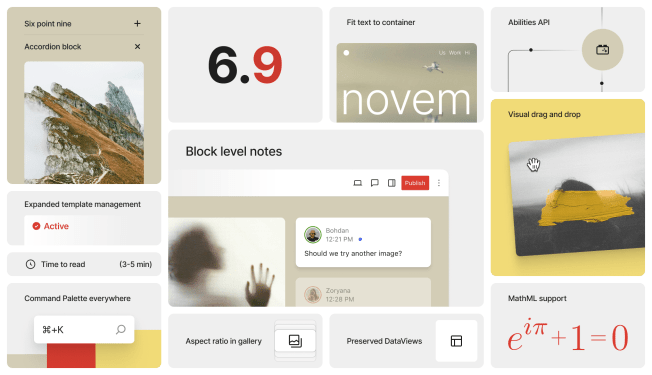
I am genuinely giddy about WordPress 6.9 and its delightful updates. Major kudos to all contributors, who push it over the first hurdle of this release cycle. The Beta 1 release happened earlier this week. The final release is scheduled for December 2nd, 2025.
There are lots of different updates for the full range of WordPress users.
Content creators get a number of new and waited-for Blocks, with Accordion, Time to Read, Term Query and MathML Block, and further refinements to block handling and existing blocks.
Theme and site builders get additional tools to style a site via theme.json and majorly improved template management right in the site editor, and
Developers can build faster with an enhanced Block Bindings API and Interactivity API, and for the admin side of plugins the component library of DataViews and DataForms has some great updates as well.
Release Test co-lead, Krupa Nanda posted great instructions on how you can Help test the Beta 1 release of WordPress 6.9 . It’s the best way to learn how to use the new features and report quirks and bugs back to the contributors, so they can be fixed before Release Candidate 1 which is scheduled for November 11.
In Europe we will turn back our clocks one hour on Sunday (Oct 26). The US will follow suit next week (Nov 2). This will be the week of “pick-up meetings” for me. It’s what I call the phase where I miss a meeting and instead turn up at someone else’s meeting and meet new people. Win-win. But seriously, if you scheduled a meeting with me next week, you can’t send too many reminders if you want me to turn up in time.
Have a splendid weekend ahead,
Yours, Birgit
Table of Contents
This week in WordPress is a great long-running show by WPbuilds and host Nathan Wrigley. A panel of three people chats about last week’s WordPress news. They comment, explain and present addtional view points. It’s loosely inspired by “This week in Google” an even longer-running show of the This week in Tech (TWiT) network that was renamed at the beginning of this year to Intelligent Machines. With Jeff Jarvis, Leo LaPorte and others. It’s my favorite podcast. But I digress.
In the latest episode, This week in WordPress 353, Michelle Frechette, Tim Nash, Nathan Wrigley and yours truly discussed the great Internet outage of 2025 aka AWS outage, the WordFence Security Report, WordPress 6.9 upcoming features, Gutenberg updates, and Tammie Lister’s fun blocks and so much more. Listen in on YouTube or your favorite Podcast app.
Developing Gutenberg and WordPress
Ray Morey, The Repository, reported that WordPress 6.9 Beta 1 Now Available and Ready for Testing and gives and overview of the features and also what’s didn’t make it into the release, a nice recap on the progress of the Admin Redesign.
Besides WordPress 6.9 Beta, the fabulous crew of contributors also released Gutenberg 21.9. It brings three new blocks: MathML, Term name and Term Count blocks, the latter two used in the context of the new Term Query block. The allowedBlocks feature has been expanded to all blocks and users can also use the new UI tools to controls allowed blocks for templates and patterns, without writing code or editing raw block markup. Hide/show block features was added also to synced patterns and template parts. It can also be called upon via Command Palette and keyboard shortcut cmd/ctrl+shift+H.
Isabel Brison, JavaScript developer at Automattic and core contributor, joined me on the podcast and filled various knowledge gaps about the updates in this release. We also had great fun discussing WordPress 6.9 features, soon coming to your a WordPress instance near you. The podcast episode Gutenberg Changelog #123 will land in your favorite podcast app over the weekend.
On Thursday, Oct 30, at 20:00 UTC, Velda Christensen‘s workshop will be about Landing Pages, Posts, & More: Strategies for a Stronger Site -In this beginner-friendly workshop, we’ll explore simple ways to organize your WordPress content so visitors can easily find what they need and take the next step.
If you are listening via Spotify, please leave a comment. If you listen via other podcast apps, please leave a review. It’ll help with the distribution.
Plugins, Themes, and Tools for #nocode site builders and owners
Blocktober Fun, the October challenge to build a block a day with Automattic’s Telex, is almost over. This week, Tammie Lister prompted the Block building AI tool for another set of fun blocks:
A new fun plugin arrived at the WordPress plugin repository: It’s called Throwable by Qara Yahya, founder of BlockLayouts. Using it you can place buttons, paragraphs or image into the Throwable block. The adjust Gravity aka speed items fall and Bounce setting, and have some nice animation on your site.
Justin Tadlock released Breadcrumbs Block v. 3.0. The update includes support for the built-in Layout and Block Gap (Spacing) features in WordPress. “There are quite a few other changes and some notable bug fixes, particularly if you extend the block with custom code. Be sure to check out the changelog” he wrote on X.
Theme Development for Full Site Editing and Blocks
“Keeping up with Gutenberg – Index 2025” A chronological list of the WordPress Make Blog posts from various teams involved in Gutenberg development: Design, Theme Review Team, Core Editor, Core JS, Core CSS, Test, and Meta team from Jan. 2024 on. Updated by yours truly. The previous years are also available: 2020 | 2021 | 2022 | 2023 | 2024
Building Blocks and Tools for the Block editor.
Seth Rubenstein, lead developer at the Pew Research Center and speaker at WordCamp US, chatted with Nathan Wrigley on the Jukebox podcast about Block Composability in WordPress’ Future. Rubinstein “shares fascinating stories from the work h e’s recently been doing. He breaks down what block composability really means, the ability to build modular, reusable, and even interactive blocks that work seamlessly together, empowering both developers and end users to create sophisticated web applications within the familiar WordPress block editor.” wrote Wrigley in his podcast show notes.
Fellyph Cintra, developer advocate working for Automattic, published Things you might have missed about the Playground project over the past few months. It’s a great roundup post about the amazing work of the team. He mentions the PHP-Wasm changes, updates to the Playground CLI, the JavaScript API, how to use Playground with Playwright and the performance improvements with OPCache enabled by default. He also addresses rumors about missing features compared to traditional WordPress installs, noting that this gap is becoming less significant.
In preparation for the WordPress 6.9 Field Guide, André Maneiro just posted an update about the Fields API, that has been worked on for many Gutenberg releases. It lists functions and options with code examples. Updates on DataViews and DataForm are still to come.
Now also available via WordPress Playground. There is no need for a test site locally or on a server. Have you been using it? Email me with your experience
Questions? Suggestions? Ideas? Don’t hesitate to send them via email or send me a message on WordPress Slack or Twitter @bph.
It’s a bit of Automattic lore, but although I founded the company in June 2005, CNET asked me to stay on for a few more months to finish out some projects, which I did. Our HR systems have me as the second employee, after Donncha O Caoimh (still at the company!) So today is my 20th anniversary at Automattic! It’s 20 years since I started hacking on Akismet, our first product, and on WordPress.com.
The team gave me a sweet surprise! I’ve been fighting for the open web for 20 years, and hope to do it for at least 20 more. There’s a lot of exciting behind-the-scenes stuff happening inside Automattic that also made this day special, but one significant thing is public.
I don’t think WP Engine employees or investors were aware of the gaslighting they did, hopefully some of this is enlightening. And there’s a lot more discovery to go!
WordPress Bhopal has been at the forefront when it comes to igniting young minds, empowering them with knowledge, generating new ways to achieve optimal and maximum value, and sparking a positive social impact— kind of feels like a motto.
We love doing all of it!
And as we proudly complete our 10th year of formation (Oct. 2nd), this year in particular, we’ve been targeting ways to amplify our impact. A special highlight was EmpowerWP Bhopal (Women’s Day event), where we hosted women in different stages & walks of their lives and demonstrated how WordPress & the community can support them in achieving/expanding their potential. The response was heartwarming.
Post this event’s success, and that of last year’s do_action, where we empowered NGOs by building their websites, it felt only natural that the next chapter in our mission of empowering the social community should focus on the students.
And honestly, why we feel more drawn towards the student community can be traced back to the fact that the genesis of the WP Bhopal community itself was by a second-year college student back in 2015. Ever since, we’ve been taking workshops in colleges of our city, but this year, it was more about formalising it and making it more impactful & grander than ever.
Being the only active chapter in the State of Madhya Pradesh—a state with 55 districts and over 400 cities—there was always a little nudge to take our initiative beyond our home, Bhopal.
I still vividly remember while pitching sponsors for WordCamp Bhopal 2023, the idea kept resurfacing: the student community must benefit from this. The lack of exposure and the gap between theory & practical skills is profusely felt. Aditya often mentions that when he started with WordPress, it was purely out of his own interest, not something taught or exposed to him in his institute. For him, building websites was uncommon among his batchmates. And the truth is, the situation hasn’t changed, and we still need revitalisation to help the youth realise their potential. This became the agenda of this initiative.
Too much foundation-building… now’s the time to reveal what I’ve so heartily been tucking in…
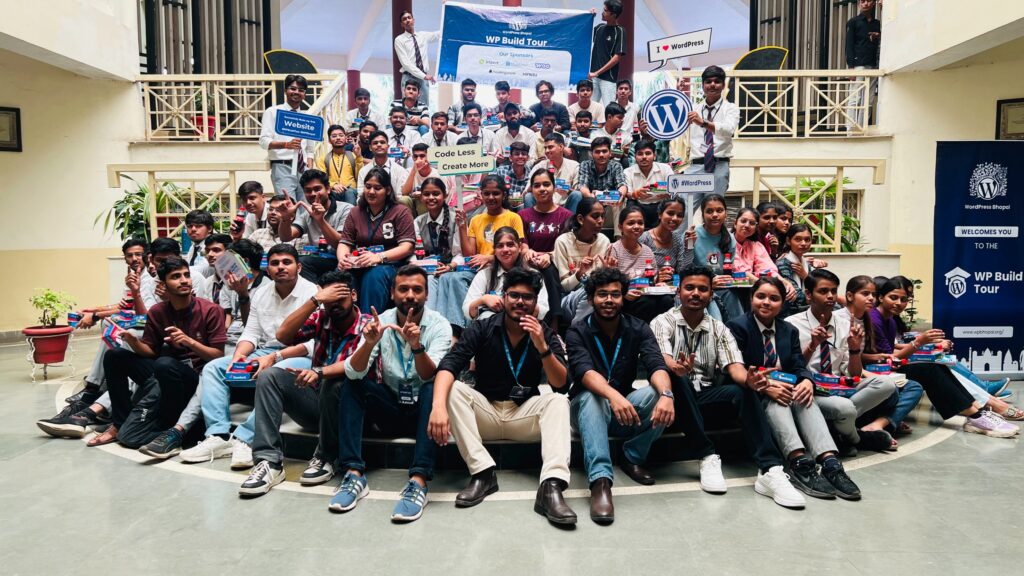
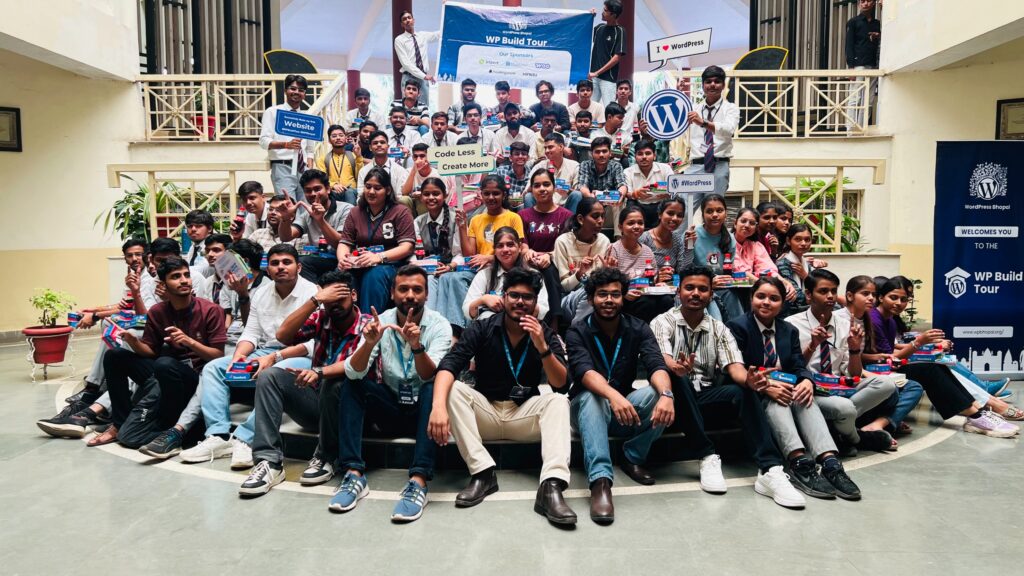
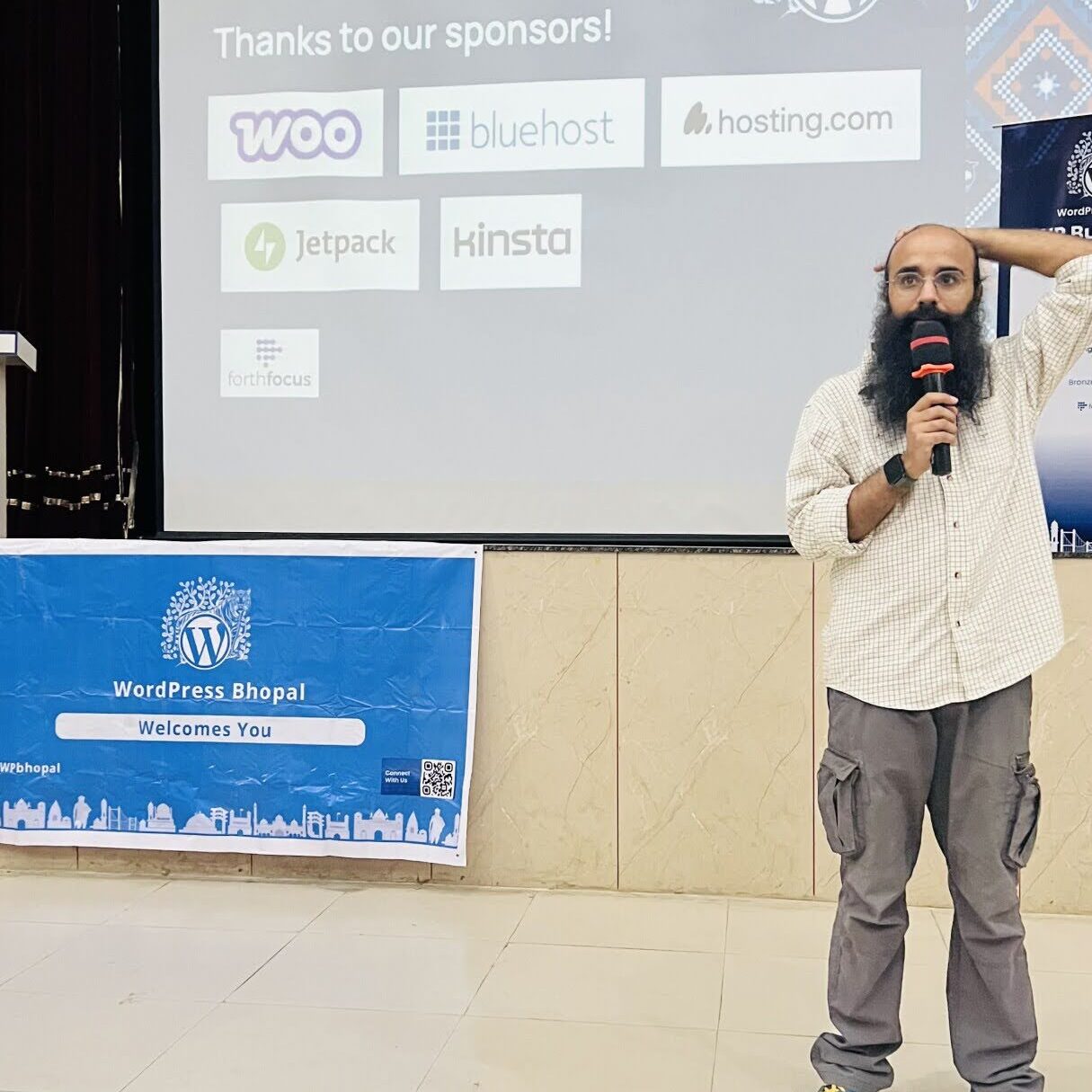
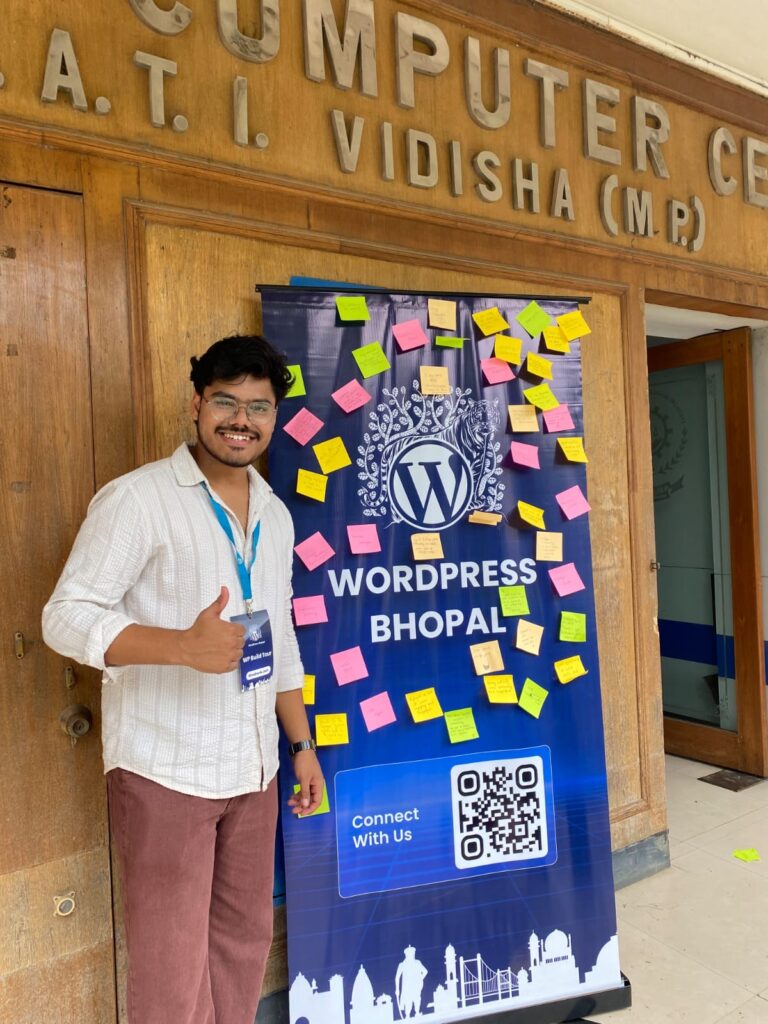
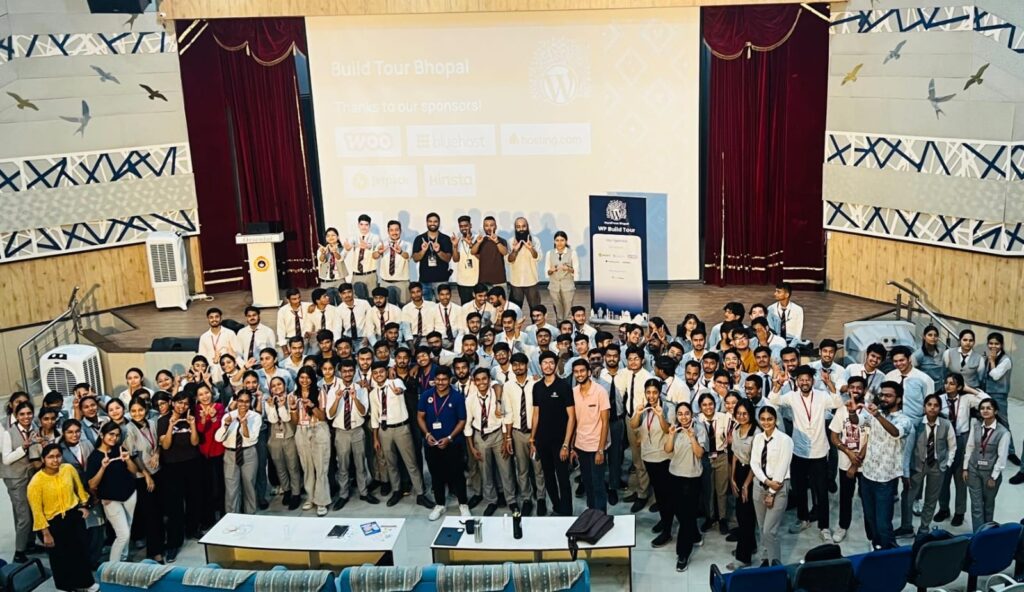
WE ARE SO PROUD & DELIGHTED to share that possibly the largest event of its kind, so far—the WP Build Tour 2025—has been successfully organised, impacting and empowering more than 1700 students across Madhya Pradesh in one go!
What’s in the Name? And Why This Matters.
The name came after much thought. We wanted it to reflect the core idea: Tour to capture the essence of a tour bus going around the State, empowering students (especially first-timers) to Build their very first WordPress websites, apart from expanding their technical confidence.
The mission was rooted in our identity as the only active WP chapter in Madhya Pradesh:
Expanding our reach to more students across the State.
Spreading WordPress awareness to inspire new local chapters
Giving students confidence to bring their ideas online
This plan was a win-win for us personally, for the community, and for the social cause we stand for.
WordPress Bhopal x WP Build Tour
The Planning Phase: How Did We Pull This Off?
The initial plan was to cover colleges in major cities. Ties with GDG (Google Developer Groups) communities and college clubs helped spread the word and support with arrangements that differed from college to college.
Interests were called in from colleges. Once we had a number, like the location, student profiles, number of students, etc, we initiated the process. We designated volunteers from each college to be a bridge, because, of course, they know the best way in there. Each college had around 120-600 students in one sitting.
Thanks to their support, we were able to pull this off smoothly. Special shout-outs to: SIRT Student Body (Bhopal), Advance Studies Club- Medicaps Indore, GDG Indore & E-Cell, SATI Vidisha.
Sessions were designed for all levels, no matter the technical background. We were conscious of common hurdles & from day zero of planning, we decided to remove those barriers at first instance. In this regard, at preliminary registration itself, students were guided to apply for the GitHub Education Pack, so by the event day, they have access to free domains & developer tools. For hosting, we relied on InfinityFree and FreeHosting.com. Sometimes, a challenge was GitHub taking too long to approve the account(s), so the backup was to manage through subdomains from InfinityFree and additional free hosting setups.
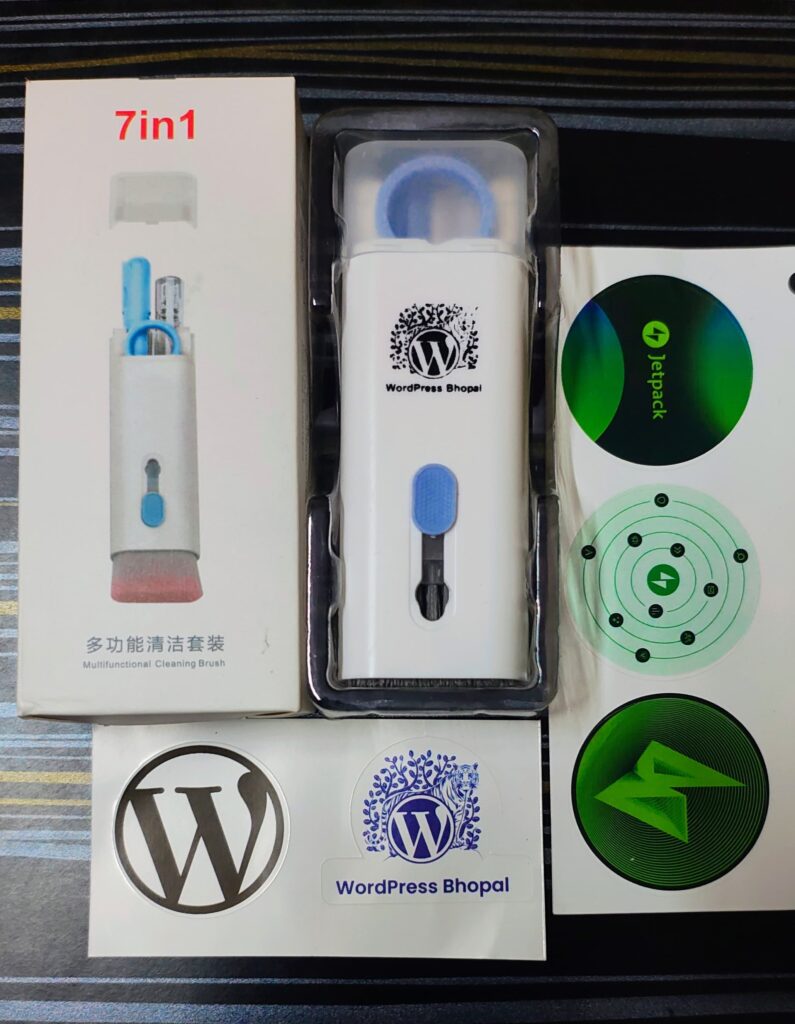
The setup also included swags and refreshments to keep up with the momentum. Thought was put into keeping those as relevant as possible. Participants were provided with mini cleaning kits to take home. For refreshments, we relied on the quick & easy- Pizzas & Burgers along with beverages.
Building Website in a Day: The Possibility
Now that’s a given, building your own website (properly) takes time— planning, ideation, resources, so what’s the catch? No catch, really. Here, with a 4–5 hour workshop, we wanted students to experience the spark of: “I can actually do this.” The pressure wasn’t to build the whole of it in one day but to cover all the basics then & there. So the next time they open it, it’s only to further mould it as per their requirements.
From purchasing a domain, to pointing DNS records, to watching DNS propagation happen live—and finally installing WordPress—it was a crash course in turning abstract concepts into real, working websites.
And the output? A portfolio, a blog, a project showcase, even startup ideas. The pride was real. Social media lit up with links saying, “We built this.”
Honestly, we were a little sceptical at times—like when there weren’t many doubts, or when lunch was announced and students walked out. We wondered, “Will they even come back?” Because this wasn’t meant to be just another attendance exercise; we wanted it to be voluntary, something they chose to be part of.
But there was consensus in the team that even if just one kid shows up, we’ll keep going. And guess what? Not only did they come back, but they jumped in with full energy. Doubts, queries, ideas, thoughts—their enthusiasm blew us away. It’s hard to put into words how fascinating it was to see the effort actually paying off.
By the end, every participant had not just knowledge but something concrete: a live website, their website! Photos, reels, and hashtags like #WPBuildTourBPL amplified the energy far beyond the classrooms.
Beyond the Website
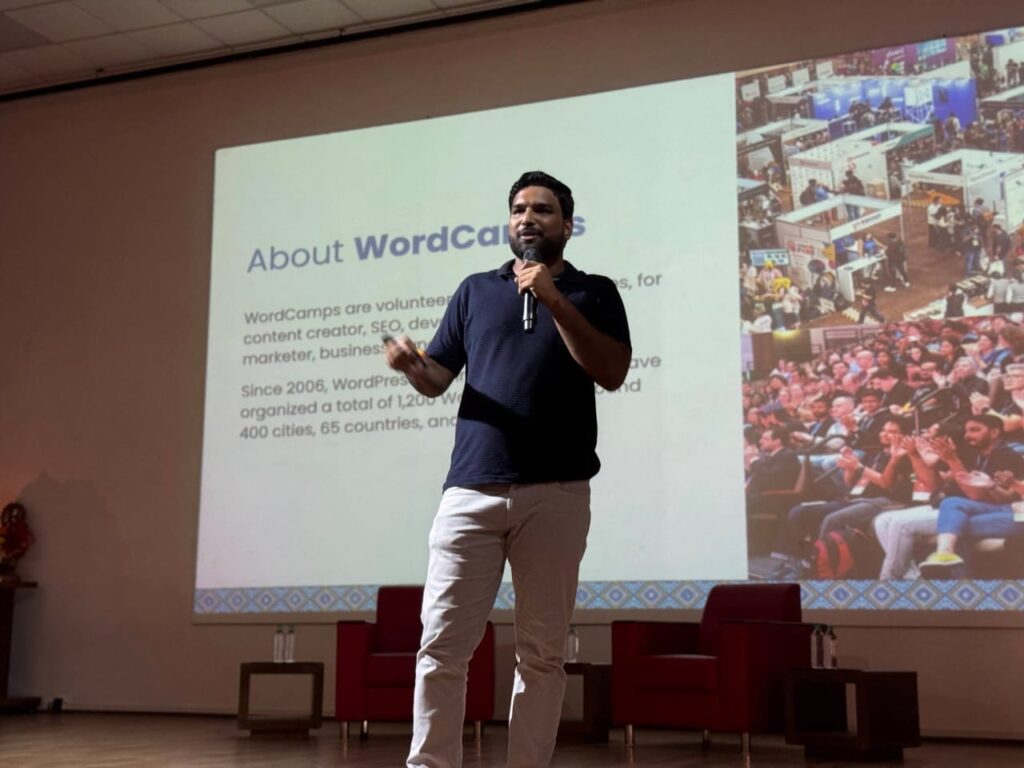
Though the primary goal was to help students build their own websites from scratch, the sessions were also designed to introduce them to the WordPress community. They covered career opportunities, ways to get involved, and the benefits the community offers. Students were given an overview of how to contribute, how chapters operate, and how they can become a part of the ecosystem. The aim was to make the experience not just hands-on but also empowering—equipping them to pave their own path, with community connection as a strong starting point. This also supports our broader goal of fostering new chapters across the state.
The Route We Took
We’re very thankful to the college administrations of each institute we took the Tour to for their trust and support throughout. This post would be failing in its agenda without giving them due credit for opening their doors and believing in the vision of the WP Build Tour.
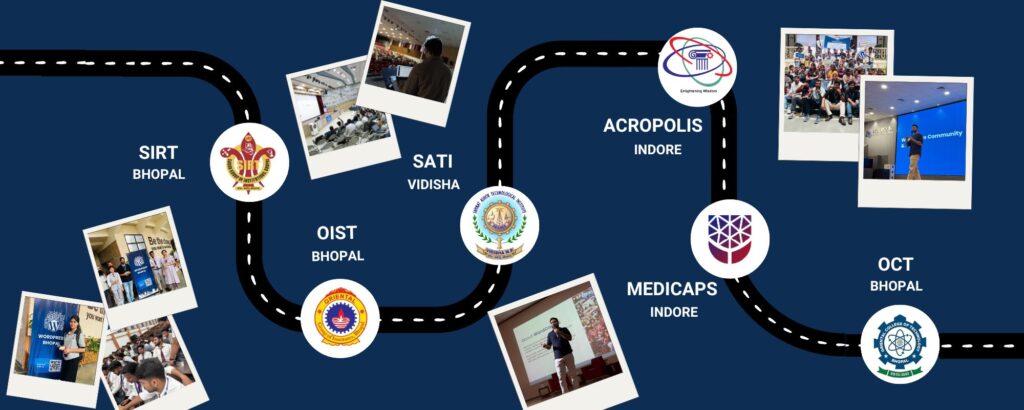
Here’s where the Tour travelled:
Sagar Institute of Research & Technology, Bhopal
Oriental Institute of Science & Technology, Bhopal
Samrat Ashok Technological Institute, Vidisha
Acropolis Institute of Technology & Research, Indore
Medicaps University, Indore
Oriental College of Technology, Bhopal
Each stop added its own flavour and warmth. If we could’ve squeezed in more, we surely would have, but even with the stretch, it was worth it.
The social media was our backbone—announcements, posts, designs, keeping the buzz alive. Big thanks to Mansi (also our go-to content person), along with Md. Farid, Amit & Riddhima. And yep, that cool Build Tour logo you see up there? Amit designed it.
On the ground, Shashank, Kapil, and Shivam held things together—guiding students through technicalities, taking charge of arrangements, managing logistics, and even stepping in as resource persons when needed. Shashank went the extra mile, balancing all this while also supporting social media.
Aditya, Guneet, and Kripesh led as resource persons, bringing not only their WordPress expertise but also their effortless way of connecting with students. (Classic engineers with their own fanbase, haha!)
Mayur, Anshika, Pooja, Malay, Ninay, Roshini, and Prabal each contributed in various roles, adding strength to the endeavour.
The Sponsors who made this Possible
This tour wouldn’t have been possible the way it happened without our incredible sponsors. Gold Sponsors Jetpack, Bluehost, Woo, Hosting.com, Kinsta, StellarWP, andour Bronze Sponsor, ForthFocus.
Their support helped us take the Tour across campuses in the best way possible, provide refreshments and swags, and equip students with the right resources.
And of course, a big thanks to the global WordPress community for having our back throughout!
Giveaway winner
Swags
Moments beyond: In our Hearts
Some moments will stay with us forever:
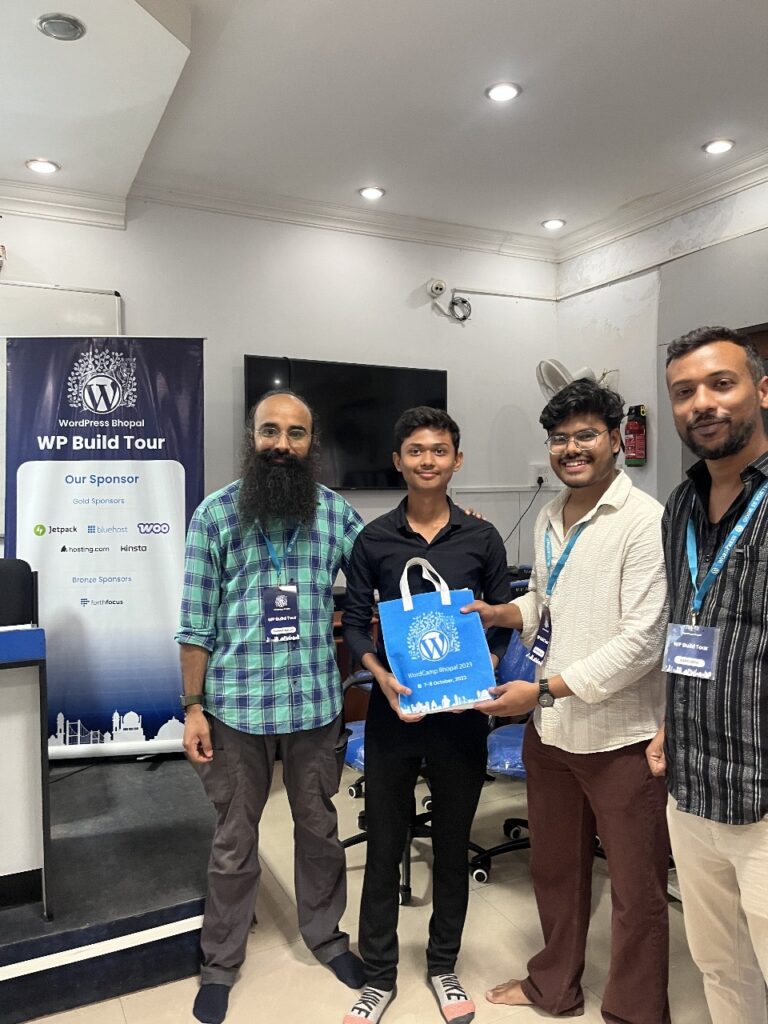
The warmth of teamwork, swag, and refreshments turns workshops into mini-celebrations
The collective gasp when a site went live
Proud social media posts
Smiles of giveaway winners walking away with specially curated kits.
Because at its heart, the WP Build Tour 2025 was never just about code or content. It was about confidence. About potential realised. About futures being built—one student, one website, one breakthrough at a time.
We were featured in local newspapers
Organising events is one thing, and adding purpose to them takes it to another level. For us in Bhopal, organising events has never been just about the “event.” It’s about going a step further and sparking change, no matter how small. Thankfully, the WordPress community has always been open and kind enough to welcome such ideas and encourage us to push boundaries. And for that, we’re so grateful!
The WP Build Tour 2025 wasn’t the end but rather the beginning of a movement. And as we now look forward to WordCamp Bhopal 2025 this December, we carry with us 1,700 sparks of possibility, ready to light up the future of WordPress and beyond.
I don’t get sick very often, but when it catches up to me it hits like a freight train. Just trying to keep all the plates spinning while operating at 10% capacity, been sleeping a ton. Today was in some ways better, some ways worse than yesterday. I try to avoid hospitals and emergency care, as you wind up in their system, so I’m trying to ride this one out at home. Had to cancel a bunch of travel and conferences and meetings I was looking forward to this week. Really makes you appreciate and be grateful for good health — it’s a baseline for everything else and I’m blessed with it 99% of the time.
WooCommerce 10.3 is out, just in time for Black Friday / Cyber Monday, with some nice improvements to the checkout experience, tracking cost of goods sold, and a new beta MCP server, “This new feature enables AI assistants like Claude, Cursor, VS Code, or any other MCP-compatible client to interact directly with WooCommerce stores through a standardized protocol, opening up new possibilities for AI-assisted store management and development workflows.” You can also help out in testing WordPress 6.9, which comes out on December 2nd.
If I’m slow on anything right now, I apologize. I’ve got some flu/Covid thing, so I’m operating at reduced capacity.
Strong customer support is key for SaaS success. Building relationships with users and hosting providers boosts satisfaction and can be a powerful marketing tool.
Semrush has always been my favorite go-to tool for SEO research. Unfortunately, it comes with a hefty price tag that can’t always be justified, especially for small businesses just getting started.
While it’s incredibly powerful, many bloggers simply don’t need to pay a premium for a massive suite of enterprise features they will never use.
That’s why I’ve put together this guide to the best Semrush alternatives for bloggers. I’ll show you which tools give you the features you actually need to boost your traffic without the complexity or big price tag.
TL:DR: Tools like LowFruits and SEOBoost are perfect for replacing specific Semrush features at a much lower cost. Others, like Ahrefs and Moz, are direct, high-powered competitors that offer a similarly broad (and expensive) feature set.
My Top Semrush Alternatives
After testing many SEO tools over the past few years, I’ve narrowed down the best Semrush alternatives to a few standout options. Each tool offers unique strengths that make it perfect for different blogging needs and budgets.
Here’s a quick comparison of my top picks for bloggers who want maximum value:
I’ve used Semrush for a few years, and I think it’s one of the most powerful SEO platforms out there. However, it’s not always the best fit for every WordPress user.
When I talk to bloggers and small business owners, most tell me they want something simpler, more affordable, and easier to use inside WordPress.
Here are a few common reasons I’ve seen people (myself included) look for a Semrush alternative:
Lower cost: Semrush plans cost more than $100 per month, which is a high cost for a smaller site or personal project. Many other tools offer the same key features for much less.
Simpler setup: Semrush can feel overwhelming if you’re just getting started with SEO. Many alternatives provide clear, step-by-step SEO recommendations that are easier to act on.
Built for WordPress: Most alternatives integrate directly into your WordPress dashboard, so you can optimize posts and pages without switching between multiple tools.
Focus on essentials: Semrush includes a lot of advanced features for agencies and large teams. If you just want keyword ideas, content audits, and basic rank tracking, you don’t need all that extra complexity.
If your goal is to grow your traffic, a simpler SEO tool can save you time, cut costs, and still give you everything you need to improve your rankings
What to Look For in a Semrush Alternative
When choosing an SEO tool, bloggers should focus on four key criteria to make sure that it meets their specific needs:
Focus on Actionable Insights: Many tools drown you in data and charts. The best tools for bloggers cut through the noise and show you exactly what keywords to target or which posts to update. You need answers, not just more data.
Intuitive and Beginner-Friendly: You shouldn’t need a marketing degree to use your SEO tool. I looked for platforms with clean interfaces that guide you toward the right information, rather than hiding it behind dozens of menus.
The Right Features (Not All of Them): For most bloggers, the essential features are keyword research, competitor analysis, rank tracking, and a basic site audit. Anything more is often a costly distraction.
A Blogger-Friendly Price: The whole point is to avoid Semrush’s big price tag. A great alternative needs to provide real value without costing a lot.
Overall, my goal isn’t to help you find an exact copy of Semrush, but the right tool to grow your blog traffic without the high cost.
My In-Depth Process for Testing the Best Semrush Alternatives
I tested each SEO tool on different WordPress sites, ranging from new blogs to established websites with thousands of monthly visitors. My goal was to focus on real-world performance, rather than just listing features.
My selection criteria focused on four key areas that matter most to bloggers:
Usability: Can someone new to SEO use this tool without getting lost in complex features?
Effectiveness: Does the tool provide actionable insights that lead to measurable improvements in search traffic?
Impact on SEO Performance: Can you see real results within a reasonable timeframe?
Pricing: Most bloggers work with tight budgets. A great alternative must provide tremendous value and a clear return on investment, fitting comfortably within a blogger’s budget.
I evaluated each tool during actual content creation, keyword research sessions, and monthly SEO audits. I tracked which tools helped improve search rankings and which ones felt overwhelming or provided unclear guidance.
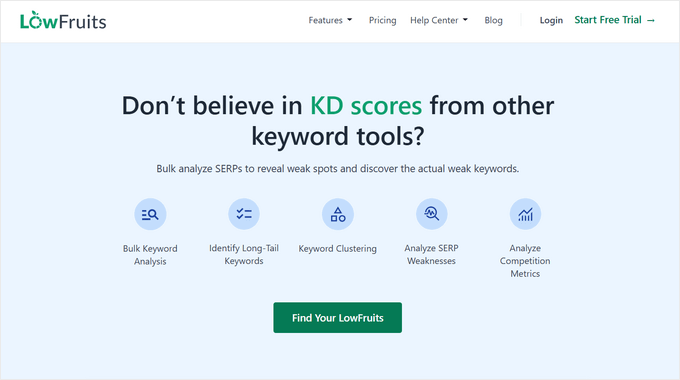
LowFruits is my go-to tool for finding easy-to-rank keywords that bigger websites often miss. While Semrush can overwhelm you with thousands of keyword suggestions, LowFruits focuses on finding the “low-hanging fruit” you can actually rank for.
My Experience With LowFruits
I’ve used LowFruits to find keywords that helped my content rank on the first page within just a few weeks.
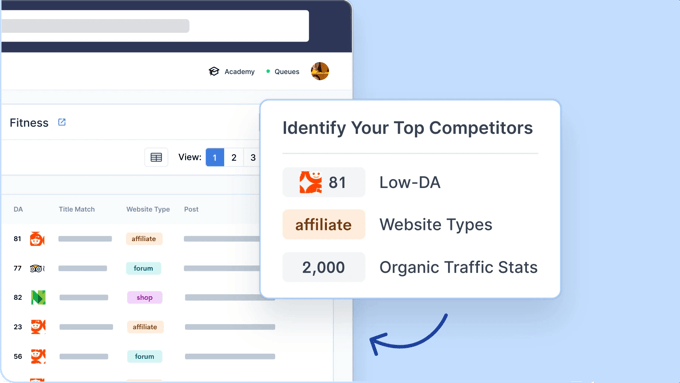
LowFruits can analyze search results and identify weak spots where your content can compete, like forum threads, Reddit discussions, or low-authority blogs. These are the signals that tell you a smaller site can realistically rank, too.
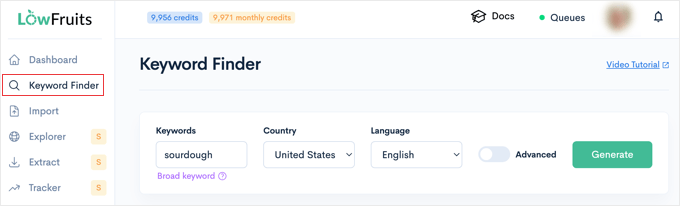
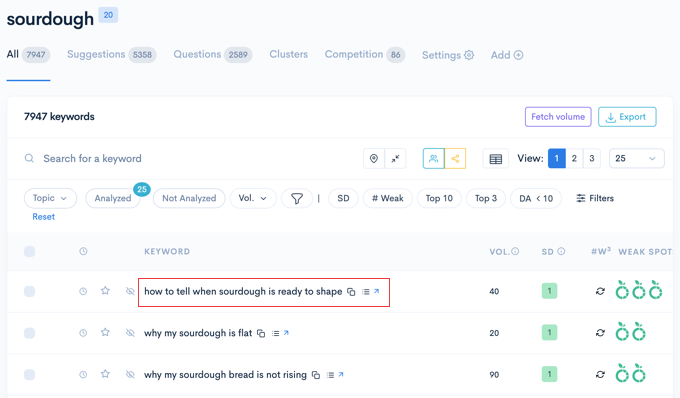
For example, I tried searching for the keyword ‘sourdough’. Instead of showing me impossible keywords, it flagged ‘how to tell when sourdough is ready to shape’ because the top results were from forums and small blogs.
This showed me that a well-written article could easily compete.
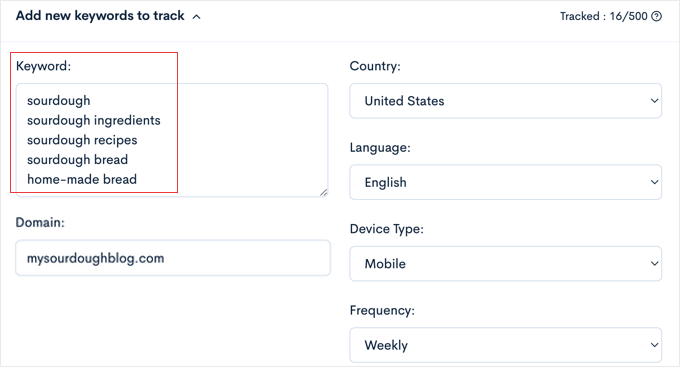
I also found the Bulk SERP Checker particularly powerful. When I tested it with a large list of keywords, it quickly analyzed them all and gave me clear insights into which ones were worth targeting.
This saved me hours compared to manually checking each keyword’s competition in Google. The tool also showed me exactly why specific keywords were easier to rank for, including weak domain authority and thin content among current results.
LowFruits vs Semrush
LowFruits and Semrush approach keyword research from different angles. Semrush gives you large-scale data: search volume, keyword trends, and historical tracking. It’s ideal if you need a full SEO picture or manage several websites.
LowFruits, on the other hand, focuses on practicality. It scans real Google results to help you spot low-competition phrases that smaller sites can target right away.
The interface is streamlined and focused, which can be a relief if you find Semrush’s feature-rich dashboard overwhelming. For users who only want fast, actionable data, it’s much easier to navigate.
Pros of LowFruits:
A simple dashboard makes it perfect for SEO beginners
Affordable pricing that won’t break your blogging budget
Highly effective at discovering untapped keyword opportunities
Bulk analysis saves significant time during research
Cons of LowFruits:
Fewer advanced features compared to Semrush
Limited backlink analysis
Smaller keyword database than some competitors
Pricing and Value: LowFruits offers budget-friendly plans starting at $21 per month (billed yearly), making it accessible for most bloggers. The pricing is transparent with no hidden fees or complicated tier structures.
Why I Recommend LowFruits: LowFruits offers targeted insights that actually work for small-scale bloggers. Instead of competing with massive websites, you’ll find your niche opportunities. The tool makes keyword research feel less overwhelming and more strategic.
All in One SEO (AIOSEO) turns your WordPress dashboard into a complete SEO command center. It’s the best SEO plugin that brings keyword optimization, page analysis, and even rank tracking right inside WordPress, so you don’t need to keep switching between tools.
AIOSEO is a tool we use across all of our websites, and it has quickly become an essential part of my SEO workflow. I rely on it to optimize posts, track rankings, and analyze performance from the same place.
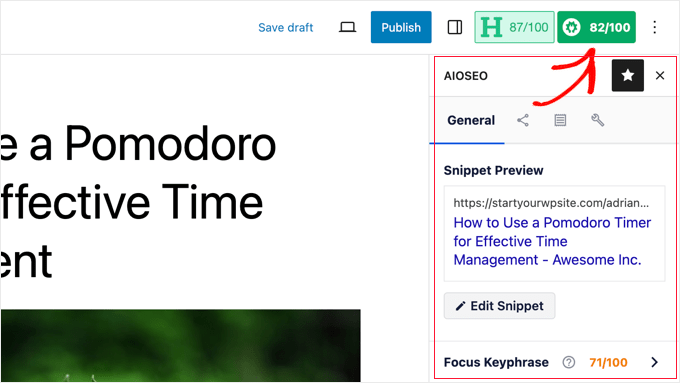
I love how AIOSEO includes SEO suggestions inside the WordPress post editor. It checks your titles, descriptions, and readability as you write, and the recommendations update in real time.
It’s also designed for beginners, so you always know what to improve without needing to understand technical SEO.
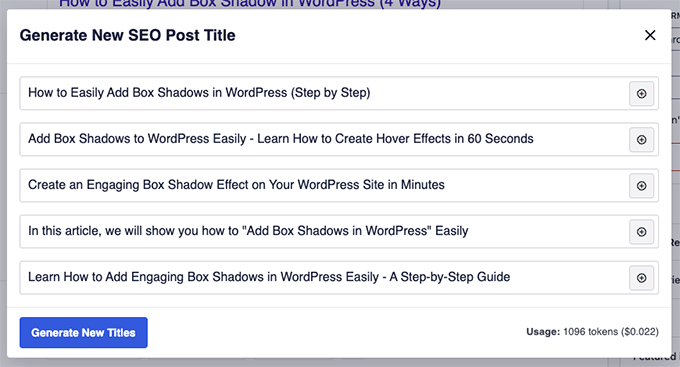
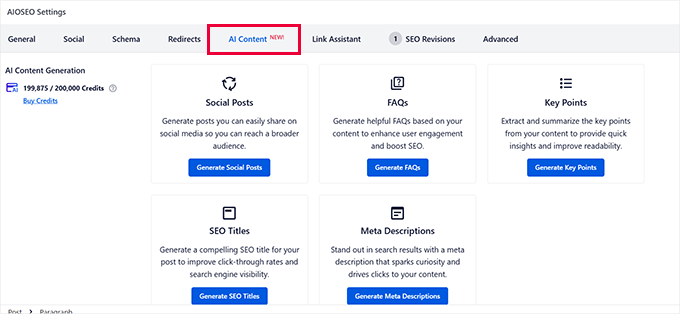
One of my favorite features is the AI Content Generator, which can automatically generate meta titles and descriptions, and much more.
I’ve used it to create SEO-friendly outlines, summaries, and FAQ sections with schema markup already added. That means Google can better understand the content right away, and I save hours of manual setup after publishing.
It can also generate social media posts for platforms like Facebook, Instagram, LinkedIn, and X (formerly Twitter), making it easy to promote content right after publishing.
Combined with real-time SEO feedback as I write, these tools have streamlined my entire content creation process.
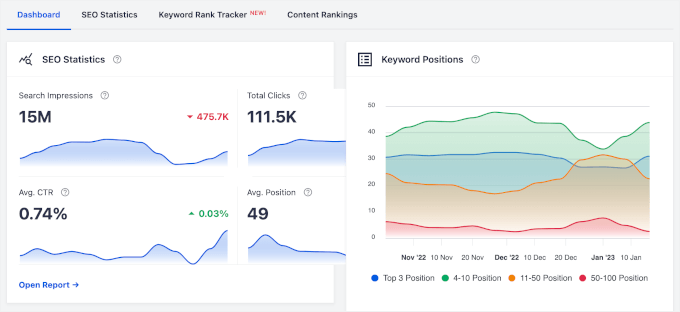
Position tracking has also been invaluable.
I can see how my content ranks compared to competitors, similar to Semrush’s reporting, and make adjustments immediately.
AIOSEO vs Semrush
Semrush is better suited for in-depth research and big-picture strategy. It’s ideal if you need to compare competitors, track backlinks, or manage multiple websites under one account. But it also requires you to constantly switch between your website and the Semrush platform.
On the other hand, AIOSEO is much more convenient for WordPress users, letting you see ranking data, optimize content, and track progress from within your editor.
In practice, this means you can handle most of your content creation and optimization directly within WordPress.
Just keep in mind that its analytics are based on Google Search Console data and may not offer the same comprehensive insight as Semrush’s suite.
Pros of AIOSEO:
Excellent integration with WordPress
Easy-to-use interface that beginners can understand immediately
Comprehensive features, including rank tracking and AI content tools
Works seamlessly alongside other SEO tools for complete coverage
Cons of AIOSEO:
Limited to WordPress users only
Doesn’t offer standalone competitive analysis features
Smaller keyword database compared to dedicated research tools
Pricing and Value: AIOSEO offers competitive pricing with a free version and pro plans starting at $49.50 per year. This makes it significantly more affordable than Semrush while providing essential SEO features most bloggers actually need.
Why I Recommend AIOSEO: The plugin offers versatile SEO tools that directly enhance content performance within WordPress. Instead of learning a completely new platform, you can improve your SEO using the dashboard you already know.
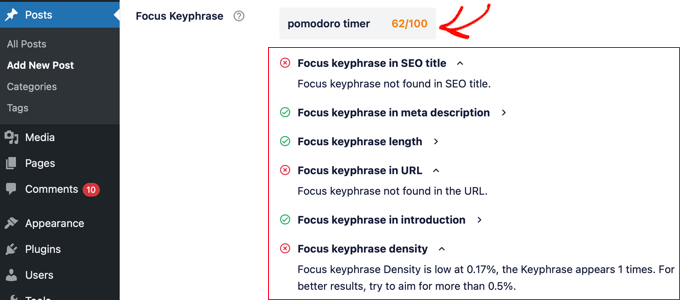
SEOBoost helps you optimize your writing for better search rankings. It analyzes your content for structure, keyword usage, readability, and headings, providing a clear content score alongside targeted recommendations to boost your visibility.
I use SEOBoost whenever I’m researching a new topic. It streamlines the entire content creation process, from building detailed briefs to ensuring my posts are fully optimized for search.
My Experience With SEOBoost
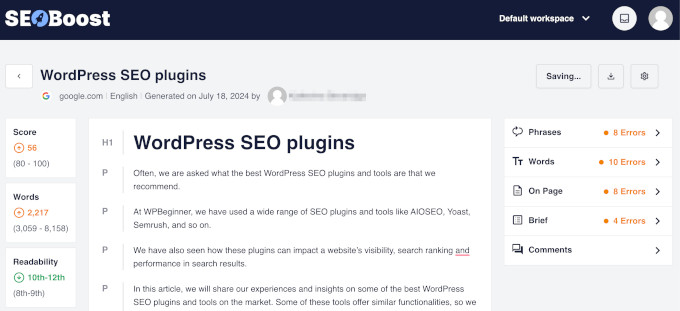
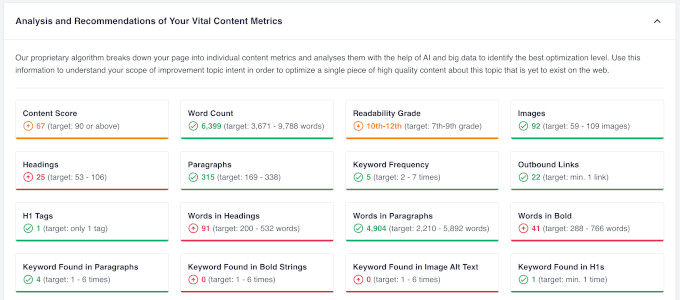
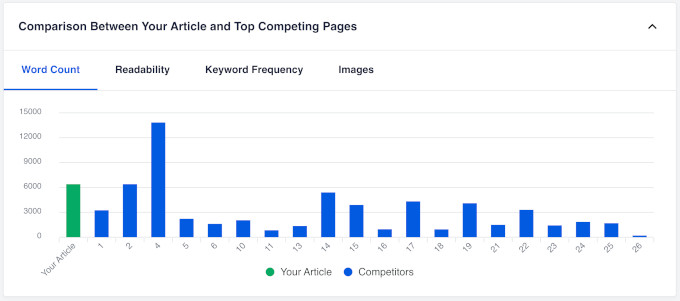
SEOBoost’s standout feature is its content optimization tool. I’ve used it to analyze the top-ranking articles for my target keywords, and it gives a data-driven checklist, including a recommended word count, related keywords to include, and a content score to aim for.
This takes the guesswork out of creating comprehensive content that search engines want to see. Following its suggestions has helped me produce more targeted, competitive articles faster.
I’ve also relied on the tool’s comprehensive content audits to uncover exactly what’s preventing my blog posts from ranking higher.
It can identify issues like content readability, missing keywords, and other structural problems that could hurt your rankings.
SEOBoost’s Topic Reports are incredibly helpful for understanding what content is succeeding in my niche.
By analyzing the top 30 pages that rank on Google, I can instantly see how successful blogs structure their content and quickly spot important gaps or opportunities.
I can also easily organize and track my content strategy using its content management and optimization features. Real-time suggestions guide me as I write, highlighting which keywords to include and which sections need improvement, so I can quickly optimize my posts.
Semrush vs SEOBoost
Both tools help you write SEO-friendly content, but they work in slightly different ways.
Semrush’s SEO Writing Assistant gives you real-time feedback as you write in WordPress or Google Docs. It checks readability, tone, keyword usage, and originality, so you can fine-tune your content without leaving your editor.
SEOBoost takes a broader approach. You can build full content briefs before writing or paste in existing drafts for review. It analyzes structure, keyword coverage, and readability to show exactly what needs improvement.
Overall, Semrush is best for live optimization as you write, while SEOBoost helps you plan and polish your articles before publishing.
Pros of SEOBoost:
Built-in content optimization tool
Detailed site audits that find actionable technical issues
Straightforward interface designed for individual website owners
Competitive pricing makes advanced features accessible
Cons:
Smaller user community compared to established tools
Limited integration options with other marketing tools
Pricing and Value: SEOBoost offers flexible pricing starting at $22.50 per month. The cost offers significant value considering the depth of analysis you receive.
Why I Recommend SEOBoost: It allows you to create rank-worthy articles with its powerful content optimization tool.
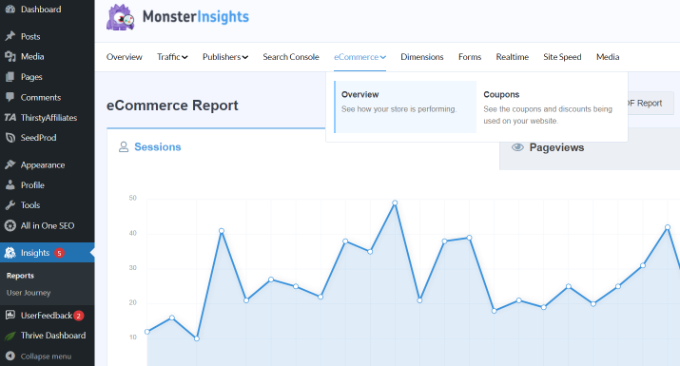
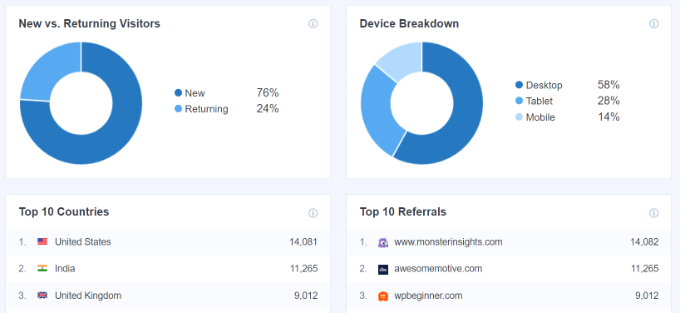
MonsterInsights transforms Google Analytics into easy-to-understand insights that actually help me and my team improve SEO across our websites.
We use it regularly to track which content drives organic traffic, monitor visitor engagement, and spot trends that inform updates and new posts.
The plugin focuses on simplicity and data accessibility rather than overwhelming you with extensive toolsets. I especially like how it presents analytics in a way that makes sense for bloggers and website owners who want actionable insights, not spreadsheets.
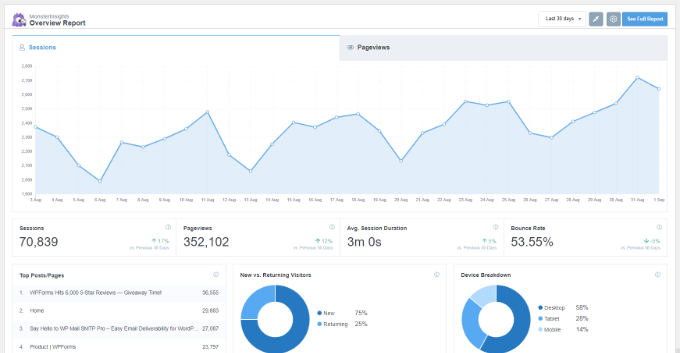
I regularly use MonsterInsights’ clear, actionable reports to keep an eye on traffic trends and understand how my content is performing.
I once noticed in a MonsterInsights report that an old post about ‘troubleshooting a slow WordPress admin’ was suddenly getting a lot of organic traffic, even though I hadn’t checked it in years.
Seeing that data so easily prompted me to update the article with new information and add some affiliate links. That single action, guided by MonsterInsights, significantly boosted both the traffic and revenue from that post.
This is exactly the kind of insight that often gets lost in standard Google Analytics, and I rely on MonsterInsights to highlight it quickly.
Enhanced eCommerce tracking has also been valuable for me as a blogger who makes money through affiliate marketing and product sales. I can see which organic traffic converts best, helping me focus my SEO efforts on content that actually generates income.
MonsterInsights vs Semrush
Semrush helps you discover ranking opportunities and monitor your visibility, while MonsterInsights focuses on what’s already driving visitors to your site.
Semrush is a comprehensive, standalone platform that offers deep analytics and research features, though it can take some time to learn.
On the other hand, MonsterInsights works within your familiar WordPress dashboard. You can check your organic traffic performance while writing new content or updating existing posts.
MonsterInsights translates Google Analytics data into clear charts and summaries. This makes it easier to spot traffic trends and make quick, informed decisions. Especially if you find traditional SEO platforms like Semrush overwhelming or too detailed for daily use.
Pros of MonsterInsights:
User-friendly interface that makes analytics accessible to beginners
Insightful organic traffic reports that guide content decisions
Seamless WordPress integration keeps everything in one place
Enhanced eCommerce tracking for online stores and affiliate marketers
Cons of MonsterInsights:
Limited to Google Analytics-based data only
Doesn’t provide keyword research or competitive analysis features
Requires Google Analytics setup and configuration
Pricing and Value: MonsterInsights offers varied pricing tiers starting at $99.60 per year, making advanced analytics accessible for different budgets. The investment pays off quickly when you can identify which content drives the most valuable traffic.
Why I Recommend MonsterInsights: The plugin helps bloggers make data-driven decisions without the analytics overwhelm that stops many people from using their traffic data effectively. You’ll finally understand what’s working in your SEO strategy.
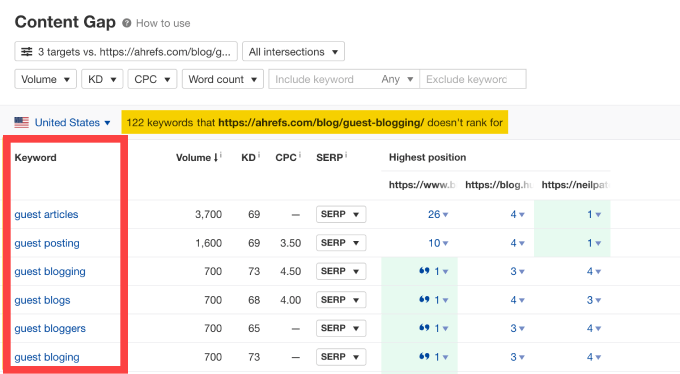
Ahrefs is one of the most powerful SEO tools out there and a top competitor to Semrush. The platform is particularly good at backlink analysis and competitive research.
I’ve found Ahrefs useful for understanding the complete SEO landscape of any blogging niche. The tool provides deep insights into what’s working for successful websites and how you can apply similar strategies to your own blog.
My Experience With Ahrefs
Ahrefs built its reputation on having one of the largest and most accurate backlink databases in the industry.
This has been invaluable for identifying exactly which websites link to my competitors and uncovering powerful link-building opportunities for my own sites.
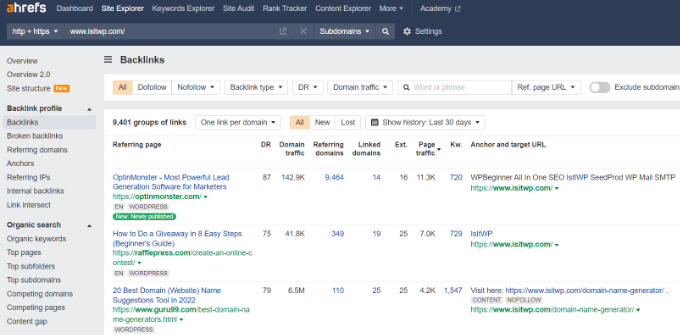
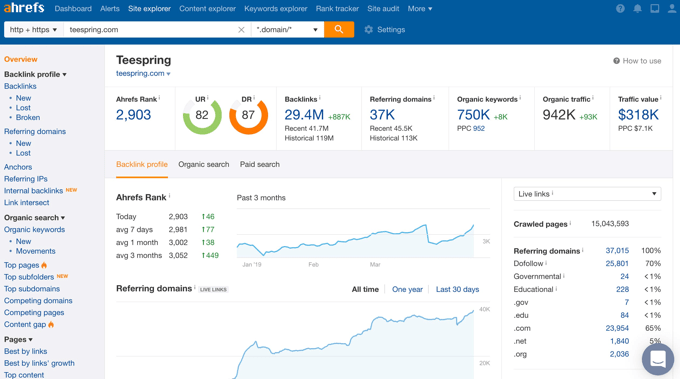
The Site Explorer feature lets me see the complete backlink profile of any website, including link quality and relevance. By studying top-ranking pages, I’ve been able to understand why certain content performs well and apply those insights to improve my own authority.
Ahrefs vs Semrush
Ahrefs and Semrush are direct competitors, and both are premium, all-in-one toolkits. In my experience, Ahrefs has a better backlink index, which makes it my go-to choice for serious link-building campaigns.
Both tools offer powerful keyword research features, but Semrush stands out for its depth in PPC advertising and integrated campaign management. It’s better when you need keyword data and insights for paid campaigns.
Plus, many users find the Ahrefs interface to be cleaner and more intuitive, which can be a plus for bloggers graduating to a professional-grade tool.
Pros of Ahrefs:
Industry-leading backlink analysis with the most comprehensive database
Powerful keyword research tools with accurate difficulty scoring
Excellent site auditing features that identify technical issues
Strong competitive analysis capabilities for any niche
Cons of Ahrefs:
Higher pricing may be prohibitive for beginner bloggers
Interface can feel overwhelming for users new to SEO
Advanced features require a learning curve to use effectively
Pricing and Value: Ahrefs plans start at $129 per month, which can be a big expense for many bloggers. However, the detailed data and keyword tools make it worth the cost if you’re serious about growing your website.
Why I Recommend Ahrefs: For bloggers who are serious about improving SEO, Ahrefs gives powerful tools that help you grow your website faster. I find it especially useful when I need clear competitive insights and a complete view of my site’s performance.
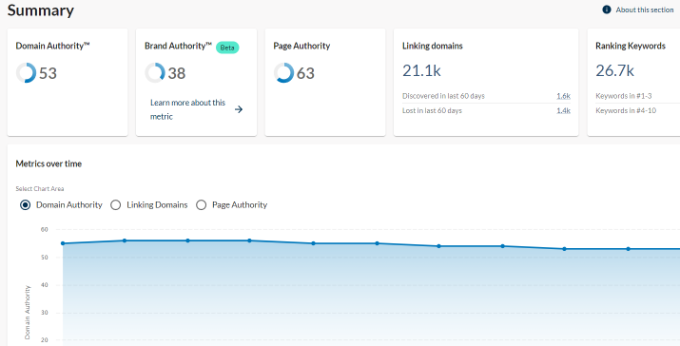
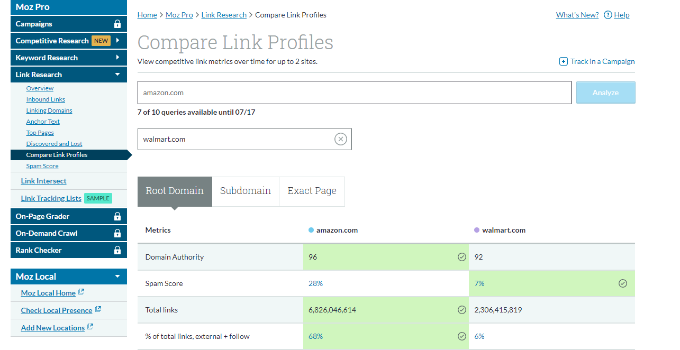
Moz Pro has been a trusted name in SEO for years with features that help bloggers understand their website’s authority and ranking potential.
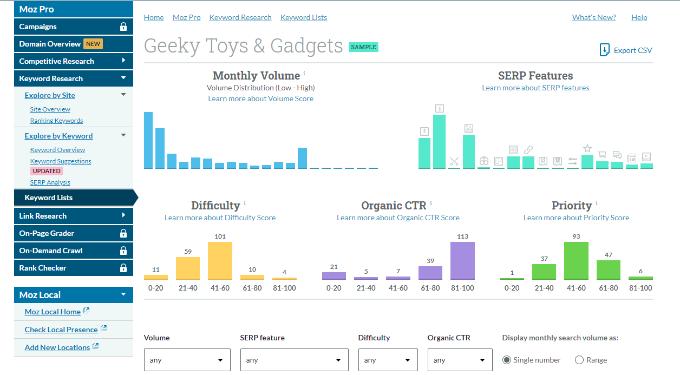
The platform combines keyword research, site audits, and optimization recommendations, all within a dashboard that’s welcoming for both beginners and experienced users.
I appreciate Moz’s approach to making complex SEO concepts easy for beginners while still providing the depth that experienced bloggers need. The tool strikes a good balance between comprehensive features and user-friendly design.
My Experience With Moz Pro
Moz is famous for its Domain Authority (DA) metric, which has become an industry standard for deciding a website’s credibility. DA has been a useful benchmark to track my sites’ growth and compare our authority to competitors.
The keyword research tools give me reliable data with difficulty scores that often feel more realistic than some other tools.
I also like Moz Pro’s site auditing features. They’re easy to understand, and the explanations for fixing issues have helped me resolve technical SEO problems quickly.
Moz Pro vs Semrush
Like Ahrefs, Moz is a direct competitor to Semrush in the premium, all-in-one SEO tool category. The main difference is its long-standing reputation and the widespread use of its Domain Authority metric.
Overall, Semrush offers more features, particularly for advertising and content marketing. But Moz focuses on core SEO fundamentals like site audits, backlink analysis, and rank tracking, while also standing out for its emphasis on education and community support.
Some users find Moz’s interface less modern than Semrush’s, and its keyword database is smaller. However, it remains a solid choice for bloggers who want trusted metrics and actionable SEO guidance over huge dataset size or advanced marketing extras.
Pros of Moz:
Domain Authority metric trusted by SEO professionals
Reliable keyword research with realistic difficulty scoring
Strong community and educational resources for learning SEO
Proven track record with consistent, accurate data
Cons of Moz:
Interface feels dated compared to more modern tools
Smaller keyword database than competitors like Semrush, which may mean missing some obscure, long-tail keyword ideas
Feature updates happen less frequently
Pricing and Value: Moz Pro plans start at $49 per month for a single website. It’s a better fit for established bloggers and growing businesses.
Why I Recommend Moz: For bloggers who want trusted SEO metrics, Moz provides reliable insights that have helped many websites improve their search performance.
Additional Alternatives for Consideration
Beyond my top recommendations, several other tools deserve mention for specific use cases and budgets.
These alternatives might be perfect for your particular blogging needs or financial situation.
This tool provides keyword tracking and site audit capabilities at budget-friendly prices.
Its clean interface is ideal for bloggers who want reliable SEO data without a steep learning curve. It offers enough insights to guide content strategy without the complexity of enterprise platforms.
This tool is useful for growth-hacking and provides detailed keyword analysis to help you find content gaps.
It is particularly helpful for understanding search trends and identifying seasonal opportunities. It helps you time your content creation to match when people are actively searching for related topics.
Mangools stands out for its modular approach and visual design that makes SEO data easy to understand.
It works best for bloggers who prefer specialized tools over an all-in-one platform. You can use just the features you need without paying for settings you’ll never touch.
Which Is the Best Semrush Alternative for Your Website?
To make it simple, here are my recommendations based on the most common blogging needs:
For finding new content ideas: Start with LowFruits. It’s the best for finding low-competition keywords you can actually rank for, which is the most important thing for a new or growing blog.
For optimizing content in WordPress:All in One SEO is the clear winner. Its built-in TruSEO analysis streamlines your workflow inside the editor better than any external tool.
For content audits and on-page optimization:SEOBoost analyzes your writing for structure, keywords, and readability, helping you create content that ranks.
For understanding your traffic: If you find Google Analytics confusing, get MonsterInsights. It makes your data easy to understand and helps you see which content is actually bringing in traffic from search engines.
For serious growth and deep analysis: If your blog is already established and you need advanced backlink and competitor data, then choose Ahrefs.
This table may help you decide whether you need a Semrush alternative:
My best advice is to be honest about your biggest challenge right now and choose tools that directly solve it. At WPBeginner, we use several tools because they fit different use cases.
You don’t need a massive, expensive toolkit to start growing your blog. The goal is to get a solution that helps you take action and create better content. You can always expand your toolkit later as your blog grows and your needs change.
FAQs About Choosing the Right SEO Tool for Your Needs
Picking the right SEO tool can be tricky, and bloggers often have questions about how the tools work, what they cost, and whether they’re worth it.
Here are the most common questions we get about Semrush alternatives.
Is there a free alternative to Semrush?
Yes, there are free tools like Google Search Console and Ubersuggest (free trial) that offer basic SEO features. However, for in-depth keyword research and competitor analysis, you may need to invest in paid options.
Should I use an advanced SEO tool like Semrush or Ahrefs, or something simpler?
Choose advanced tools if you need detailed data for competitive research, large websites, or managing multiple clients. For smaller blogs or if you’re just getting started, simpler or specialized tools are often more practical and less overwhelming.
How does LowFruits help you find easy keywords for your blog?
LowFruits analyzes Google search results to spot keywords with low competition. This lets you target topics your blog has a real chance to rank for, even in competitive niches.
Are cheaper SEO tools as good as Semrush or Ahrefs?
Cheaper and specialized tools are great for targeted tasks like keyword research and content optimization. They may lack ‘all-in-one’ features, but often provide more value for smaller sites or niche bloggers.
What features should a beginner look for in an SEO tool?
Look for keyword research, content optimization, site analysis, and user-friendly reporting. If you use WordPress, then built-in plugin options like AIOSEO can save a lot of time.
Can I combine different SEO tools, or should I just pick one?
Many bloggers mix and match tools, like using LowFruits for keyword discovery and AIOSEO for content optimization. This can offer better value than relying on a single platform.
Which SEO tool is the easiest to use for WordPress bloggers?
All in One SEO and MonsterInsights are both designed for WordPress, making them the most beginner-friendly options for bloggers who want an integrated experience.
Additional SEO Guides and Resources
Choosing the right SEO tool is just the first step in building a successful blogging strategy. These additional resources will help you maximize your chosen tool’s potential and create content that actually ranks.
Whether you’re just getting started with SEO or looking to refine your existing strategy, these guides provide practical, step-by-step instructions for real results.
![WordPress 6.9 Highlight grid [WIP]](https://i0.wp.com/gutenbergtimes.com/wp-content/uploads/2025/10/WordPress-6-9-Highlight-grid-variation-1.png?resize=652%2C375&ssl=1)
 But seriously, if you scheduled a meeting with me next week, you can’t send too many reminders if you want me to turn up in time.

 The latest episode is